MYOB to QuickBooks Enterprise Conversion Services
Numerawise Solutions migrates your accounts, balances, and complete transaction history from MYOB into QuickBooks Enterprise through our MYOB to QuickBooks Enterprise conversion service. Every figure is reconciled against the original file and verified before go-live, and the work is performed by Intuit ProAdvisors.
Complimentary file review · Fixed-price quote within 24 hours · Intuit ProAdvisor Gold
MYOB → QuickBooks Enterprise
A managed conversion from MYOB to QuickBooks Enterprise
MYOB is a long-established accounting platform popular with small and mid-sized businesses. Moving those records into QuickBooks Enterprise is considerably more involved than one-click importers suggest. Transaction detail is often collapsed into totals, bank reconciliations are broken, and entries are allocated to incorrect accounts, with the consequences typically emerging months later during reporting or an audit. Our MYOB to QuickBooks Enterprise conversion service removes that risk: the file is rebuilt correctly and reconciled against your existing records before the new system goes live.
Numerawise Solutions is an Atlanta-based practice of Intuit ProAdvisors (Gold tier) and experienced bookkeepers, with more than 200 completed conversions. The fee is fixed and agreed before the engagement begins, and your information remains confidential throughout.
A practical guide
MYOB to QuickBooks Enterprise, done right the first time
Switching accounting systems always feels bigger than it should. If you have outgrown MYOB and your accountant keeps pointing you toward Intuit’s flagship desktop product, a MYOB to QuickBooks Enterprise conversion is probably on your radar — and probably keeping you up at night.
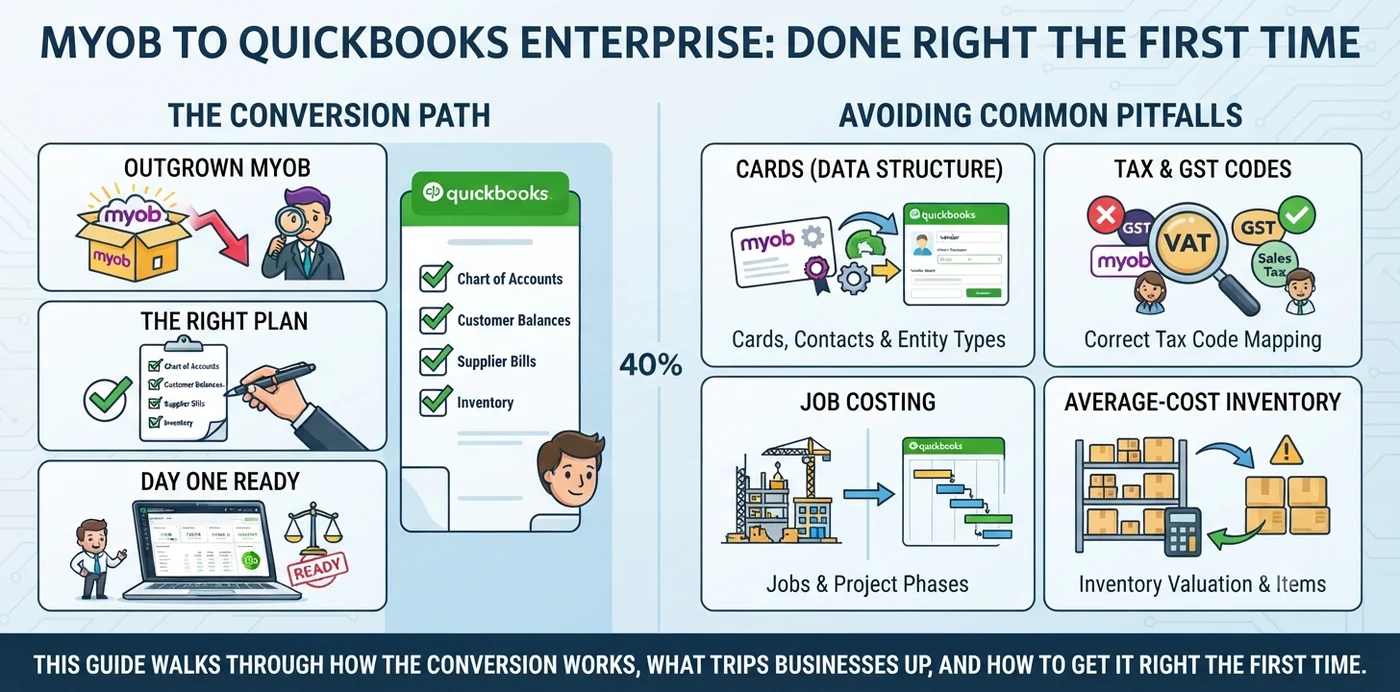
The good news: it does not have to be messy. With the right plan, your chart of accounts, customer balances, supplier bills, and inventory can land in QuickBooks Enterprise clean and reconciled, ready for day one. The catch: MYOB and QuickBooks do not speak the same language. Cards, GST codes, jobs, and average-cost inventory all behave differently once they cross over. Miss those details and you will spend months untangling reports. This guide walks through how the conversion actually works, what trips businesses up, and how to get it right the first time.
The basics
What is a MYOB to QuickBooks Enterprise conversion?
A MYOB to QuickBooks Enterprise conversion is the process of moving your accounting data — accounts, contacts, balances, inventory, and transaction history — from MYOB into QuickBooks Desktop Enterprise, so you can run your books in the new system without losing financial accuracy.
Done properly, the finished file matches your old one where it counts. Your opening balances, accounts receivable (AR), and accounts payable (AP) should tie back to MYOB to the dollar as of your switch date. If they do not, the conversion is not finished — no matter how good the reports look on the surface.
Reasons to switch
Why businesses move from MYOB to QuickBooks Enterprise
People rarely switch systems for fun. Usually a real pain point pushes them. Here are the most common reasons we see:
- Expanding into the US market. MYOB is built for Australia and New Zealand, while QuickBooks Enterprise is a US-focused product with a much larger US accountant network behind it.
- Serious inventory needs. With Advanced Inventory, QuickBooks Enterprise supports FIFO costing, multiple warehouses, and lot or serial tracking.
- More users and more data. Enterprise is designed to handle a large item list, high transaction volume, and multiple simultaneous users.
- Industry-specific editions. Contractor, Manufacturing & Wholesale, Nonprofit, Retail, and Professional Services editions add tailored reports and features.
- A bigger app ecosystem. Payroll, payments, CRM, and job-costing add-ons plug into QuickBooks with less friction.
One thing worth flagging early: because MYOB serves the Australian tax system and QuickBooks Enterprise serves the US, this is not just a data move — it is often part of a broader shift in how the business operates and reports. That shapes every decision below.
Scope of the migration
What data moves during the conversion
Not everything crosses over the same way. Some data copies cleanly, some needs rework, and a few things have to be rebuilt from scratch. Here is an honest breakdown.
| Data type | Moves cleanly? | What to watch for |
|---|---|---|
| Chart of accounts | Yes | May need renumbering and mapping to QuickBooks account types |
| Customers & suppliers (MYOB “Cards”) | Yes | MYOB stores them together; QuickBooks splits Customers and Vendors into separate lists |
| Items / inventory | Usually | Verify on-hand quantities and average cost item by item |
| Open invoices (AR) | Yes | Brought in as open invoices or as an opening AR balance |
| Open bills (AP) | Yes | Same approach as AR; the aging must match |
| Trial balance / opening balances | Yes | Entered as a dated journal at the cutover point |
| Historical transactions | Sometimes | Depends on how much history you need and the tools used |
| Payroll | Rarely 1:1 | Usually rebuilt or handled separately from the data move |
| Tax codes (GST) | No | Rebuilt as US sales tax items and groups — not mapped one-to-one |
| Multi-currency | Depends | Check exchange rates and any realized/unrealized gains |
Our process
How the conversion works, step by step
Every conversion is a little different, but a solid one follows the same backbone. Here is the sequence we use on real client files.
Reconcile MYOB first
Reconcile every bank and credit-card account, and confirm AR and AP aging are correct. You cannot build clean books on a shaky starting point.
Pick a clean cutover date
The first day of a new financial year is ideal. The start of a quarter is a strong backup. Avoid mid-month.
Decide how much history to keep
Full detail, or a balance-forward setup with just opening balances? Most businesses need one to two years of detail, not ten.
Export your MYOB data
Pull out lists (accounts, cards, items) and the transactions you plan to keep, then clean and organize them in a spreadsheet.
Map the chart of accounts and tax setup
Line up each MYOB account to a QuickBooks account and type, and design your US sales tax structure from scratch.
Import into QuickBooks Enterprise
Bring the data in with a bulk import tool such as SaaSAnt, a specialist conversion service, or careful manual entry for smaller files.
Enter opening balances
Post the trial balance as a dated journal so equity, assets, and liabilities all start correct.
Validate against MYOB
Match the trial balance, AR aging, AP aging, and bank balances line by line. This is the step people rush — do not.
Run a parallel period
Keep both systems live for at least one cycle and confirm the numbers agree before you trust the new file.
Go live and archive MYOB
Switch over, then keep a read-only MYOB backup for history and audits.
If your file involves inventory, multi-currency, or several entities, this is where a specialist earns their fee. Our Sage 50 to QuickBooks conversion work follows the same reconciliation-first playbook, and the MYOB path borrows heavily from it.
The payoff
Benefits of converting to QuickBooks Enterprise
When the move is done right, the payoff shows up quickly in daily work:
- Room to grow. More users, more items, and more transaction volume without hitting a wall.
- Stronger inventory control. FIFO, multiple locations, and serial or lot tracking through Advanced Inventory.
- Deeper reporting. Advanced Reporting and industry editions surface numbers MYOB kept hidden.
- A familiar tool for US accountants. Most US bookkeepers and CPAs already know QuickBooks, which lowers your support costs.
- A cleaner audit trail. Once set up correctly, every transaction is traceable and reconciled.
Pitfalls
Common conversion mistakes
We have cleaned up plenty of conversions that went sideways. Almost every one repeats a mistake from this list.
- Converting in the middle of a period. This splits reports across two systems and turns year-end into a headache.
- Not reconciling MYOB before exporting. Garbage in, garbage out — errors just move to the new file.
- Bringing over too much history. Ten years of detail nobody uses bloats the file and slows the project.
- Assuming GST codes map to US sales tax. They do not. Tax has to be rebuilt, or your invoices will be wrong.
- Skipping opening-balance validation. If the trial balance does not tie out, everything downstream is suspect.
- Ignoring inventory checks. Costs and quantities drift during conversion and need to be verified.
- Forgetting payroll needs its own plan. Payroll rarely converts cleanly and should be handled separately.
- No parallel run. Going live blind means you find problems after they have already caused damage.
Watch out: the single most expensive error is trusting a new file that looks tidy but never got tied back to MYOB. A clean-looking balance sheet with a hidden $30K variance is far worse than an ugly one you can actually trust.
Do it right
Best practices for a smooth conversion
Follow these and your conversion will feel boring in the best possible way — no surprises, no scramble.
Plan the timing and scope up front
- Choose the start of your financial year as the cutover date whenever you can.
- Right-size your history: one to two years of detail plus accurate opening balances is enough for most businesses.
Protect your data
- Reconcile MYOB, then freeze it so nothing changes mid-conversion.
- Keep a full read-only MYOB backup, plus exports of key reports.
Rebuild tax and validate everything
- Design US sales tax items and groups from scratch — never reuse GST logic.
- Match the trial balance, AR/AP aging, and bank balances against MYOB before going live.
- Run both systems in parallel for at least one full period.
If bookkeeping capacity is thin on your side, this is a natural point to bring in outsourced bookkeeping services so someone owns the validation while your team keeps running the business.
Why Numerawise
Why choose Numerawise Solutions
We are an Atlanta-based accounting firm that treats software migration as a craft, not a copy-paste job. We hold Intuit QuickBooks ProAdvisor Gold status and run conversions across MYOB, Sage, Foundation, Xero, and more.
What sets our QuickBooks conversion services apart: a reconciliation-first approach that ties every converted file back to the source before we call it done; real depth in complex books, with construction job costing, inventory, multi-entity, and multi-currency as our regular territory; and a willingness to handle the messy parts — tax rebuilds, opening-balance journals, and parallel testing, the work that quietly makes or breaks a conversion. Need help after go-live? Our payroll services and ongoing bookkeeping keep the new system running smoothly.
Final thoughts
Respect the details and going live is a non-event
A MYOB to QuickBooks Enterprise conversion is very doable — but only when you respect the details. The systems handle contacts, tax, and inventory differently, so a plan that works line by line beats a rushed data dump every time. Start by reconciling MYOB and picking a clean cutover date. Rebuild your US tax setup instead of forcing GST codes across. Bring the history you actually need, then prove the new file matches the old one before you trust it. Do those things, run a parallel period, and going live becomes a non-event. Handled with care, the payoff is real: cleaner books, stronger reporting, and a system your accountant already knows.
In short
Key takeaways
- A conversion moves accounts, contacts, balances, inventory, and history from MYOB into QuickBooks Desktop Enterprise.
- Reconcile MYOB first, then pick a clean cutover date — ideally the start of your financial year.
- MYOB GST codes do not map to US sales tax; the tax setup must be rebuilt.
- Bring one to two years of detail plus accurate opening balances, and archive the rest.
- Validate the trial balance, AR/AP aging, and bank balances against MYOB before going live.
- Run both systems in parallel for at least one period to confirm accuracy.
Who performs the work
Led by an Intuit ProAdvisor

Ram — Founder & Principal
Ram is the founder of Numerawise Solutions in Atlanta. An Intuit ProAdvisor (Gold tier) and a former Intuit Technical Support engineer, he has personally led more than 200 accounting-software conversions, including MYOB and QuickBooks Enterprise engagements, for small and mid-market firms across the United States.
More about Ram Verified on UpworkCommon questions
MYOB to QuickBooks Enterprise conversion FAQs
What is a MYOB to QuickBooks Enterprise conversion?
It is the process of moving your financial data — accounts, contacts, balances, inventory, and history — from MYOB into QuickBooks Desktop Enterprise. The goal is a clean, reconciled file where your opening balances, AR, and AP match MYOB exactly, so you can run reports and file taxes without gaps or guesswork.
How long does a MYOB to QuickBooks Enterprise conversion take?
It depends on data size and how much history you keep. A balance-forward setup with lists and opening balances can take a few days. A full conversion with several years of detail, inventory, and multi-currency can run two to four weeks, including validation and a parallel period.
Will I lose my transaction history when I convert?
Not if you plan for it. You can bring over detailed history, but most businesses only need one or two years plus accurate opening balances. Older records stay accessible in a read-only MYOB backup, which also satisfies audit and tax record-keeping needs. Keep the original file archived so nothing is truly gone.
Can inventory be transferred from MYOB to QuickBooks Enterprise?
Yes. Item lists, quantities, and average costs can move across, but they must be checked carefully. QuickBooks Enterprise handles inventory differently and, with Advanced Inventory, supports FIFO, multiple locations, and lot or serial tracking. Verify every on-hand quantity and cost before you go live.
Do MYOB GST codes convert to QuickBooks sales tax?
No, and this catches many businesses. MYOB uses Australian GST codes, while QuickBooks Enterprise (US) uses sales tax items and groups. Tax setup has to be rebuilt from scratch to match your jurisdictions. Mapping GST codes one-to-one will produce wrong tax on invoices and reports.
What is the best time to switch from MYOB to QuickBooks?
The start of a new financial year is ideal, with the start of a quarter as a solid backup. A clean cutover date keeps prior-period reports in MYOB and new activity in QuickBooks, which makes reconciliation and year-end far simpler. Avoid converting in the middle of a month.
Can I convert MYOB to QuickBooks Enterprise myself?
You can, especially for a simple balance-forward setup. But conversions with inventory, multi-currency, payroll, or several entities get complicated fast. A specialist reduces the risk of unbalanced books, mismatched AR/AP, and broken tax codes. Many businesses do the export themselves and bring in help for validation.
How do I make sure my converted data is accurate?
Compare the new QuickBooks file to MYOB before trusting it. Match the trial balance, AR aging, AP aging, and bank balances line by line as of the cutover date. Then run both systems in parallel for at least one period. If the numbers agree, you are safe to go live.
What accounting records should I keep after converting?
Keep a full read-only backup of your MYOB company file, plus exports of key reports like the trial balance and detailed ledgers. Tax authorities such as the IRS expect records to be retained for several years, so archive everything before decommissioning MYOB. Storage is cheap; missing records are expensive.
Begin
Ready to move from MYOB to QuickBooks Enterprise?
Provide a few details and we will email a fixed-price quote within one business day, with your MYOB history reconciled into a clean QuickBooks Enterprise file.