Sage 50 to QuickBooks Conversion
There are two ways to convert Sage 50 to QuickBooks. Intuit’s free tools (Dataswitcher for QuickBooks Online, the Conversion Tool for Desktop) move balances and limited history, and only if your file meets their eligibility rules — accrual basis, size limits, US edition. A specialist conversion moves your full transaction history — AR/AP still linked, payroll YTD, inventory — reconciled to the penny, at a fixed written price from $500. Below: an honest check of whether the free tool will work for your file, and exactly what we do when it won’t.
Quick answer: Numerawise converts Sage 50 to QuickBooks Online or Enterprise, including the chart of accounts, customers, vendors, open AR/AP and transaction history. Most simple files complete in about two weeks (three to four with inventory or payroll history), from $500, reconciled against your Sage trial balance before handover.
Comparing first? Read our Sage 50 vs QuickBooks comparison to decide, then come back to convert.
We move US small businesses from Sage 50 (formerly Peachtree) to QuickBooks Online or Desktop — customers, vendors, items, AR/AP open balances, and payroll history migrated, then reconciled to your Sage trial balance, AR, AP and inventory before go-live. Starting at $500, most simple files done in 2 weeks (inventory or payroll history extends to 3–4).
Free scoping call · Fixed-price quote in 24 hours · No obligation
What goes wrong
Why firms move off Sage 50
Sage 50 still does the basics — but in 2026 the friction adds up. Here’s what owners tell us.
Desktop-only friction
Sage 50 is desktop-bound in 2026. Modern accounting needs cloud access, mobile, and integrations Sage 50 doesn’t deliver natively.
Limited integrations
QuickBooks Online has 600+ connected apps. Sage 50 has a more limited, mostly legacy integration ecosystem.
Aging Sage support
Sage’s roadmap clearly favours Intacct and X3. Sage 50 has seen limited new development in recent years.
Get a fixed-price quote in 24 hours
Free scoping call. No obligation. We’ll tell you exactly what your migration involves.
The process
How we migrate Sage 50 to QuickBooks
Free scoping call
Review your Sage 50 version, modules, and QuickBooks target. Fixed quote within 24 hours.
Data export
Export the Sage 50 file via SDK or direct query — GL, AR, AP, inventory, and payroll.
Chart of accounts mapping
Map every Sage account to QuickBooks, with a walk-through approval before we proceed.
Master file load
Customers, vendors, items, and employees migrated with all metadata.
Open balances
AR/AP aging kept intact. Inventory migrated with cost basis preserved.
Historical detail (optional)
GL transaction detail loaded by month and reconciled to your Sage trial balance.
Go-live + 30-day support
Reconciliation report, walk-through, and 30 days of post-conversion support included.
Your data
What moves over when you convert
Nothing in scope gets left behind. A full Sage 50 to QuickBooks conversion brings across:
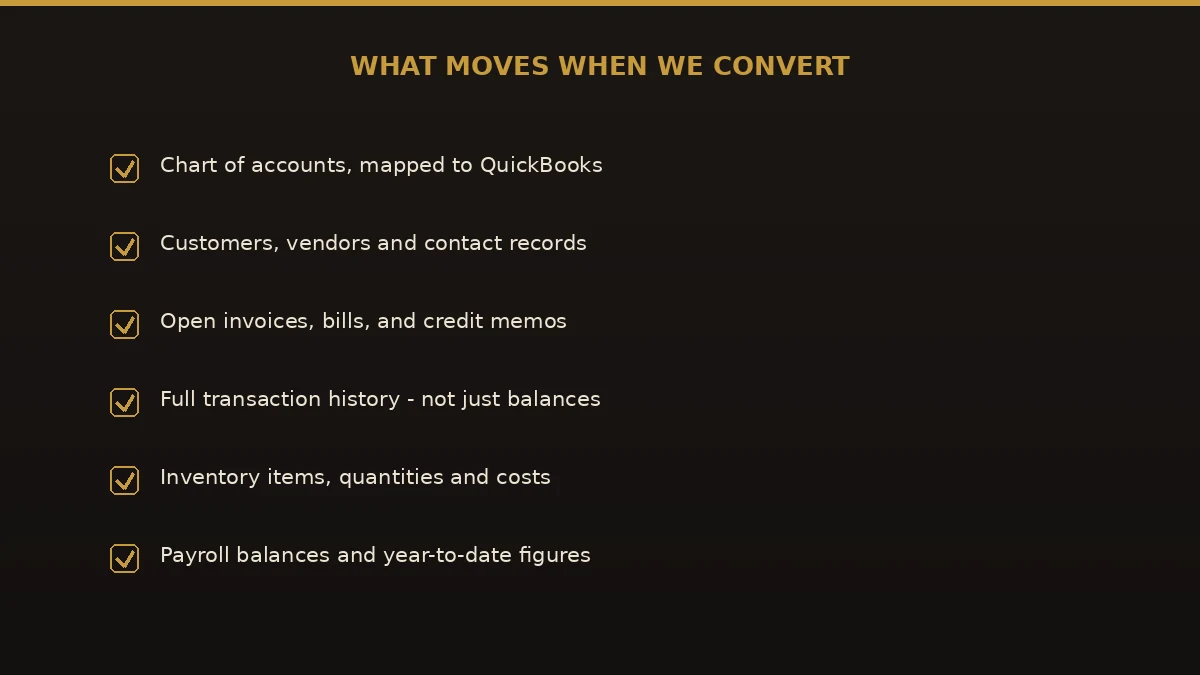
- Chart of accounts — mapped and restructured, with opening balances set
- Customers & vendors — contacts, addresses, terms, tax codes, credit limits
- Items & inventory — quantity on hand, cost basis, reorder points, preferred vendor
- Accounts receivable — every open invoice, payment, and credit, aging matched to Sage
- Accounts payable — every open bill and vendor credit, AP aging reconciled
- Employees & payroll history — YTD earnings, withholdings, deductions
- General ledger history — monthly detail reconciled to your Sage trial balance
- Bank & credit card accounts — opening balances set for day-one bank feeds
Full disclosure
What converts, what’s partially converted, and what isn’t
The checklist above shows what comes across. Here is the same answer the way auditors like it — including the items no Sage 50 converter brings over, and how we handle each one:
“Not converted” never means lost: you keep a complete read-only archive of the old system, and anything marked partial or rebuilt is itemized in your written mapping plan before we start — so there are no surprises at go-live. Working through the cutover yourself? Use our printable Sage 50 to QuickBooks migration checklist — the same three-phase process we run.
Side by side
Sage 50 vs. QuickBooks Online
A typical small-business comparison. Your numbers depend on users, modules, and add-ons.
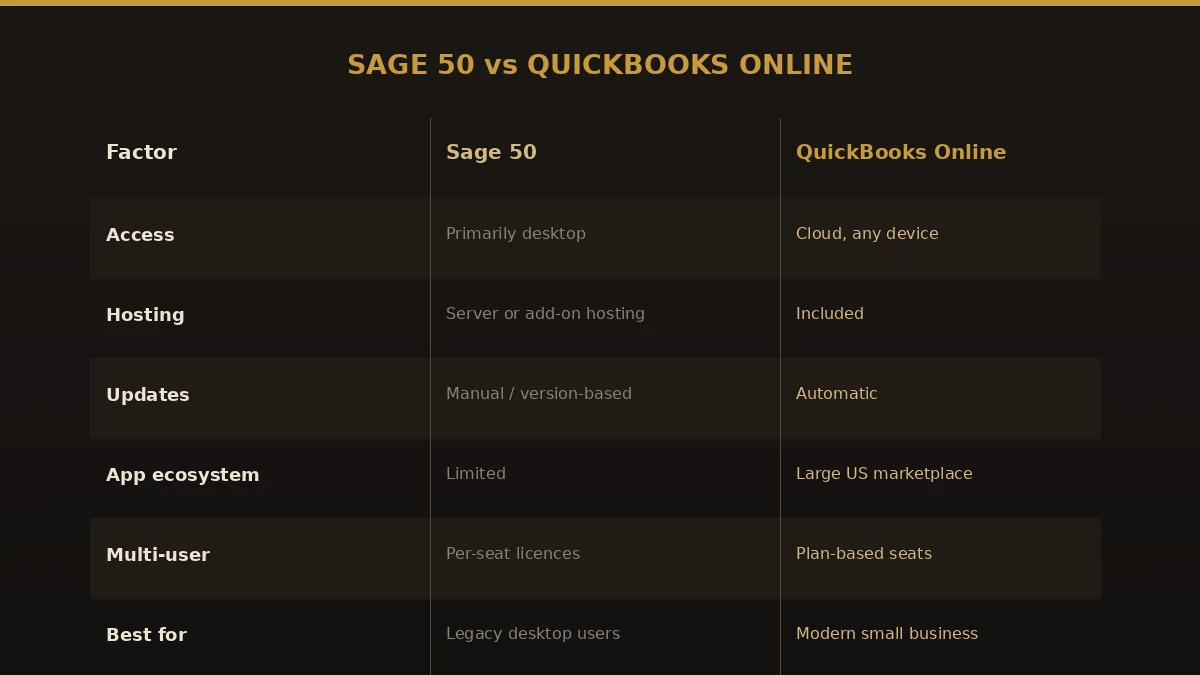
| What we’re comparing | Sage 50 | QuickBooks Online | QuickBooks Desktop |
|---|---|---|---|
| Annual cost (3 users) | $1,500–$3,000 | $660–$1,800 | $549–$1,999 |
| Works in a browser | Only with paid hosting | Yes, included | No |
| Mobile app | Very limited | Full-featured | No |
| Bank feeds | Manual or paid add-on | 10,000+ banks, automatic | Limited |
| App integrations | Under 50 | 600+ | ~200 |
| Inventory assemblies | Yes | Needs an add-on | Yes (Premier / Enterprise) |
| Industry versions | No | No | Yes (contractor, nonprofit, manufacturer) |
| Active development | Maintenance only | Regular updates | Moderate |
Before you approve the mapping
What you give up and gain moving from Sage 50
You keep your ledger, your lists and your open balances. What changes is how four Sage 50 habits are expressed in QuickBooks Online, and each one is a decision to make before the chart of accounts is mapped, not after go-live. The general pros and cons of each product are in our Sage 50 vs QuickBooks comparison; this is the conversion-day view.
| In Sage 50 today | How Sage 50 does it | How QuickBooks Online does it | What you give up and gain |
|---|---|---|---|
| Departments and locations | Built into the account number and filtered with a department mask (each account is entered once per location/department combination); Premium and higher add formal account segments. | One account, tagged with a class or location on each transaction. | Give up: department totals that fall out of the account number. Gain: a chart a fraction of the size, and any report filtered by class or location. |
| Two open fiscal years | Up to 26 open periods across two years; you post by period and close the first year with the Year-End Wizard before moving on. | No periods to open or close. At the start of a new fiscal year, last year’s net income moves to retained earnings automatically; you protect past months with a closing date and an optional password. | Give up: period-based posting control. Gain: no year-end wizard. Decide: who holds the closing-date password, and set the date to your cutover on day one. |
| Job phases and cost codes | Phases, and cost codes inside phases, are available in Premium and higher. | Projects on Plus and Advanced. Project phases and cost groups need Advanced with the Construction add-on (or Intuit Enterprise Suite). | Give up: phase and cost-code detail on Plus. Gain: a project dashboard with income, costs and margin per job. Heavy phase users should compare QuickBooks Enterprise. |
| Users and access | Installed on Windows; remote access usually means a hosting service. | Browser-based. Billable users: Simple Start 1, Essentials 3, Plus 5, Advanced 25 (accountant users are extra). | Give up: the local file. Gain: no server, live accountant access. Decide: count active Sage 50 users before you pick a tier. |
The one that changes the price of your QuickBooks plan
Sage’s own help describes department masking by entering every account once for each location and department combination — its example turns one account into four. That works in Sage 50, but QuickBooks Online Simple Start, Essentials and Plus each cap the chart of accounts at 250 active accounts (Advanced is unlimited), so a masked chart copied across as-is can hit the cap on day one. A file with 70 income and expense accounts across four combinations is 280 accounts in Sage 50; mapped properly it becomes 70 accounts plus four classes or locations. Plus allows 40 classes and locations combined; Simple Start and Essentials have none, so a departmentalised Sage 50 company lands on Plus at minimum.
Three counts to take before your scoping call
- Accounts after unmasking. Count your base accounts with the department and location codes stripped off. That number, not the Sage 50 total, is what has to fit under 250.
- Departments and locations. Count the distinct codes in use. Over 40 points to QuickBooks Online Advanced.
- Jobs that use phases or cost codes. If estimates are tracked to the phase, you need Advanced with the Construction add-on, or QuickBooks Enterprise, to keep that detail.
Write the three numbers down and send them with your Product Information screen; they decide the QuickBooks tier, and the tier decides the mapping. If you are working through the cutover yourself, the printable Sage 50 migration checklist picks up from here.
Straight talk
Common problems we prevent
Most failed migrations fail the same handful of ways. Here’s what goes wrong — and how our process stops it.
Wrong account structure
Sage 50’s flat five-digit accounts don’t auto-map to QuickBooks parent and sub-accounts. We build a full mapping document and you approve it before anything loads.
Open balances disappear
Enter a lump-sum opening balance and you lose all your aging detail. We migrate every open invoice and bill individually, with original dates.
Inventory cost-basis errors
Moving inventory without its FIFO/LIFO/average cost basis creates instant valuation problems. We pull cost data from the SDK and load it per item.
Payroll history missing
If YTD payroll totals don’t carry over, your W-2s are wrong at year-end. We migrate employee records and YTD totals, with a reconciliation step for mid-year jobs.
Corrupted converter-tool data
Consumer converter tools produce broken account links, duplicate vendors, and missing relationships. We use direct SDK exports and validate every record count.
No reconciliation after migration
A migration without a reconciliation report is a guess. We deliver a written report comparing every QuickBooks balance to Sage before you go live.
Online or Desktop?
QuickBooks Online vs. Desktop — which is right for you
The most common question we get. Here’s the honest answer — and we decide together on the scoping call.
Choose QuickBooks Online if
- You want to work from a browser or phone
- Your team works from different locations
- You want to connect apps like Shopify, Gusto, or HubSpot
- You want bank feeds and automated reconciliation
- You run a service or light-product business
Choose QuickBooks Desktop if
- You need inventory assemblies or manufacturing BOMs
- You do high-volume batch invoicing
- You need job costing with phases and cost types
- You want local data storage
- You need a contractor, nonprofit, or manufacturing edition
Pricing
Simple, scope-based pricing
Fixed price quoted in 24 hours, in writing
Most jobs complete in about 2 weeks
Full data preservation — nothing left behind
30 days of post-conversion support included
Multi-user, payroll history, and inventory add scope — quoted up front so there are no surprises.
| Migration scope | Starting price |
|---|---|
| Simple file — service business, 1–2 years, no payroll | from $500 |
| Standard file — inventory or payroll, 2–3 years | from $750 |
| Complex file — inventory + payroll + history, 3–5 years | from $1,200 |
| Multi-entity or large file | Custom quote |
No hourly rates and no surprise invoices. If a file turns out more complex than expected, we absorb it — you pay the quoted amount and that’s it.
Who does the work
About the lead conversion specialist

Ram Singh — Founder & senior specialist
Ram leads every engagement personally. Intuit QuickBooks ProAdvisor (Gold tier), Atlanta-based, and has personally led migrations from Sage, NetSuite, Xero, FreshBooks, AccountEdge, and Foundation into QuickBooks for US small and mid-market firms.
More about Ram Verified on UpworkTrusted & certified
Proven on 200+ migrations
“Ram migrated seven years of Sage 50 history into QuickBooks Desktop for our manufacturing company. Every penny reconciled on the first pass. I’ve never had a smoother software transition.”
“We were on Sage 50 for eleven years and I was terrified to switch. Ram moved everything — payroll, inventory, seven years of history — and my books balanced to the penny on day one. He even found three data issues we didn’t know about.”
“We tried the migration ourselves with a converter tool. It was a disaster. We called Ram and he cleaned it up and rebuilt it the right way. Wish we’d started with him.”
“Fast, accurate, and no surprises on the invoice. The reconciliation report gave us full confidence everything transferred correctly before we went live.”
Questions, considered
Sage 50 to QuickBooks migration FAQs
How much does Sage 50 to QuickBooks cost?
Starts at $500 for single-user, straightforward migrations. Multi-user, payroll, or inventory adds scope. We quote a fixed price within 24 hours.
How long does it take?
Two weeks for most small business jobs. Inventory or payroll history extends it to three to four weeks.
Do we lose payroll history?
No. Payroll history migrates with employee detail, YTD totals, and tax filings intact.
Can we keep our chart of accounts as is?
Mostly. Sage 50’s 5-digit format converts to QuickBooks’ hierarchical structure. We walk through every account before migrating.
Will our Sage 50 file still work afterward?
Yes. We never touch your production file. Your Sage 50 file stays intact as your historical archive.
QuickBooks Online or Desktop?
We recommend Online for most small businesses (cloud access, mobile, integrations). Desktop if you need inventory assemblies, batch invoicing, or local-only data. We decide together on the scoping call.
Is there a free Sage 50 to QuickBooks conversion tool or free download?
Not one that moves a full file reliably. Intuit’s own conversion tool only supports a narrow list of source systems, and the free export routes (IIF or CSV) carry your lists but drop transaction history, invoice-to-payment links, and reconciliations. Most businesses that try a free download end up re-keying data or paying to repair a broken file. Our fixed-price service moves your full history and reconciles it to the penny — starting at $500.
What about Dataswitcher or the QuickBooks conversion tool?
Dataswitcher is the automated engine Intuit partners with for some conversions, and it works well for clean, standard files. But it’s self-serve — you upload the file, accept its mapping, and troubleshoot any errors yourself. We handle the whole job, including files the tool rejects, custom chart-of-accounts mapping, payroll history, and post-conversion reconciliation, so you get a finished, balanced QuickBooks file instead of a raw import to clean up.
Can you convert Sage 50 to QuickBooks Desktop, not just Online?
Yes. We convert Sage 50 to QuickBooks Desktop Pro, Premier, and Enterprise as well as QuickBooks Online. Desktop is often the better fit when you need inventory assemblies, job costing, batch invoicing, or local-only data. We help you pick the right target on the free scoping call.
Do you have a moving-to-QuickBooks checklist?
Yes. Before go-live we run a written checklist: confirm your Sage 50 version and active modules, back up the source file, agree the cutover date, map the chart of accounts, reconcile payroll YTD, verify opening balances, and sign off the reconciliation report. You get a copy so nothing slips. Ask for it on the scoping call.
Can you convert Sage 50 2022 or an older version?
Yes. We convert Sage 50 US Edition 2022, 2021, and earlier releases back to Peachtree 2009, plus the current subscription version. Older files sometimes need an interim update step first, which we handle. You don’t need an active Sage subscription for us to read your file.
Do you also convert Great Plains (Microsoft Dynamics GP) to QuickBooks?
Yes. Great Plains to QuickBooks is a larger scope than Sage 50 — more accounts, often multiple entities — but the same method applies: full history, reconciled to the penny, at a fixed price. Ask for a Great Plains quote on the call.
What versions of Sage 50 do you support?
Sage 50 US Edition from 2012 through the current release, plus Peachtree versions back to 2009. Not sure which you have? Open Help → About Sage 50.
Can you do a mid-year Sage 50 to QuickBooks migration?
Yes — it’s the most common timing. For mid-year jobs we include a payroll YTD reconciliation step by default so your year-end W-2s are accurate.
Do my classes and departments carry over?
Yes. Sage 50 departments map to QuickBooks classes and location tracking. We mirror your structure before migration and assign it to all open transactions.
Will my Sage 50 department-masked chart of accounts fit in QuickBooks Online?
Usually not as-is. Sage 50 masking enters each account once per department or location combination, while QuickBooks Online Simple Start, Essentials and Plus cap the chart at 250 active accounts. We strip the department codes off, map the base accounts, and turn the codes into classes or locations: Plus allows 40 combined, Advanced is unlimited.
Do you migrate job-costing data?
Yes, within what QuickBooks supports. Sage 50 job costing maps to customer:jobs and classes in QuickBooks Online, and to the job/phase/cost-type structure in Desktop Premier Contractor and Enterprise.
Can you migrate to QuickBooks Online Advanced?
Yes. We can set up custom fields, batch invoicing, and workflow automation as part of the migration if your business needs more than the standard QuickBooks Online plan.
What if my Sage 50 file is damaged or corrupted?
Often we can still migrate it. We assess the file on the scoping call; if it can be repaired we repair it first, otherwise we discuss migrating from a backup or a clean trial balance.
Can you convert Sage 50 to QuickBooks Online for Canada?
Yes. Canadian migrations need GST/HST tax codes, provincial tax setup, and Canadian payroll handling. Mention your province on the call.
Do I have to stop using Sage 50 during the migration?
No. You keep running in Sage 50 as normal while we work on a copy of your file. On go-live day you start entering new transactions in QuickBooks, and your Sage file stays intact as your archive.
What does go-live day look like?
We finalize the cutover date, deliver the written reconciliation report, and walk you through your new QuickBooks file on a live screen share. From there you enter new transactions in QuickBooks, and we stay available for 30 days for any questions.
Are there ongoing costs after the migration?
Nothing from us. You pay Intuit’s standard QuickBooks Online or Enterprise subscription (Intuit no longer sells one-time Desktop licenses to new customers), but our engagement ends when the migration is done and the 30-day support period closes. If you want continuing bookkeeping or training, we quote that separately.
What do you need from me to begin?
A copy of your Sage 50 company file, your version number, a list of active modules, your QuickBooks target edition, and your preferred go-live date. For payroll migrations we also need your most recent payroll register.
Can you convert QuickBooks back to Sage 50 if we want to go back?
We get this occasionally. Usually a QuickBooks setting or add-on solves the problem without switching back, so we’d start with a call. If the decision is final, we can scope the reverse migration.
Conversion or migration?
Sage 50 to QuickBooks migration, done right
“Conversion” and “migration” mean the same thing here. Whether you searched for a sage 50 to quickbooks conversion or a sage 50 to quickbooks migration, we move your full history — not just opening balances — and reconcile it to the cent. Same fixed-price service, either word.
Begin
Ready to leave Sage 50 behind?
Send a few details and we’ll email a fixed-price quote within one business day. No call required — though we’re happy to talk.
Still deciding? Read Sage 50 vs QuickBooks — including where Sage 50 is genuinely the better product, and why DataSwitcher migrations stall.