Sage 100 to QuickBooks Conversion Services
Our Sage 100 to QuickBooks conversion service moves your entire Sage 100 accounting history — chart of accounts, customers, vendors, inventory, job costing, payroll, and years of transactions — into QuickBooks Online or Desktop. Still on Sage MAS 90 or Sage MAS 200 (Sage 100’s former names)? Those files convert the same way. Every balance reconciled and verified in writing. You open QuickBooks on go-live day and the numbers are right.
Sage 100 — formerly MAS 90 and MAS 200 — is a modular system: GL, inventory, sales orders, job costing and payroll each hold data QuickBooks structures differently. The real work is mapping those modules correctly, not a plain export. We rebuild the chart of accounts and classes, validate inventory cost and quantity, reconstruct open sales orders, load payroll year-to-date, and reconcile the result to your Sage trial balance before go-live.
Free discovery call · Fixed-price quote in 24 hours · No commitment
The real question
Is Sage 100 still earning what it costs?
A Sage 100 to QuickBooks conversion is on more finance teams’ agendas than ever. Sage 100 began life as MAS 90. Businesses that bought it in the 1990s and early 2000s got a capable system, and plenty are still running it today. The question we hear now is rarely whether Sage 100 works — it is whether the system still earns what it costs to keep, and whether a Sage 100 to QuickBooks migration would pay for itself.
For a growing number of companies, it does not. Annual maintenance, a business partner on retainer, a server approaching replacement, and a shrinking pool of people who know the software add up to a figure that gets harder to defend each budget cycle. A Sage 100 to QuickBooks conversion puts that spending back on the table.
What it does not do is happen on its own. Sage 100 holds its data in modules built to work together, but never built to be lifted out as a set. Run all of it through a generic import utility and you end up with a company file that opens without complaint and reconciles to nothing. If you’re weighing whether to attempt this yourself, see our breakdown of the real hours and cost of a DIY Sage 100 conversion versus hiring a specialist.
We treat a Sage 100 to QuickBooks migration as accounting work first. Balances are proven before extraction and proven again afterward, and any difference between the two gets explained instead of plugged.
The drivers
Why businesses move from Sage 100 to QuickBooks
Cost is usually the trigger, but seldom the only reason. Add up licensing, per-module fees, hosting or server upkeep, and consultant hours, and the annual total often runs to a multiple of a comparable QuickBooks arrangement — a gap that tends to widen rather than close.
Staffing follows close behind, and in some markets it has overtaken cost entirely. Sage 100 experience has become genuinely scarce. When the one controller who understands the system gives notice, the exposure becomes obvious within a week. QuickBooks does not carry that risk.
The rest of the reasons accumulate:
- Routine entries take fewer clicks and are easier to teach
- QuickBooks Online removes the terminal server, VPN, and hosted-desktop invoice
- Accountants and outsourced teams get controlled access without new infrastructure
- Departmental and job-level reporting without commissioning a report writer
- A far deeper catalog of connected apps for payments, expenses, and industry tools
- A well-scoped conversion is measured in weeks; the Sage implementation took quarters
Choosing your target
Which QuickBooks is right — Online or Enterprise?
Which product you land on matters more than most vendors admit, and the honest answer depends on your inventory and your appetite for remote access.
QuickBooks Online
- Runs entirely in a browser — the server is gone
- Backups are Intuit’s responsibility, not yours
- Continuous bank feeds with rules handling most categorization
- Multiple users at once, no licence juggling
- An audit log of who entered and changed what
QuickBooks Enterprise
- The better destination where inventory drives the business
- Multiple locations, bin-level tracking, serial or lot numbers
- Barcode scanning for receiving and fulfillment
- Pricing rules by customer, item, or quantity break
- Granular permissions across 14 activity areas; native job costing
We make the recommendation during discovery, once we have seen your transaction volume and item count. We do not assume it beforehand. To size it yourself first, use the worksheet on which QuickBooks edition fits a Sage 100 company.
Scope
Whether you run Standard, Advanced or Premium does not change this list, because the three architectures share one table layout; Sage 100 Standard vs Advanced vs Premium covers what does differ between them.
What data can be converted
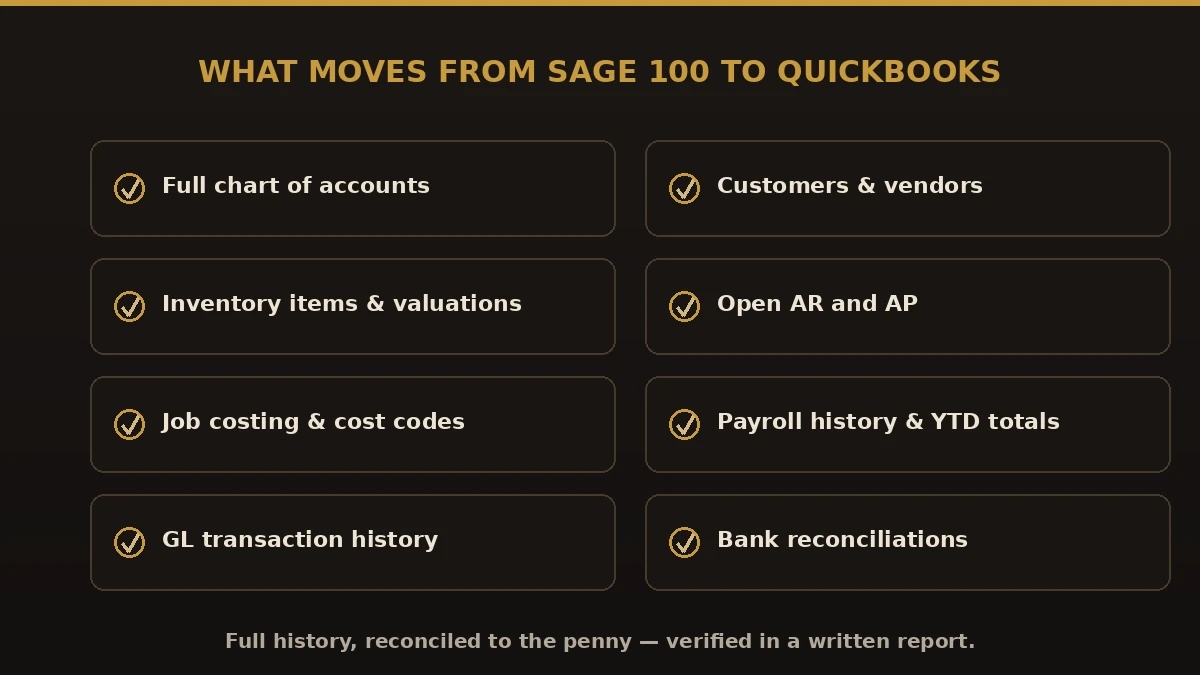
The scope below reflects a typical Sage 100 to QuickBooks conversion. Yours is confirmed in writing before anyone exports anything.
Financial data
Chart of accounts, with segmented Sage 100 account numbers translated into QuickBooks accounts supported by Classes or Locations. General ledger detail for the historical period we agree on. Opening balances as of the cutover date. Journal entries and recurring templates, rebuilt as memorized transactions so your month-end routine survives the move.
Customer data
- Customer records with billing and shipping addresses
- Contacts, phone numbers, and email addresses
- Open receivable detail, invoice by invoice, dates intact so aging stays accurate
- Terms, tax status, and credit limits
Vendor data
- Vendor records and remittance addresses
- Purchasing contacts
- Open payables, bill by bill
- 1099 flags and tax IDs, verified during cleanup rather than in January
Sales and purchasing
Sales invoices and credit memos for the converted period, customer payments with their cash application preserved, and open sales orders where the destination product supports them. On purchasing: open purchase orders, vendor bills, and vendor credits.
Inventory
Item masters with descriptions and numbers, product lines mapped to item types and categories, units of measure, on-hand quantities by location, and inventory valuation — with the costing method reviewed first.
Payroll
Employee records, pay types, deductions, accrual setup, and year-to-date figures where the cutover falls mid-year. We routinely advise against converting payroll in transaction-level detail. The cleaner approach is to close prior periods in Sage 100, bring history across as summarized journal entries, and start live payroll in QuickBooks from the cutover date.
How we work
Our Sage 100 to QuickBooks migration process
Discovery
We map your Sage 100 edition and version, hosting, active modules, record counts, custom fields, Visual Integrator jobs, the reports your team depends on, and every integration exchanging data with the system.
Migration planning
Discovery produces a written scope: the cutover date (almost always a fiscal year or quarter end), how many years convert, the cleanup done before extraction, the destination product and subscription level, and an owner for every approval.
Data extraction
Data comes out of Sage 100 through whichever method suits each module — Business Insights Explorer, Visual Integrator, or ODBC queries. Extracts are taken from a copy; your team keeps working in the live system.
Data cleanup
Duplicates are merged, dead records retired, naming standardized, and addresses corrected. Before anything moves, every subsidiary ledger is confirmed to agree with its control account — an out-of-balance subledger in Sage will be out of balance in QuickBooks too.
Data conversion
Records import in dependency order: lists first, then opening balances, then historical transactions. Each import is staged so it can be reviewed and, if needed, reversed without disturbing what came before.
Validation
Nothing is handed over until the trial balance, balance sheet, P&L, AR and AP aging, inventory valuation, and sales tax liability all tie back to Sage 100 as of the cutover date. Variances get researched and resolved, never absorbed into a balancing entry.
User testing
Your team works in the file before it becomes the system of record — entering invoices, applying payments, paying bills, running a PO through to receipt, producing month-end statements, and confirming permissions restrict what they should.
Go live
A final extract captures everything posted since the cutover date. QuickBooks is released as the system of record; Sage 100 stays available read-only for history and audit. We stay engaged through your first full month-end close and first bank reconciliation.
At a glance
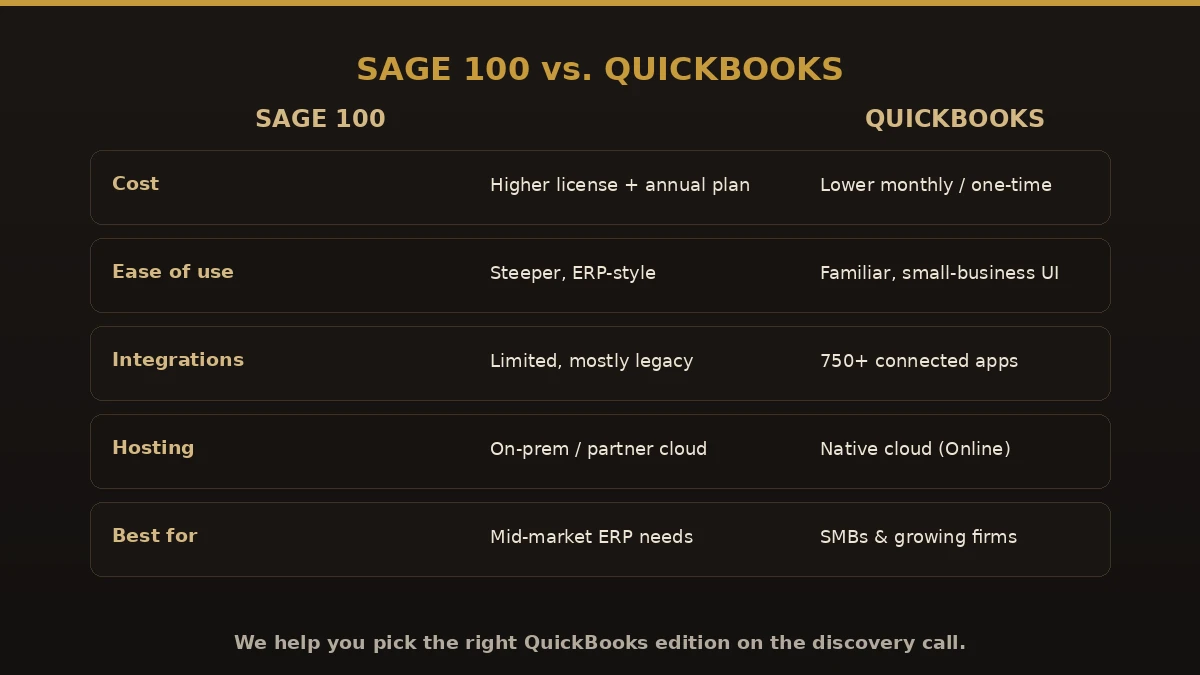
Sage 100 vs. QuickBooks
| Feature | Sage 100 | QuickBooks Enterprise |
|---|---|---|
| Deployment | Desktop or hosted | Desktop, hosting available |
| Cloud options | Limited, via a hosting provider | Hosting available; Online for full cloud |
| GL structure | Segmented account numbers | Account list with Classes and Locations |
| Inventory | Advanced, multiple costing methods | Advanced, with Advanced Inventory add-on |
| Job costing | Yes, via the Job Cost module | Yes, native |
| Multi-user | Yes | Yes |
| Learning curve | Moderate to steep | Shorter for most users |
| Trained staff | Limited | Widely available |
| Integrations | Selective | Extensive |
Who we serve
Industries we serve
We convert Sage 100 companies in manufacturing and light assembly, wholesale distribution, construction and the specialty trades, professional services, retail, healthcare practices, automotive, HVAC, plumbing and electrical contracting, and the nonprofit sector.
Contractors and distributors make up the largest share of the work, mainly because those two groups feel the job-costing and inventory questions most acutely. Running Sage 100 Contractor instead? See our Sage 100 Contractor to QuickBooks page.
Where the work is
Common migration challenges
Segmented account structure
Sage 100 GL accounts typically carry division and department segments. QuickBooks handles that dimension through Classes or Locations rather than inside the account number. Getting the mapping right at the start determines whether departmental reporting survives.
Inventory costing methods
Sage 100 supports FIFO, LIFO, average, standard, and lot or serial costing. QuickBooks does not match that range. Where the method must change, we calculate the valuation difference before conversion and document exactly how it is recorded, so the adjustment stays visible for an auditor.
Historical transaction volume
QuickBooks products have list and transaction limits that vary by edition. When full history would push a file toward them, we convert two or three years in detail, bring earlier periods across in summary, and keep Sage 100 read-only for the rest of your retention period.
Custom reports
Anything built in Crystal Reports does not transfer. Those reports get rebuilt using QuickBooks reporting, memorized report groups, or an external tool. Discovery identifies which are genuinely needed — often a meaningful share has not been opened in years.
Connected applications
Every application exchanging data with Sage 100 — payroll, payment processors, shipping, industry software — is reviewed for QuickBooks compatibility, then reconnected or replaced.
Open documents at cutover
Partially received POs, partially invoiced sales orders, and progress-billed jobs get individual attention, reviewed line by line. There is no bulk method that handles them reliably.
The case for help
Why choose professional migration
A Sage 100 to QuickBooks conversion touches every balance a business reports. Handled internally by people already closing the books and answering the phone, it stretches across months and tends to produce a file nobody entirely trusts.
Bringing in a team that has done it before means the billing cycle keeps running, collections do not pause, and vendors get paid on schedule. It means converted balances that agree to the source account by account, open receivables and payables carried as documents instead of lump-sum balances, reporting rebuilt around what management actually reads, and someone available when your first close throws up a question.
If you are weighing a conversion, we start with a review of your company file and come back with a written scope, a timeline, and a fixed fee before you commit to anything. Compare paths on our conversion hub or step up to Sage 100 to QuickBooks Enterprise.
Who does the work
About the lead conversion specialist

Ram — Founder & Principal
Founder of Numerawise Solutions, established in Atlanta in 2024. Intuit ProAdvisor (Gold tier) and a former Intuit Technical Support engineer. Has personally led 200+ accounting-software conversions for US construction, manufacturing, distribution, professional-services, and nonprofit firms. We also provide ongoing bookkeeping and payroll support after go-live.
More about Ram Verified on UpworkQuestions we get before every project
Sage 100 to QuickBooks FAQs
Can you really move everything from Sage 100 to QuickBooks without losing data?
Yes — with the right process. Within the agreed scope, your Sage 100 data is exported, mapped, and brought into QuickBooks accurately. Any fields the destination cannot support are documented and archived. The key is getting the field mapping right and reconciling every balance before go-live, which is exactly what our 10-point validation guarantees. We don’t hand over the file until every number matches.
Can you transfer data from Sage to QuickBooks?
Yes — transferring data from Sage to QuickBooks is exactly what we do. Whether you’re on Sage 100, Sage 100cloud, the older Sage MAS 90/MAS 200, or Sage 50, we move your chart of accounts, customers, vendors, inventory, open AR/AP, payroll history, and years of transactions — not just opening balances — and reconcile every figure to the penny before go-live.
Is QuickBooks Desktop going away in 2026?
Not entirely. Intuit stopped selling new QuickBooks Desktop Pro, Premier, and Mac subscriptions to US customers in September 2024, and support for Desktop 2023 ends May 31, 2026. But QuickBooks Desktop Enterprise is still sold to new and existing customers, and existing Pro/Premier subscribers can keep renewing. This is exactly why, when you leave Sage 100, we help you pick a target that lasts — QuickBooks Online for cloud continuity, or QuickBooks Enterprise for Desktop-style power that isn’t being phased out.
Is Sage 100 similar to QuickBooks?
They overlap but aren’t the same. Sage 100 (formerly MAS 90/200) is a modular, ERP-style system built for mid-market operations, while QuickBooks is a more streamlined small-business platform. QuickBooks is easier to learn, lower cost to run, and connects to 750+ apps; Sage 100 offers deeper manufacturing and distribution modules. Most firms that switch want QuickBooks’ simplicity and cloud access without losing their history — which the migration preserves in full.
Is Sage 100 obsolete?
No — Sage 100 is still supported and sold. But many businesses find it heavier and more expensive than they need, with a smaller, mostly legacy integration ecosystem. If Sage 100 feels like more system than your operation requires, moving to QuickBooks is a common, well-trodden path, and your full Sage 100 history comes with you.
Do you convert Sage MAS 90 and MAS 200 to QuickBooks?
Yes. Sage 100 was sold as Sage MAS 90 and Sage MAS 200 until the 2013 rebrand, and we convert those files routinely — including older MAS 90/200 versions. The chart of accounts, history, and balances move across the same way as a current Sage 100 file.
Is there a free Sage 100 to QuickBooks conversion tool?
Not a reliable one. Intuit’s built-in conversion tool doesn’t support Sage 100, and free CSV/exports carry lists but drop transaction history, links, and reconciliations. Most firms that try the free route re-key data or pay to fix a broken file. Our fixed-price service moves your full history and reconciles it to the penny.
Can you migrate Sage 100 to QuickBooks Desktop as well as Online?
Yes. We convert Sage 100 to QuickBooks Desktop Pro, Premier, and Enterprise, and to QuickBooks Online. Because Sage 100 users often rely on inventory, job costing, and multi-entity setups, Desktop or Enterprise is frequently the better target — we help you decide on the discovery call.
What about the Dataswitcher or QuickBooks conversion tool?
Dataswitcher is the automated engine Intuit partners with for certain conversions, but its Sage 100 support is limited and self-serve. We handle the full job — custom account mapping, inventory and job-costing data, payroll history, and post-conversion reconciliation — so you receive a finished, balanced QuickBooks file rather than a raw import to clean up.
Do you convert Sage 100cloud and Sage 100 Contractor?
We convert Sage 100 and Sage 100cloud (standard, advanced, and premium) to QuickBooks. Sage 100 Contractor is a different product with its own job-cost structure — we handle that too, on a dedicated scope.
How long does a Sage 100 to QuickBooks migration take?
Most single-entity Sage 100 conversions finish in two to three weeks. Multi-entity, heavy inventory, or full payroll history can extend to four to six weeks. You get a firm timeline with your fixed quote before any work begins.
Will our Sage 100 inventory and job costing carry over?
Yes, within what QuickBooks supports. Sage 100 inventory items, quantities, and valuations map to QuickBooks items; job costing maps to customer:jobs and classes in Online, or the job/phase/cost-type structure in Desktop Premier Contractor and Enterprise. We confirm the mapping with you before migrating.
Do we have to stop using Sage 100 during the conversion?
No. You keep working in Sage 100 while we convert a copy of your file. On go-live day you start entering new transactions in QuickBooks, and your Sage 100 file stays intact as a permanent archive — you don’t need to keep paying for it.
Should we go to QuickBooks Online or QuickBooks Desktop?
It depends on team size, workflows, and how you work. QuickBooks Online suits most businesses (cloud, auto-updates, integrations). Desktop Enterprise fits advanced inventory (serial/lot, multi-location), complex job costing, or very high volume. We give an honest recommendation during discovery — no upsell.
What happens to our Sage 100 job costing data?
Job costing migrates, but it requires careful mapping. Sage 100’s job, phase, and cost-code structure maps to QuickBooks’ customer:job and class framework. We build the mapping during discovery, test it in staging, and validate it before go-live.
Can you handle multiple Sage 100 companies at the same time?
Yes — we run multi-entity conversions regularly. Each entity gets its own QuickBooks file, or we consolidate based on your structure. Inter-company relationships are documented and each entity gets its own validation pass before any consolidation testing.
What if something doesn’t look right after we go live?
Every project includes 30 days of post-go-live support at no extra charge. If a discrepancy surfaces, we investigate, find the root cause, document it, and fix it. That window exists because the first month of live use is when subtle issues appear.
Do you sign an NDA before we share our data?
Yes, always. Every engagement starts with a signed mutual NDA before any client data is exchanged. Your financial records, customer lists, vendor data, and transaction history stay confidential throughout and after.
Can our CPA review the work as it progresses?
Absolutely — we encourage it. Your accountant gets read-only access at every milestone: trial-balance match, transactional pass, and final reconciliation. A lot of our work comes through CPA referrals.
Conversion or migration?
Sage 100 to QuickBooks migration, done right
“Conversion” and “migration” mean the same thing here. Whether you searched for a sage 100 to quickbooks conversion or a sage 100 to quickbooks migration, we move your full history — not just opening balances — and reconcile it to the cent. Same fixed-price service, either word.
Begin
Get your free Sage 100 assessment
Tell us about your setup. We assess your data and scope, recommend Online vs. Desktop for your needs, give a realistic timeline, and send a fixed-price written quote within 24 hours. Straight answers, no sales pressure.