Sage 100 to QuickBooks Enterprise Conversion Services
Numerawise Solutions migrates your accounts, balances, and complete transaction history from Sage 100 into QuickBooks Enterprise through our Sage 100 to QuickBooks Enterprise conversion service. Still running Sage MAS 90 or Sage MAS 200 — the names Sage 100 used before 2013? Those files convert to QuickBooks Enterprise exactly the same way. Every figure is reconciled against the original file and verified before go-live, and the work is performed by Intuit ProAdvisors.
Looking for QuickBooks Pro, Premier or Online instead of Enterprise? That’s our Sage 100 to QuickBooks conversion service. Running Sage 100 Contractor and weighing Intuit’s construction platform? See Sage 100 Contractor to Intuit Enterprise Suite migration.
Complimentary file review · Fixed-price quote within 24 hours · Intuit ProAdvisor Gold
The case
Why businesses leave Sage 100 for QuickBooks Enterprise
Sage 100 is a solid ERP — that’s not the problem. The problem tends to show up when a company grows, changes hands, or loses the one person who really knew how to drive it.
The reason we hear most often is staffing. Post a job opening for a Sage 100 bookkeeper, then post one for QuickBooks, and watch the applications — you’ll get a fraction of the response for Sage. Covering a leave or replacing a controller gets a lot less stressful when half the accountants in your city already know the software.
Then there’s the learning curve. Sage 100 is built around modules, and that structure confuses people who didn’t grow up in it. QuickBooks Enterprise feels familiar to just about anyone who has touched a set of books. Cost is the quiet one: owners tell us their Sage bill looks reasonable, right up until they total the modules, the add-ons, and the consultant hours.
And there’s where the products stand today. QuickBooks Enterprise is now Intuit’s flagship desktop product. Once Intuit stopped selling new Pro Plus and Premier Plus subscriptions to fresh customers, Enterprise became the desktop path forward. It handles large data files, runs up to 40 users at once, and ships with advanced inventory, reporting, and role-based permissions. None of this makes Sage 100 a bad product — the right tool just depends on your team, your budget, and how you actually work.
What’s involved
What a Sage 100 to QuickBooks Enterprise conversion actually involves
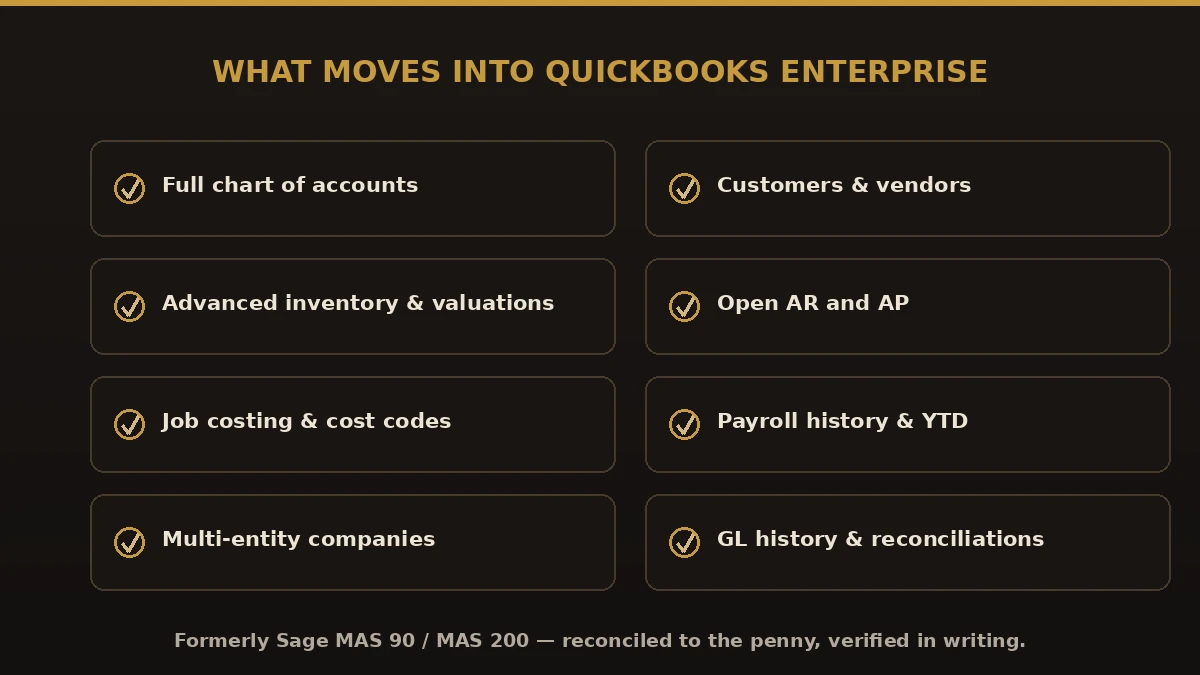
Here’s the part that trips people up: there’s no magic button that scoops your Sage 100 data and pours it into QuickBooks. The two programs organize information in completely different ways. A real conversion comes down to three moves — you pull clean data out of Sage 100, match every field to its home in QuickBooks Enterprise, then import it in an order that keeps everything linked. Prove the numbers tie out at the end, and you’re finished. Skip that last step, and you’ll find out the hard way, usually at tax time.
What usually comes over clean
- Chart of accounts
- Customer and vendor lists
- Item and inventory lists
- Open accounts receivable and accounts payable
- Employee records (names and basic details)
- Opening balances as of your cutoff date
What needs a careful hand
Full transaction history takes real work — every line has to be formatted and checked, so most firms bring open items plus a summary, not every transaction ever posted. Payroll detail is its own animal: historical paychecks often land as summarized journal entries rather than live paychecks, and your year-to-date wage and tax figures need close attention so W-2s stay correct. Job costing matters most to construction and manufacturing shops — mapping Sage 100 jobs to the QuickBooks Customer:Job structure takes planning, not guesswork. And custom fields and reports almost never map one-to-one, so plan to rebuild them.
Compare
Sage 100 vs. QuickBooks Enterprise
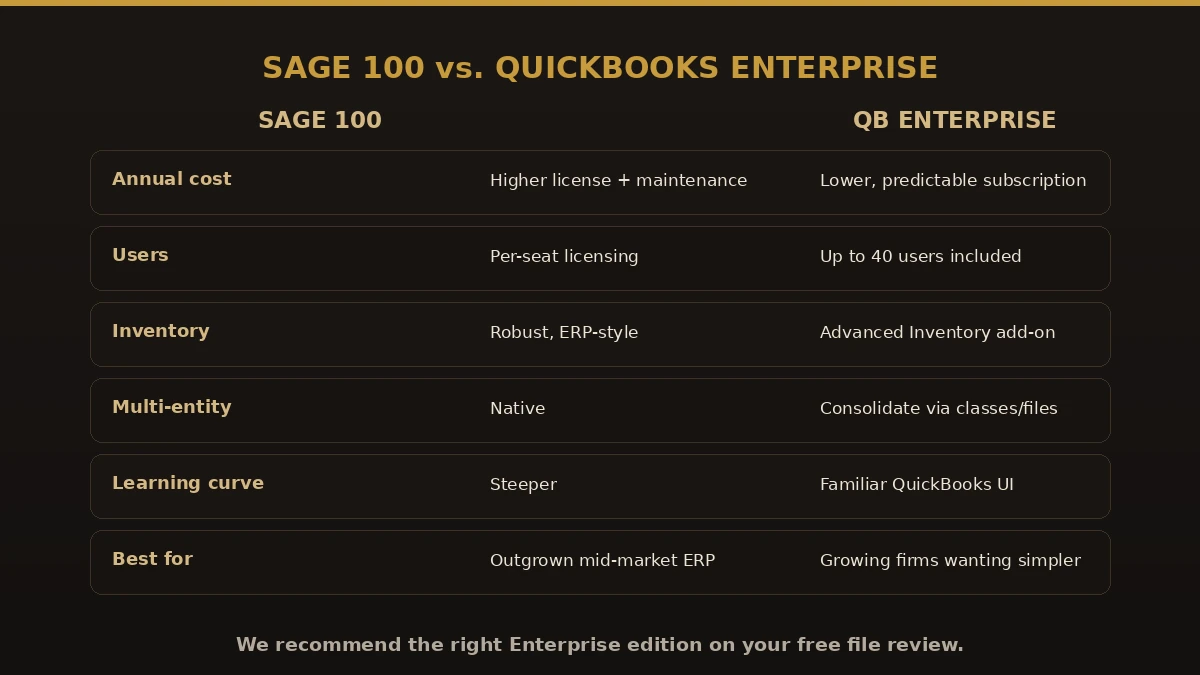
| Feature | Sage 100 | QuickBooks Enterprise |
|---|---|---|
| Best fit | Mid-sized firms needing modular ERP | Small-to-mid firms wanting robust, familiar accounting |
| Learning curve | Steeper, module-based | Gentler, widely known interface |
| Users | Scales with modules and licenses | Up to 40 simultaneous users (Diamond tier) |
| Job costing | Strong, built for construction and manufacturing | Strong in Contractor and Manufacturing editions |
| Inventory | Advanced, module-driven | Advanced Inventory add-on |
| Staffing | Fewer bookkeepers know it | Large pool of QuickBooks-trained pros |
| Hosting | On-premise or hosted | Desktop, and can be hosted in the cloud |
The process
The extraction step differs by edition: Standard and Advanced are read through the Sage 100 ODBC driver from a copy of the MAS90 folder, Premium from a restored SQL backup. Sage 100 Standard vs Advanced vs Premium sets out what each runs on and what the move keeps from each.
The conversion, step by step
A dependable Sage 100 to QuickBooks migration follows the same eight steps almost every time.

Assess and plan
Write down your Sage 100 modules, users, integrations, and data. Choose the right Enterprise edition (Contractor, Manufacturing & Wholesale) and lock in a cutoff date.
Clean up in Sage 100 first
Reconcile your accounts, close what you can, and merge duplicate customers and vendors. Garbage in, garbage out.
Export the data
Pull the chart of accounts, name lists, item and inventory lists, open AR and AP, and whatever history you’ve decided to keep.
Map and format
Match every Sage 100 account and list to the correct QuickBooks field, then decide how much history to carry: opening balances only, or full detail.
Build the QuickBooks Enterprise file
Set company info, preferences, users and roles, sales tax, and payroll items before a single record lands.
Import in order
Lists first (accounts, customers, vendors, items), then opening balances, then transactions. Get the order wrong and the links break.
Reconcile and validate
Match the trial balance, AR and AP aging, and bank reconciliations. Keep spot-checking reports against Sage 100 until they agree.
Train and go live
Pick a go-live date, train your team, and leave Sage 100 in read-only mode as a reference for a while.
If running this alone sounds like a lot, that’s exactly where professional QuickBooks conversion services earn their fee.
Payoff
What you gain by switching
- Easier hiring and coverage — a deep bench of QuickBooks talent
- Faster onboarding — new hires learn the system in days, not months
- Real control — advanced reports and role-based access
- Room to grow — large file support and up to 40 users
- A familiar ecosystem — payroll, payments, and thousands of add-ons
- Less daily grind — routine bookkeeping simply eats less time
Watch out
Where conversions go wrong
- Skipping the cleanup — importing duplicates and unreconciled accounts just moves the mess
- Hauling over too much history — it bloats the file and multiplies errors; summarize what you don’t need
- Importing in the wrong order — transactions before lists and balances and your links collapse
- Ignoring payroll year-to-date figures — botch these and W-2 season turns into a nightmare
- No validation step — if you never reconcile, you won’t know the data is wrong until it costs you
- Deleting Sage 100 too soon — keep it through at least one full close and tax cycle
Get it right
How to keep it smooth
- Set a clean cutoff date — month-end or year-end makes reconciliation far easier
- Reconcile before you export — start from numbers you actually trust
- Back up Sage 100, twice — more than one copy, stored somewhere safe
- Pick the right Enterprise edition up front — switching editions later is a headache
- Test with a sample — import a small batch, confirm it, then run the full load
- Write down your account mapping — a simple map saves hours later
- Mind your records retention — follow IRS recordkeeping guidance on how long to hold records
Who performs the work
Led by an Intuit ProAdvisor

Ram — Founder & Principal
Ram is the founder of Numerawise Solutions in Atlanta. An Intuit ProAdvisor (Gold tier) and a former Intuit Technical Support engineer, he has personally led more than 200 accounting-software conversions, including Sage 100 and QuickBooks Enterprise engagements, for small and mid-market firms across the United States.
More about Ram Verified on UpworkCommon questions
Sage 100 to QuickBooks Enterprise conversion FAQs
What is a Sage 100 to QuickBooks Enterprise conversion?
In plain terms, it’s moving your accounting data out of Sage 100 and into QuickBooks Enterprise. Since the two systems store data differently, the work means exporting your records, mapping each field to the right spot in QuickBooks, importing everything in the correct order, and reconciling until the balances agree.
Do you convert Sage MAS 90 and MAS 200 to QuickBooks Enterprise?
Yes. Sage 100 was sold as Sage MAS 90 and Sage MAS 200 until the 2013 rebrand. We convert those files — including older MAS 90/200 releases — into QuickBooks Enterprise with the full chart of accounts, history, and balances intact.
Why QuickBooks Enterprise instead of QuickBooks Online for a Sage 100 file?
Enterprise is usually the better landing spot for Sage 100 users because it handles the larger item counts, advanced inventory, job costing, and multi-entity needs that Sage 100 firms typically have. If your operation is simpler, we’ll tell you honestly that QuickBooks Online or Desktop Pro/Premier may fit better and cost less.
Can you consolidate multiple Sage 100 companies into QuickBooks Enterprise?
Yes. Multi-entity Sage 100 setups are one of the most common reasons firms move to Enterprise. We map each company, preserve inter-entity detail where QuickBooks supports it, and reconcile every entity separately before go-live.
Is there a free Sage 100 to QuickBooks Enterprise conversion tool?
Not a dependable one. Intuit’s built-in tool doesn’t support Sage 100, and free exports carry lists but drop transaction history, links, and reconciliations. For an Enterprise-scale file that gap is expensive to fix later. Our fixed-fee service moves the full history and reconciles it to the penny.
Will Sage 100 inventory and job costing move into Enterprise?
Yes. QuickBooks Enterprise supports advanced inventory (multiple locations, assemblies, FIFO) and the job/phase/cost-type structure in the Contractor and Manufacturing editions, so Sage 100 inventory valuations and job-cost history map across cleanly. We confirm the mapping with you before migrating.
How long does a Sage 100 to QuickBooks Enterprise conversion take?
Single-entity Enterprise conversions usually run two to three weeks. Multi-entity consolidations, heavy inventory, or full payroll history can extend to four to six weeks. You receive a firm timeline with your fixed quote before work starts.
Is there a tool that automatically converts Sage 100 to QuickBooks Enterprise?
Short answer: no single button does it. The two programs are built differently, so a real conversion relies on structured exports, careful field mapping, and validated imports. Third-party utilities can speed up pieces of the job, but a person still has to plan the mapping and confirm the balances tie out afterward.
How long does a Sage 100 to QuickBooks Enterprise conversion take?
Anywhere from a couple of weeks to a couple of months. A small company with tidy records might wrap in one to two weeks. Larger firms with inventory, job costing, or years of history often need four to eight. The cleanup and reconciliation eat the most time, not the import.
Will I lose my historical data?
You won’t, as long as you plan for it. You can bring open items plus a summarized or detailed history into QuickBooks, and most businesses keep open balances and recent detail while holding on to their Sage 100 backup for older records. Nothing disappears as long as that source file stays safe.
How much history should I bring over?
Enough to run your reports and file your taxes, and not much more. Years of raw transactions bloat the file and raise the odds of errors. A common setup is open AR and AP, opening balances, and the current fiscal year in detail, with older periods summarized or simply left in Sage 100 for reference.
Which QuickBooks Enterprise edition is best after leaving Sage 100?
That comes down to your industry. Construction firms usually reach for the Contractor edition, while product-based businesses lean toward Manufacturing & Wholesale. Choose the edition that matches how you work before you import anything, because switching editions later creates extra cleanup you’d rather avoid.
Can payroll data be converted?
It can, but this is the piece to slow down on. Historical paychecks often come across as summarized journal entries instead of live paychecks. The trick is setting up year-to-date wages and taxes correctly so W-2s and quarterly filings stay accurate. Plenty of firms convert mid-year only after confirming those figures line up.
How much does a Sage 100 to QuickBooks Enterprise conversion cost?
There’s no flat sticker price. It moves with your data volume, how much history you keep, and whether you hire help. Doing it yourself mostly costs time. Professional QuickBooks Enterprise conversion services are usually priced by scope, so get a clear estimate first, and remember to budget for the QuickBooks Enterprise subscription too.
Can I run Sage 100 and QuickBooks at the same time during the switch?
You can, and honestly you should. Keep Sage 100 in read-only mode as a reference while your team settles into QuickBooks. Running both for a short stretch lets you compare reports and catch anything that slipped through. Once you’ve closed a full period cleanly in QuickBooks, you can retire the daily use of Sage 100.
Do I need an accountant, or can I do it myself?
If your books are simple, you can absolutely handle it yourself with careful planning. But once inventory, job costing, payroll, or years of history enter the picture, a specialist saves time and prevents expensive mistakes. A pro takes the mapping, imports, and reconciliation off your plate so your books start clean and stay that way.
Begin
Ready to move from Sage 100 to QuickBooks Enterprise?
Provide a few details and we will email a fixed-price quote within one business day, with your Sage 100 history reconciled into a clean QuickBooks Enterprise file.