Foundation to QuickBooks Conversion
Our Foundation to QuickBooks conversion moves US construction firms to QuickBooks Enterprise or Online Advanced — job cost ledger, AIA billing, certified payroll, and equipment costing mapped or rebuilt where QuickBooks needs it, reconciled to your Foundation trial balance. Built and verified by construction-accounting specialists.
Free scoping call · Fixed-price quote in 24 hours · No commitment
How we protect your numbers
More than an import tool
A good construction accounting conversion takes more than knowing which buttons to press. It takes real bookkeeping judgment and the patience to verify every balance instead of assuming.
Comprehensive data review
Nothing moves until we have gone through your Foundation file properly — duplicate records, inconsistent naming, dormant accounts, and history that needs careful handling. Catching the messes early is far cheaper than fixing them after.
Preparation & cleanup
Before we convert anything, we clean and standardize your records so years of accumulated clutter do not follow you into the new file. This step often improves reporting more than the software change itself.
Secure migration
The data moves into QuickBooks Online or Desktop using methods we have run many times, keeping the links between accounts, jobs, customers, and transactions intact and confidential throughout.
Verification & reconciliation
We reconcile balances, confirm customer and vendor records, and run the new statements against your original Foundation reports line by line. We do not call it finished until the converted file matches.
Post-migration support
We do not hand you the keys and disappear. After go-live we help your team find their way around QuickBooks and get comfortable with how everything is set up.
Bookkeepers, not just movers
Deliberate data mapping instead of blind imports, full reconciliation before sign-off, and a plan built around your business. We can also keep your books current afterward with ongoing bookkeeping.
The part most conversions get wrong
Protecting your job costing, retainage, and WIP data
Foundation’s whole strength is its construction-specific accounting — which is exactly what a careless migration tends to flatten out. Moving job costing data properly means more than copying numbers across. The structure behind those numbers has to survive too: cost codes, phases, change orders, committed costs, and the thread connecting every transaction back to the job it belongs to.
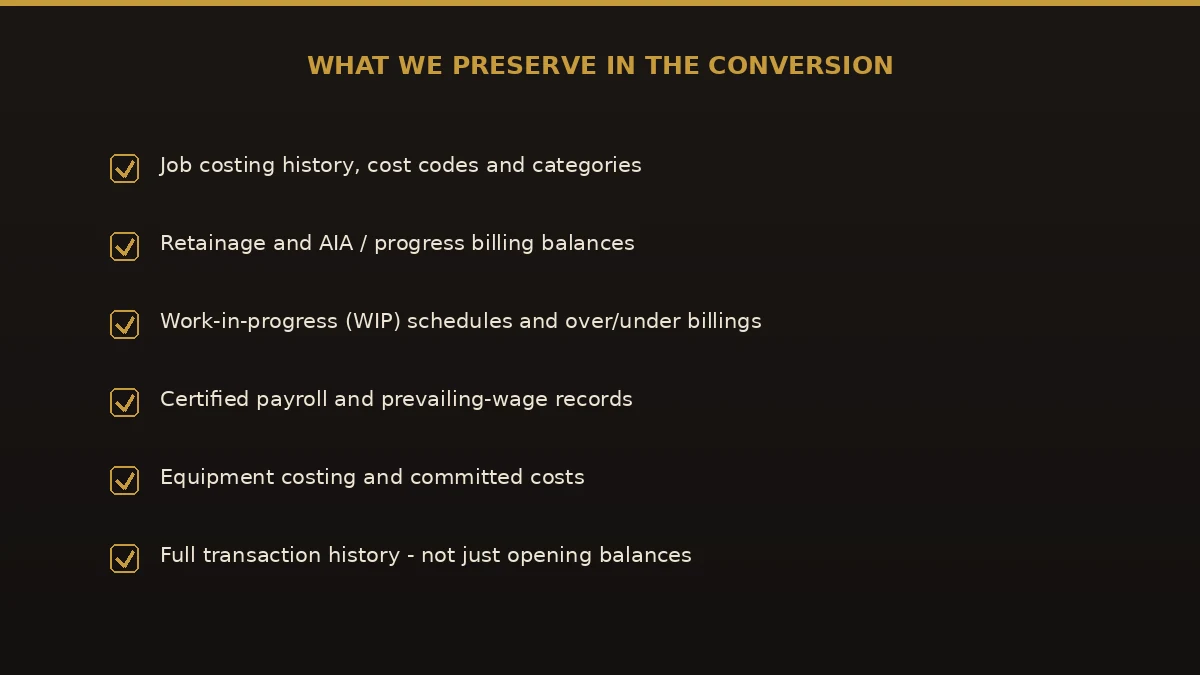
Retainage and work-in-progress need the same attention. Get retainage receivable and payable wrong and your balance sheet will not reconcile, your over/under-billing schedule drifts, and your bonding company notices. So we map those balances on purpose and check them against your Foundation reports instead of trusting that the import sorted it out.
We also look at the places QuickBooks simply behaves differently from Foundation — certified payroll, gross receipts and sales tax, and equipment cost tracking. Spotting those gaps before the conversion, rather than at month-end when something will not tie, is usually what separates a clean switch from an expensive one.
What you are left with is a QuickBooks file your project managers can actually use to read job profitability — not just a tidy ledger that looks fine until you dig in.
On the cutover date: what happens to job cost history and open WIP
Short version: closed jobs stay where they are, as saved Foundation reports; open jobs move with their to-date numbers; and open WIP becomes one opening entry that has to equal Foundation’s last over/under billing report. No job history is thrown away — it just is not re-keyed transaction by transaction into QuickBooks, which for most contractors would cost more than it is worth.
Pick the date first. Cut over at a month-end — a quarter-end or fiscal year-end is cleaner — after that month’s pay applications are billed in Foundation and its job cost postings are complete. Every number below is taken as of that one date.
| In Foundation on cutover day | What it becomes in QuickBooks | Tie it to |
|---|---|---|
| Closed jobs and their full job history | Stays in Foundation, saved as job history and job cost reports (PDF and Excel). Prior-year totals by job can come over as summary entries if you want year-over-year comparisons. | Foundation job history reports |
| Open jobs: budget and cost to date by cost code | Each open job set up with its cost codes mapped; cost to date brought in as opening entries by cost code | Foundation job cost detail as of the cutover date |
| Contract value and change orders | Contract amount per job with approved change orders included; pending change orders listed separately, not booked | Foundation change order report by status |
| Billed to date and open receivables | Open pay-application balances carried as open invoices by job | Foundation A/R aging by job |
| Retainage receivable and payable | Balances by job and by subcontractor in dedicated retainage accounts | Foundation retainage reports |
| Committed costs (open POs and subcontracts) | Only the remaining, unbilled amounts, re-entered as open purchase orders | Foundation committed cost report by job |
| Over/under billings (open WIP) | One opening journal entry for the net over/under position, backed by the job-level schedule | Foundation’s final over/under billing (WIP) report |
Save the answer key before access ends. Foundation’s Job Costing module produces over/under billing and WIP reports and job histories, and its PO and Subcontract module reports committed costs by job, so every row above has a Foundation report to tie to. Run and save the full set as of the cutover date — trial balance, over/under billing, job cost detail, committed costs, A/R and A/P aging by job, and retainage — before anyone’s Foundation login is switched off. Those reports are your audit trail and the check figures for the first QuickBooks month-end.
After go-live, the first month of checks — tying WIP job by job, aging retainage in both directions and testing certified payroll — are laid out in our Foundation vs QuickBooks comparison, which now includes a fill-in retainage tie-out worksheet. If you are heading to Intuit’s cloud suite instead, the Foundation to Intuit Enterprise Suite migration page covers that route.
Have your CPA sign off on the opening over/under billing entry and the WIP method behind it before the first post-conversion financials go to a surety or lender. How long-term contracts are recognized for tax is your CPA’s call, not ours.
Two destinations
QuickBooks Online or QuickBooks Desktop — which one?
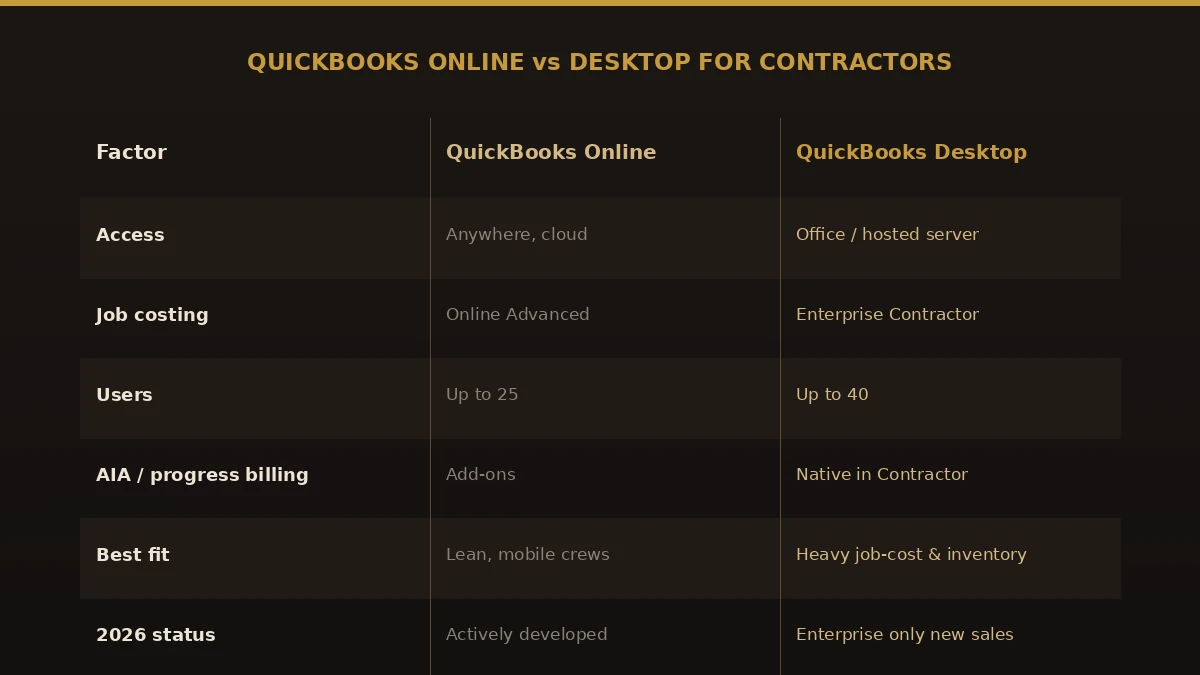
We work with both. Which one fits comes down to how your business actually runs — we will talk through your reporting needs, team size, internet reliability, and integrations before any data moves.
Foundation to QuickBooks Online
QuickBooks Online makes sense if you want cloud access, live collaboration with your accountant, automatic updates, and the ability to work from more than one location — reachable from any job site, not just the office computer.
Foundation to QuickBooks Desktop
Desktop still has its place — if you want a locally installed system, need certain advanced reports, or want your data staying in-house. We structure the file so it is ready to use from day one. Need the reverse later? See QuickBooks Online to Desktop.
Construction specialists
Foundation to QuickBooks, done by people who know job costing
If you run a construction business, odds are you started out on Foundation. It is solid software, built specifically for the trades, with job costing and certified payroll handled the way contractors actually need them. A lot of firms run on it comfortably for years.
Then something shifts. Maybe your accountant is tired of remoting in to pull a report. Maybe your project managers want to check job numbers without being in the office. Maybe the maintenance cost finally stopped making sense. Whatever the trigger, you start asking what it would take to move to QuickBooks — and whether you can do it without scrambling years of financial history along the way.
That second part is where people get nervous, and they are right to. A Foundation to QuickBooks conversion is almost never a clean export-and-import. Job-cost detail, customer and vendor records, open invoices, retainage, and historical transactions all have to be mapped, moved, and checked before you can trust a single report. That is the work we take off your plate — our bookkeepers know both systems from the inside, and we run a disciplined Foundation to QuickBooks migration process that keeps your books intact and your business running while the switch happens.
What goes wrong
Why construction firms switch
Foundation is built for construction — but for many contractors the cost, mobility, and integration gaps add up. Here is what we hear most.
Cost vs. ROI
Foundation pricing has crept upward. Mid-sized contractors typically pay $30K–$60K/yr for capability QuickBooks Enterprise delivers at roughly $1,800/yr.
Illustrative ranges for a typical mid-market setup — actual costs vary by users, modules, and contract terms; we confirm your specifics in the scoping quote.
Mobile crew access
Foundation’s mobile story is improving but lags QuickBooks Online’s native mobile workflow for field crews and project managers.
Integration ecosystem
Modern construction tech — Procore, Buildertrend, ServiceTitan — has deeper QuickBooks integrations than the Foundation counterparts.
What it involves
What the conversion actually involves
Moving from Foundation means rebuilding your construction accounting inside QuickBooks so it shows the same job-level financial position you had before. A full move usually includes:
- Your job cost ledger, mapped to QuickBooks customers, sub-customers, items, and classes
- AIA progress billing with retainage tracking, rebuilt on AIA-compatible templates
- Certified payroll history, with ongoing payroll routed through an integrated app
- Equipment costing, rebuilt as classes or sub-customers to match your operating model
- Union reporting structure, where applicable
- Chart of accounts mapped from Foundation
- Customer, vendor, and job records
- Open AR/AP and account balances
- A full reconciliation against your Foundation trial balance
Skip or misplace any of it and your job-cost reports go sideways — which is why every step is reconciled before you rely on it.
The process
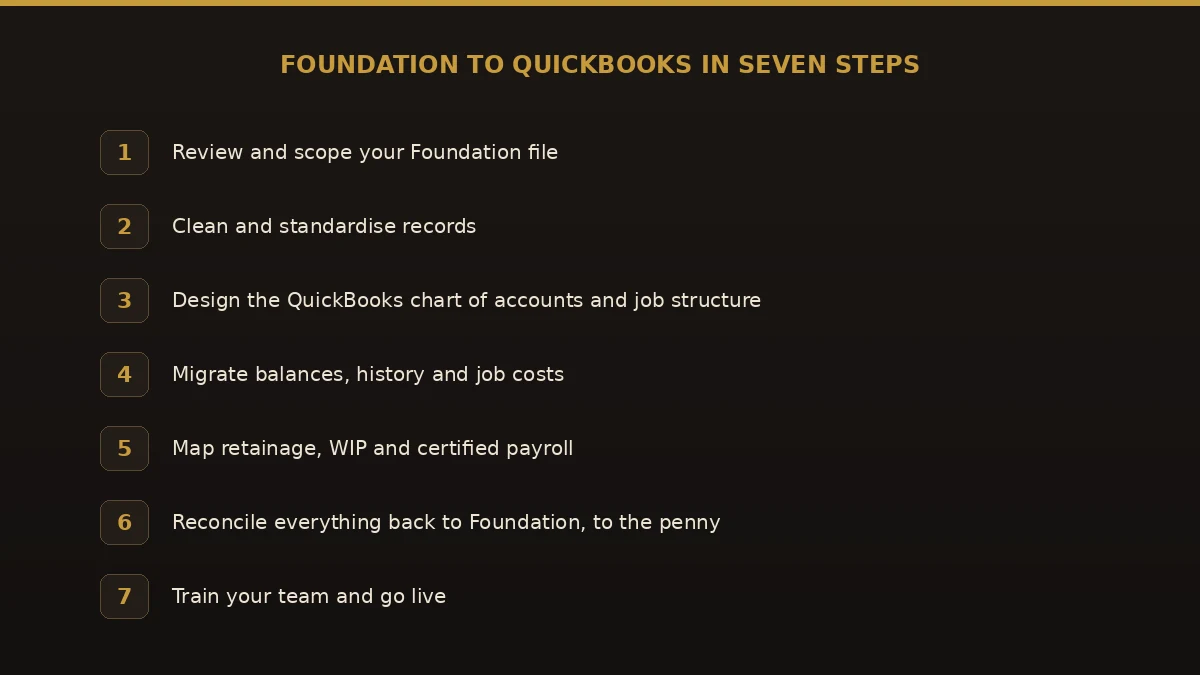
Foundation to QuickBooks in seven steps
Every Foundation to QuickBooks migration follows the same structured, construction-aware process — fixed price, full reconciliation.
Scoping call (free)
Review your job structure, AIA setup, certified payroll, and equipment. Fixed quote within 24 hours.
Data extraction
Foundation export plus targeted database queries for full job-cost detail.
Job structure mapping
Foundation jobs, phases, and cost codes map to QuickBooks customers, sub-customers, items, and classes.
AIA + retainage setup
Progress-billing structure rebuilt in QuickBooks with AIA-compatible templates and retainage tracking.
Certified payroll bridge
Foundation payroll history loaded; ongoing certified payroll handled via an integrated app.
Equipment costing
Equipment costs rebuilt as classes or sub-customers based on your operating model.
Reconciliation + handover
Reconciled to your Foundation trial balance, with one month of construction-specific support after cutover included.
Integrations
Connects to the construction tech your team already uses
Your project management, scheduling, and field-ops tools keep working after the conversion.
- Procore
- Buildertrend
- ServiceTitan
- ProjectSight
- RedTeam
- Knowify
- CoConstruct
- Sage Field Operations
Side by side
Foundation Software vs. QuickBooks for construction
Where the day-to-day difference shows up for US contractors. For the feature-by-feature version verified against both vendors’ own documentation — retainage, certified payroll, WIP and AIA billing — read Foundation vs QuickBooks Enterprise Contractor. Coming from a different platform? We also handle Sage 100 Contractor, Sage Intacct, and NetSuite conversions.
| What to compare | Foundation | QB Enterprise | QBO Advanced |
|---|---|---|---|
| Annual cost (10 users) | $30,000–$60,000 (third-party estimates; contracts vary) | Quoted by Intuit (edition & seats) | $4,080 |
| Job costing | Native, deep AIA | Native (Contractor edition) | Native (Advanced) |
| Certified payroll | Native | Via integrated app | Via integrated app |
| Equipment costing | Native | Via classes / sub-customers | Via classes |
| AIA billing | Native | Via integration | Via integration |
| Mobile / field | Limited | Limited (Desktop) | Native cloud |
| Integrations | Construction-specific | 600+ | 600+ |
| Implementation lift | — | 6–8 weeks via Numerawise | 6–8 weeks via Numerawise |
In practice
What a typical Foundation engagement looks like
A mid-sized general contractor, multi-entity, on a Foundation contract in the $30,000–$60,000-a-year range. We migrate to QuickBooks Enterprise in six to eight weeks, and ongoing software cost drops to roughly $2,000–$5,000 a year.
Job-profitability reports are rebuilt to match Foundation’s depth. The AIA billing structure is rebuilt using progress-billing templates. Certified payroll history is loaded and ongoing handling routed through an integrated app. Equipment costing is rebuilt as classes or sub-customers based on the operating model.
Everything is reconciled against the Foundation trial balance before handover, and the year-end audit is completed on schedule with no reconciliation gaps.
Composite engagement profile based on our construction conversion practice. Specific client engagements are not named without written consent.
Pricing
What a Foundation to QuickBooks conversion costs
What moves the number:
Small contractor, single entity, under $5M — from $3,500
Mid-size contractor, $5–25M, multi-PM — from $7,500
Large / multi-entity, $25M+ — from $12,000
Job count, payroll complexity, and equipment fleet size
Multi-company consolidation and union reporting
Every quote is fixed-price — no hourly billing — delivered within 24 hours of a free scoping call. We can also keep your books current afterward with ongoing bookkeeping and payroll.
Is this you?
Who this is for
- General contractors moving off high-cost Foundation contracts
- Specialty and trade contractors who need job-level profitability
- Multi-entity construction groups that need consolidation
- Firms that want field crews and PMs on a native mobile workflow
- Contractors standardizing on Procore, Buildertrend, or ServiceTitan
- Owners whose CPA prefers QuickBooks for year-end and audit
Why Numerawise
Why contractors pick us for their Foundation migration
People work with us because we keep it accurate, honest, and personal — and because reconciled, job-accurate books are the whole point of the move.
Construction-aware accuracy
We protect job-cost integrity and reconcile against your Foundation trial balance before handover.
Time back
Your team keeps building while we run the conversion end to end.
Reports you can trust
Job profitability, change orders, and progress billing all reconcile.
A smooth handover
A planned cutover keeps your books moving without long gaps.
Someone to ask
Real answers before, during, and after the switch — from people who know construction.
We’ve done this before
Experienced specialists who know where Foundation moves break. We also offer ongoing bookkeeping.
Who does the work
About the lead conversion specialist

Ram — Founder & Principal
Founder of Numerawise Solutions in Atlanta. Intuit ProAdvisor (Gold tier) and a former Intuit Technical Support engineer, Ram has personally led 200+ accounting-software conversions — from Sage, NetSuite, Xero, FreshBooks, AccountEdge, and Foundation into QuickBooks — for US small and mid-market firms.
More about Ram Verified on UpworkOnline or Enterprise
Choosing QuickBooks Online or Enterprise after Foundation
We convert Foundation to either QuickBooks Online or QuickBooks Desktop Enterprise. Enterprise usually fits companies that need deeper inventory and job-costing tools, or more simultaneous users than QuickBooks Online allows; Online fits teams that want browser access and app integrations. The mapping, history and penny-level reconciliation work is the same either way, and the fixed written quote names the edition.
- Live bank and credit-card feeds that reduce manual data entry
- Open receivables and payables, with aged balances retained
- Supporting attachments, where both systems permit
Moving to Xero instead? See our Foundation to Xero conversion.
Planning the move? Use the free conversion planner to see what to gather and what to decide first.
Questions, considered
Foundation Software to QuickBooks migration FAQs
Can QuickBooks really handle construction?
Yes, when set up properly. QuickBooks Enterprise has long been a widely used construction-accounting platform in the US when configured correctly for construction workflows. Foundation’s advantage is specific (deep AIA, union reporting); for most contractors under $30M revenue, QuickBooks delivers operationally.
Can you bring my Foundation job costing and cost codes into QuickBooks?
Yes — and protecting that structure is central to how we work. We carry over cost codes, phases, and job-level detail, then check them against your Foundation reports so your project profitability still holds up.
How do you handle retainage and work-in-progress?
We map both deliberately rather than leaving them to a generic import, then reconcile against your Foundation reports. That is what keeps your balance sheet and over/under-billing schedule accurate after the move.
What happens to closed jobs and open WIP when we switch from Foundation to QuickBooks?
Closed jobs stay in Foundation as saved job history reports, with optional summary totals in QuickBooks. Open jobs move with contract value, billed to date, cost to date by cost code, retainage and open commitments. Open WIP becomes one opening over/under billing entry that must equal Foundation’s final over/under billing report as of the cutover date; your CPA should review that entry.
What about AIA billing?
We rebuild your AIA structure in QuickBooks using progress-invoice templates plus retainage tracking — AIA-compatible from day one. For which QuickBooks edition fits your pay applications, see AIA progress billing: Enterprise Contractor vs Online.
Does QuickBooks handle certified payroll like Foundation does?
It handles it differently, and we flag exactly how before we convert. Foundation payroll history migrates, and ongoing certified payroll runs through an integrated app (such as Sunburst or PayPro) that hooks into QuickBooks.
What happens to equipment costing?
Foundation’s equipment ledger rebuilds as classes or sub-customers depending on your model, so cost allocation keeps working.
Should I go with QuickBooks Online or QuickBooks Desktop?
It depends on how your team works. Online is the better fit for cloud access and collaboration; Desktop suits firms that want a local install or specific advanced features. We help you decide before any data moves.
Will I lose my historical financial data?
No. Historical transactions, invoices, balances, and job data can usually come across. During scoping we agree on how much history to bring so the new file stays complete without getting bloated.
Can I run Foundation and QuickBooks side by side during the switch?
Often, yes. A short parallel period lets your team confirm the numbers and get used to the new system before Foundation gets retired. We help plan that overlap so it does not double your workload.
Is my data secure during the migration?
Yes. It is handled confidentially from the first file review through final reconciliation.
How much does a Foundation to QuickBooks conversion cost?
From $3,500 (larger contractors from $7,500, multi-entity from $12,000), depending on job count, payroll complexity, and equipment fleet size. After a quick look at your Foundation setup, you get a clear fixed-price quote within 24 hours — no surprises later.
How long does it take?
Six to eight weeks is typical for a mid-sized contractor, depending on the size of your Foundation file and how much history you are moving.
Will our PMs notice a difference?
Daily workflow gets simpler. Job-cost reports, change orders, and progress billing all work — just in a more familiar, more mobile interface.
Conversion or migration?
Foundation to QuickBooks migration, done right
“Conversion” and “migration” mean the same thing here. Whether you searched for a foundation to quickbooks conversion or a foundation to quickbooks migration, we move your full history — not just opening balances — and reconcile it to the cent. Same fixed-price service, either word. Some teams call it a Foundation ERP to QuickBooks move, others say Foundation accounting to QuickBooks; either way, the work is identical. If you simply want to convert Foundation to QuickBooks without losing job history, that is exactly what we do.
Begin
Ready to leave Foundation Software behind?
Send a few details and we’ll email a fixed-price quote within one business day. No call required — though we’re happy to talk it through.