QuickBooks Online Migration Services
Move to QuickBooks Online from almost any system — Sage, NetSuite, Xero, FreshBooks, Quicken, or QuickBooks Desktop. We migrate your accounts, balances, and history, reconcile every figure, and set QuickBooks Online up around how you actually work. Still deciding whether a personal-finance register is enough? Quicken vs QuickBooks covers that first decision.
Free scoping call · Fixed-price quote in 24 hours · ProAdvisor Gold
Move to the cloud
One destination, any starting point
QuickBooks Online gives growing US businesses cloud access, automated bank feeds, real-time reporting, multi-user access, and the deepest app ecosystem in small-business accounting. Getting there cleanly is the hard part — balances, history, and lists have to be rebuilt to fit QuickBooks Online’s structure, not dumped in as-is.
That is what we do. Whatever you are leaving behind, we migrate your data, reconcile it against your old reports, and configure QuickBooks Online so it works from day one. ProAdvisor Gold, Atlanta-based, serving all US.
What we handle
A clean move to QuickBooks Online
Migration from any platform
Sage 50/100/Intacct, NetSuite, Xero, FreshBooks, AccountEdge, Foundation, Quicken, and QuickBooks Desktop — all into QuickBooks Online.
Reconciled & verified
We reconcile the new file against your source reports line by line before you rely on it.
Setup & integrations
QuickBooks Online configured to your business, with the right apps connected. See cloud accounting setup.
Books kept current
Keep your books current afterward with ongoing bookkeeping and payroll.
What’s included
What QuickBooks Online migration services actually include
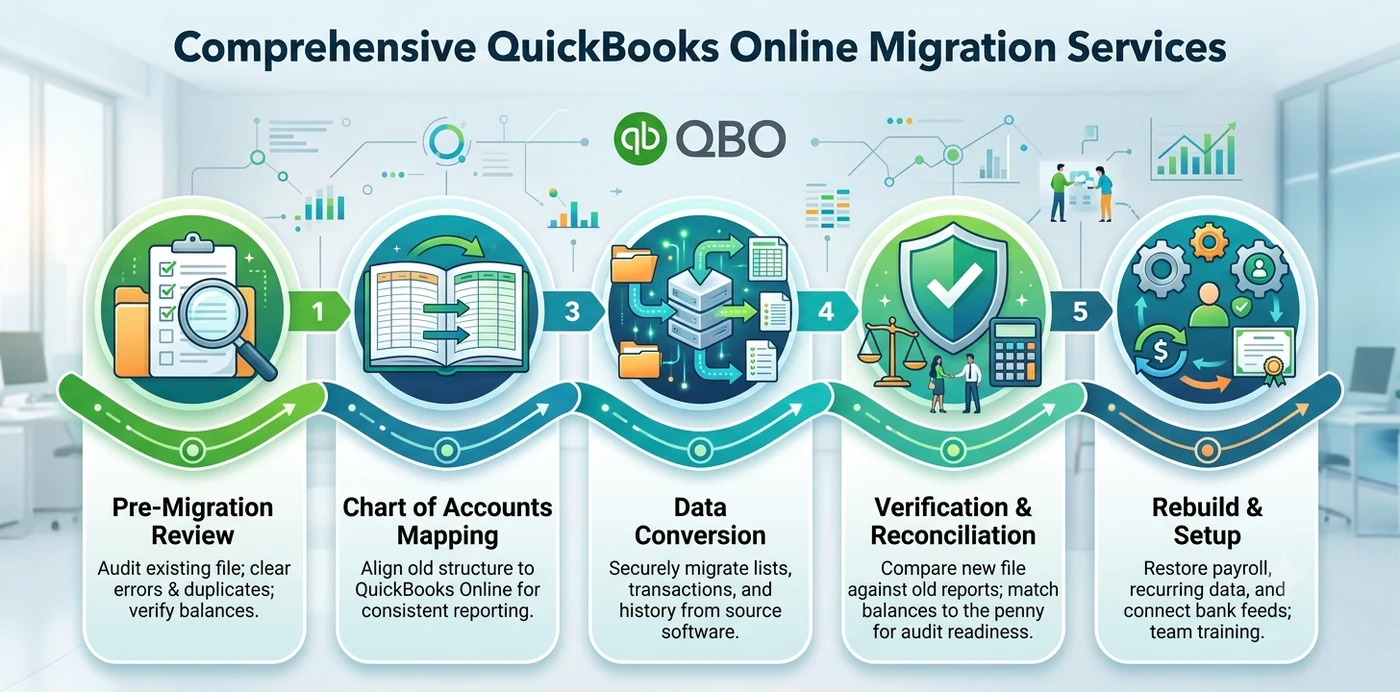
A lot of business owners assume migration means clicking “import” and walking away. In practice, a proper conversion has several moving parts, and the import is only one of them. Good QuickBooks Online migration services typically cover:
- Pre-migration review — checking the existing file for unreconciled accounts, duplicate entries, and stale balances before anything moves.
- Chart of accounts mapping — matching your old account structure to QuickBooks Online so reports still make sense afterward.
- Data conversion — moving lists, balances, and transaction history using the right tool for your source software.
- Verification and reconciliation — tying the new file back to your old reports so the numbers match to the penny.
- Rebuild work — recreating anything that does not transfer cleanly, such as payroll details, recurring transactions, and user permissions.
- Setup and training — connecting bank feeds, setting up sales tax, and getting your team comfortable in the new system.
The reconciliation step is where most do-it-yourself attempts fall apart. Moving data is easy; proving it moved correctly is the hard part — and the part that protects you during an audit or a tax review.
The process
How a QuickBooks Online migration works, step by step
Here is the process our team follows on a typical conversion. It applies whether you are handling a QuickBooks Desktop to Online migration or coming from another platform entirely.
Plan the cutoff date
The cleanest point to migrate is the start of a fiscal year or quarter. Mid-month conversions create split reporting periods that are painful to reconcile later.
Clean up the source file
Reconcile every bank and credit-card account, clear out duplicate or void transactions, and resolve open items. Bad data in equals bad data out.
Baseline your reports
Run a Profit & Loss, Balance Sheet, Trial Balance, and A/R and A/P aging before you move anything. These become your proof sheets.
Choose the right method
Intuit’s built-in tool, a third-party conversion service, or a manual list-and-balance rebuild — the best choice depends on your software and file size.
Run the migration
Convert the data and let the new file build out.
Verify against the baseline
Compare the post-migration reports to your proof sheets. Every variance gets investigated, not ignored.
Rebuild and go live
Reconnect integrations, set user roles, recreate recurring transactions, and train the team.
What moves, what doesn’t
What transfers automatically vs. what needs manual work
One of the biggest surprises during a QuickBooks data migration is learning that not everything carries over. This reflects what we generally see, though exact results vary by source software and file size.
| Usually transfers automatically | Typically needs manual review |
|---|---|
| Chart of accounts | Inventory valuation (average cost shifts to FIFO) |
| Customer and vendor lists | Reconciliation history and cleared status |
| Products and services / items | Memorized reports and report customizations |
| Open invoices and bills | Payroll details and prior pay runs |
| Account balances / trial balance | Audit trail and certain linked transactions |
| Most transaction history (within limits) | Attachments, notes, and bank rules |
A quick word on inventory: QuickBooks Desktop uses average cost, while QuickBooks Online uses FIFO. That difference alone can change your inventory valuation after conversion, so it always deserves a manual check.
The payoff
Benefits of professional QuickBooks Online migration services
When the migration is handled properly, the payoff goes well beyond “we are on a new system now.”
- Matching opening balances — your new trial balance ties back to your old one, so nothing goes missing.
- No interruption to billing or payroll — the business keeps running while the conversion happens in the background.
- Preserved reporting history — pull prior-year comparisons instead of starting from zero.
- Cleaner books — migration is the perfect moment to fix years of small messes rather than carry them forward.
- Correct handling of the tricky stuff — inventory, sales tax, and multicurrency set up right the first time.
- Saved time and avoided do-overs — a redo after a failed migration usually costs more than doing it carefully up front.
Pitfalls
Common QuickBooks Online migration mistakes
We have cleaned up plenty of migrations that went sideways. The same handful of errors come up again and again.
- Skipping reconciliation first. If the source file does not reconcile, the converted file will not either.
- Migrating mid-period. Converting in the middle of a month or quarter splits your reports and makes year-end harder.
- Assuming everything transfers. Inventory valuation, payroll history, and the audit trail rarely come over cleanly.
- No post-migration verification. Importing without tying the new trial balance back to the old one is how silent errors slip through.
- Missing the Desktop import window. Intuit’s import-and-overwrite feature is generally available only within the first 60 days of a new QuickBooks Online subscription, and very large files may exceed its transaction limits. Confirm current thresholds in Intuit’s official documentation before you start.
- Leaving both systems live. Running the old and new files in parallel without a clear cutoff creates two versions of the truth.
- Forgetting integrations. Bank feeds, payment processors, and apps all need to be reconnected and re-mapped.
Do it right
Best practices for a smooth migration
Follow these and you will avoid almost every problem above. This is the same checklist our team uses on client conversions.
- Reconcile every account before you move a single transaction.
- Pick a clean cutoff — the first day of a fiscal year or quarter is ideal.
- Baseline your reports and compare them line by line after migration.
- Keep the old system as a read-only archive for at least a few years. The IRS generally expects businesses to retain supporting records, so do not delete the source file.
- Document your chart of accounts mapping so anyone can trace where each balance came from.
- Double-check inventory and sales tax settings before going live.
- Set user roles intentionally rather than giving everyone full access.
- Run one parallel cycle if your books are high-volume or complex, so you can confirm the new system behaves before you fully switch.
In short
Key takeaways
- Migration covers far more than an import — review, mapping, conversion, reconciliation, and rebuild all matter.
- Reconcile your source file first. Bad data in means bad data out.
- Migrate at a clean cutoff, ideally the start of a fiscal year or quarter.
- Not everything transfers — inventory valuation, payroll history, and the audit trail usually need manual work.
- Verify against baseline reports before trusting the new file.
- Keep the old system as a read-only archive to satisfy record-retention expectations.
If you are coming from another platform, we also handle Xero to QuickBooks conversion, Sage 50 to QuickBooks conversion, and AccountEdge to QuickBooks conversion as dedicated services, alongside ongoing bookkeeping and payroll support.
Where are you moving from?
Popular QuickBooks Online migrations
Who does the work
Led by an Intuit ProAdvisor

Ram — Founder & Principal
Founder of Numerawise Solutions in Atlanta. Intuit ProAdvisor (Gold tier) and a former Intuit Technical Support engineer, Ram has personally led 200+ accounting-software conversions and setups for US small and mid-market firms.
More about Ram Verified on UpworkQuestions, considered
QuickBooks Online migration FAQs
What are QuickBooks Online migration services?
They are professional services that move your financial data from another accounting system — like QuickBooks Desktop, Xero, or Sage — into QuickBooks Online. A proper service includes cleaning the source file, mapping the chart of accounts, converting the data, and reconciling the new file against your old reports so the balances match exactly.
How long does a QuickBooks Online migration take?
It depends on file size and complexity. A small, well-organized set of books can convert in a few days, while a large multi-entity file with years of history and inventory may take a couple of weeks. The reconciliation and verification stage usually takes longer than the data transfer itself.
Will I lose any data when I migrate to QuickBooks Online?
Most lists, balances, and transaction history transfer, but some items do not carry over cleanly — including inventory valuation, payroll details, reconciliation history, and the audit trail. A reliable QuickBooks data migration rebuilds these manually and keeps your old file as an archive, so nothing is truly lost even if it is not auto-imported.
Can I migrate from QuickBooks Desktop to Online myself?
You can, using Intuit’s built-in import tool, but there are catches. The import-and-overwrite feature is generally limited to the first 60 days of a new subscription, large files can exceed transaction limits, and inventory shifts from average cost to FIFO. Many owners attempt a QuickBooks Desktop to Online migration solo and call in help only after the balances do not match.
How much do QuickBooks Online migration services cost?
Pricing varies with the source software, file size, transaction volume, and how much cleanup the books need. A straightforward conversion costs less than a complex one with inventory, payroll, or multi-entity structures. We quote after reviewing your file, since a quick look reveals how much manual rebuild and reconciliation will be required.
What is the best time of year to migrate to QuickBooks Online?
The cleanest cutoff is the first day of a new fiscal year or quarter. This keeps your reporting periods whole and avoids splitting a month between two systems. Migrating right after a reconciliation and before a new period begins makes verification far simpler and reduces year-end headaches.
Does my historical data transfer to QuickBooks Online?
Usually yes, within limits. Most transaction history converts during a QuickBooks Online conversion, though very large files may only bring over lists and balances. When full history cannot transfer, the standard approach is to import opening balances as of the cutoff date and keep the old system available for looking up older detail.
Can you migrate from Xero, Sage, or other software to QuickBooks Online?
Yes. Migrations from Xero, Sage 50, AccountEdge, FreshBooks, Wave, and spreadsheets are all common. Since Intuit’s native tool only handles Desktop files, these conversions rely on third-party tools or a careful manual rebuild of lists, opening balances, and open transactions, followed by the same reconciliation process used for any migration.
What happens to my inventory during migration?
This is one of the trickiest areas. QuickBooks Desktop uses average cost while QuickBooks Online uses FIFO, so inventory valuation can change after conversion. Quantities and items generally transfer, but the cost basis needs a manual review to confirm your inventory value and cost of goods sold remain accurate in the new system.
Is my data secure during the migration?
A reputable provider handles your financial records with strict confidentiality and uses secure methods to transfer files. Before starting any project, confirm how your data will be accessed, stored, and protected. Working with established QuickBooks migration experts who follow clear data-handling practices keeps your sensitive financial information safe throughout the process.
Every source
All the software we convert to QuickBooks Online
We migrate 35+ accounting platforms — Sage 50, Sage 100, Sage Intacct, NetSuite, Xero, FreshBooks, AccountEdge, Foundation, QuickBooks Desktop and more — into QuickBooks Online, with full history reconciled to your trial balance before go-live.
Begin
Ready to move to QuickBooks Online?
Tell us where you are moving from and we’ll email a fixed-price quote within one business day.