Reckon Accounts (Desktop) to QuickBooks Enterprise Conversion Services
Numerawise Solutions migrates your accounts, balances, and complete transaction history from Reckon Accounts (Desktop) into QuickBooks Enterprise through our Reckon Accounts (Desktop) to QuickBooks Enterprise conversion service. Every figure is reconciled against the original file and verified before go-live, and the work is performed by Intuit ProAdvisors.
Complimentary file review · Fixed-price quote within 24 hours · Intuit ProAdvisor Gold
Reckon Accounts (Desktop) → QuickBooks Enterprise
A managed conversion from Reckon Accounts (Desktop) to QuickBooks Enterprise
Reckon Accounts is a desktop accounting package with a long history in small business. A move to QuickBooks Enterprise should leave you with a clean, fully reconciled set of books. Automated imports regularly fall short of that standard, summarizing history into totals and discarding the reconciliation status that makes the accounts dependable. Numerawise Solutions performs the complete Reckon Accounts (Desktop) to QuickBooks Enterprise migration as a managed engagement, verifying every balance against the original file so the accounts are reliable from the first day.
Numerawise Solutions is an Atlanta-based practice of Intuit ProAdvisors (Gold tier) and experienced bookkeepers, with more than 200 completed conversions. The fee is fixed and agreed before the engagement begins, and your information remains confidential throughout.
A practical guide
The move is more familiar than you think
If your business has outgrown Reckon Accounts Desktop, moving up to QuickBooks Enterprise is a smart next step — and a Reckon Accounts to QuickBooks Enterprise conversion is more straightforward than most owners expect. Here is a fact many people miss: Reckon Accounts and QuickBooks Desktop share the same family tree. Reckon spent decades selling QuickBooks across Australia and New Zealand, then kept the underlying code when the two companies split. So the software you already know is not a distant cousin of Enterprise — it is a sibling.
That shared history helps, but it does not make the move automatic. You cannot just open a Reckon file in today’s QuickBooks Enterprise and start working. This guide walks you through how the conversion really works, what transfers cleanly, where the traps hide, and how to protect your numbers along the way.
The basics
What is a Reckon Accounts to QuickBooks Enterprise conversion?
A Reckon Accounts to QuickBooks Enterprise conversion is the process of moving your company file — your chart of accounts, customers, vendors, items, balances, and transaction history — from Reckon Accounts Desktop into Intuit’s QuickBooks Desktop Enterprise, with the books reconciled so your reports match on both sides.
The shared history behind Reckon and QuickBooks
To understand why this move is a little unusual, it helps to know where Reckon came from. Reckon started distributing Quicken and QuickBooks in Australia back in the late 1980s and 1990s under a license from Intuit. For more than 25 years, the QuickBooks Desktop product sold in Australia and New Zealand was actually Reckon’s version.
When Intuit took the QuickBooks brand back in 2014, Reckon kept the code and renamed the product Reckon Accounts. That is why Reckon Accounts Desktop still looks and feels like classic QuickBooks — same menus, same forms, even the same .QBW company file format under the hood. For you, that shared DNA is good news: the screens in QuickBooks Enterprise will feel familiar from day one. But the two products have been developed separately for over a decade, so the files are no longer directly compatible. That gap is exactly what a conversion bridges.
Why not a file swap
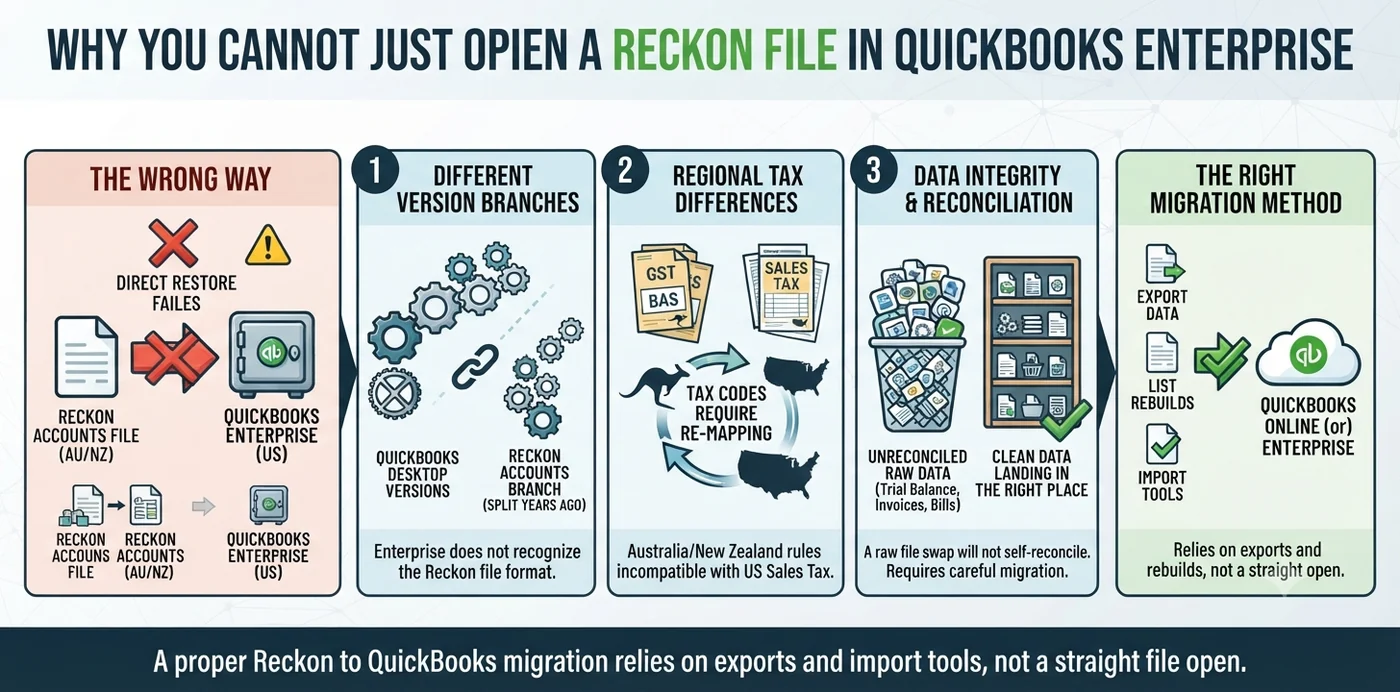
Why you cannot just open a Reckon file in QuickBooks Enterprise
Owners often ask if they can simply restore a Reckon backup inside Enterprise and be done. We wish it were that easy. A few things get in the way.
- Different version branches. QuickBooks Enterprise only opens and upgrades files from recent QuickBooks Desktop (US) versions. Your Reckon file sits on a separate branch that split off years ago, so Enterprise does not recognize it as one of its own.
- Regional differences. Reckon Accounts is built for Australian and New Zealand rules, including GST and BAS reporting. QuickBooks Enterprise (US) runs on sales tax. Tax codes have to be re-mapped, not copied across.
- Data integrity. Even when data moves, you want the trial balance, open invoices, open bills, and inventory to land in the right place. A raw file swap will not reconcile itself.
That is why a proper Reckon to QuickBooks migration relies on exports, list rebuilds, and import tools rather than a straight file open.
Our process
How the conversion works, step by step
Every clean conversion follows roughly the same path. Here is what the process looks like in practice.
Review the file first
Check the Reckon version, file size, list counts, tax setup, and pick a clean conversion date. This decides the right method and scope.
Reconcile and back up in Reckon
Reconcile bank and credit-card accounts, close the period, and save a full backup. Clean data in means clean data out.
Choose the scope
Decide between full transaction history, a year-to-date conversion, or an opening-balances (balances-forward) approach. Each one trades cost against detail.
Map the lists
Match the chart of accounts, items, tax codes, customers, vendors, and classes to QuickBooks Enterprise. This is where accounting judgment matters most.
Load into Enterprise
Import lists and transactions into a fresh Enterprise company file using tools like SaaSAnt or IIF/CSV imports, with careful field mapping.
Reconcile and match reports
Match the balance sheet, profit and loss, and trial balance in Enterprise against Reckon as of the conversion date, then verify open AR and AP.
Finish post-conversion tasks
Set up inventory quantity on hand, reconcile bank and credit-card accounts, configure user permissions, and rebuild invoice templates.
Validate and train
Sign off once the reports agree, then get your team oriented to Enterprise.
Scope of the migration
What data transfers — and what needs attention after
Not everything moves the same way. Here is a realistic map of what to expect, based on how these files actually behave.
| Data type | Usually transfers | Needs post-conversion attention |
|---|---|---|
| Chart of accounts | Yes | Duplicate or renamed accounts may need cleanup |
| Customers & vendors | Yes | Merge duplicates; check contact fields |
| Items / products | Yes | Inventory often lands as non-inventory first |
| Opening balances | Yes | Confirm against the trial balance |
| Open invoices & bills | Yes | Some import as open and need matching |
| Inventory quantity on hand | Partial | Re-enter QOH and set COGS/asset accounts |
| Bank reconciliations | No | Transactions arrive unreconciled; reconcile after |
| Tax codes (GST) | Re-mapped | Map to US sales tax; recheck coded transactions |
| Payroll history | Rarely | Bring in as opening balances or summary entries |
| Custom templates & saved reports | No | Rebuild in Enterprise |
Setting these expectations early saves a lot of surprise later. A good conversion plan tells you what is coming across in full detail and what will need a hands-on step afterward.
The payoff
Benefits of moving from Reckon Accounts to QuickBooks Enterprise
There are solid reasons businesses choose Enterprise as the landing spot, not just any version of QuickBooks.
- A familiar interface. Thanks to the shared code, the learning curve is short. Your team already knows the layout.
- Room to grow. Enterprise handles large item lists, high transaction volume, and up to 40 users at once — far more headroom than most desktop products.
- Advanced inventory. With the Advanced Inventory add-on, you get FIFO costing, multiple locations, and bin and lot tracking.
- Strong job costing. Enterprise is excellent for construction and project-based work, with detailed cost tracking and industry-specific editions like Contractor and Manufacturing & Wholesale.
- Deeper reporting. More built-in reports, better customization, and tools such as Advanced Reporting.
- You keep control of your file. It stays on the desktop. You can work offline, and you own your data.
- A big app ecosystem. Thousands of third-party apps connect to QuickBooks for payroll, payments, and industry tools.
Pitfalls
Common mistakes to avoid
These are the errors we see most often in a Reckon to QuickBooks migration.
- Attempting a DIY file swap. Forcing a Reckon file open in Enterprise wastes time and can corrupt data.
- Skipping reconciliation first. If Reckon is not reconciled, the errors just follow you into Enterprise.
- Converting mid-period. A messy cutoff date makes reports hard to match. Pick a clean one.
- Ignoring tax differences. Leaving GST codes unmapped breaks sales tax reporting in the US file.
- Rushing inventory. Bringing items over without checking quantity on hand and COGS accounts throws off your margins.
- Not matching the trial balance. If the balance sheet and P&L do not tie out on both sides, the conversion is not finished.
- Forgetting payroll. Payroll history rarely transfers cleanly; plan for opening balances instead of assuming it will come across.
- No parallel run. Switching cold, with no overlap, leaves you exposed if something looks off.
Do it right
Best practices for a clean conversion
- Pick the right date. The start of a fiscal year, or the close of a reconciled period, keeps everything tidy.
- Clean up before you convert. Merge duplicate names, fix miscategorized transactions, and reconcile every account in Reckon.
- Document your setup. Export your chart of accounts and item list so you have a reference to check against.
- Match your scope to your needs. Full detail is great for reporting; balances-forward is faster and cheaper when history is not critical.
- Confirm supported versions. Check Intuit’s official QuickBooks Enterprise documentation for the current list of file versions it can read.
- Run both systems briefly in parallel. Enter a few weeks of activity in both to confirm Enterprise behaves as expected.
- Validate with reports. Compare the balance sheet, profit and loss, trial balance, and AR/AP aging on both sides.
- Use a certified pro. An experienced QuickBooks ProAdvisor knows the mapping decisions that make or break the result.
- Archive your Reckon file. Keep it safe. The IRS recommends holding business records for several years — longer for payroll and property — so do not delete the source.
Why Numerawise
Why choose Numerawise Solutions
At Numerawise Solutions, conversions are not a side project — they are a core part of what we do. We are an Atlanta-based accounting firm and an Intuit QuickBooks ProAdvisor, and we have spent years moving businesses off legacy desktop systems and into QuickBooks reconciled to the penny of history. What sets our conversions apart:
- We are accountants first. We do not just push data through a tool. We check that your trial balance, open items, and inventory actually reconcile.
- We plan the scope with you. Full history or balances-forward, we help you choose what fits your budget and reporting needs.
- We handle the hard parts. Tax code mapping, inventory quantity on hand, and payroll opening balances are where conversions usually go wrong. That is where we are strongest.
- We support you after. Need ongoing help? Our QuickBooks bookkeeping services and payroll services keep your new file clean.
If you have handled a Sage 50 to QuickBooks conversion before, you know the difference an experienced team makes. The same care applies here — and if your books need tidying first, our catch-up and cleanup bookkeeping gets you ready to convert. Explore all our QuickBooks conversion services to see the full range.
Final thoughts
A clean upgrade, not a headache
A Reckon Accounts to QuickBooks Enterprise conversion does not have to be stressful. The shared history between the two products works in your favor, giving you a familiar interface and a smoother landing than a move to unfamiliar software ever would. The real work is in the details — choosing a clean cutoff date, mapping your accounts and tax codes, and making sure every report ties out. Get those pieces right and you end up with a QuickBooks Enterprise file that is accurate, reconciled, and ready to scale with your business. Rush them, and you inherit old problems in a shiny new system. The safest path is simple: plan the scope, reconcile your Reckon file first, and lean on a certified team for the mapping decisions.
In short
Key takeaways
- Reckon Accounts Desktop and QuickBooks Desktop share the same original code, so Enterprise will feel familiar — but the files are no longer directly compatible.
- You cannot just open a Reckon file in Enterprise; conversion uses exports, list rebuilds, and import tools.
- Reconcile and back up your Reckon file, and pick a clean conversion date, before you start.
- Expect tax codes, inventory quantity on hand, and payroll history to need extra attention after the move.
- Always match the trial balance, balance sheet, and P&L on both sides before signing off.
- A certified QuickBooks ProAdvisor reduces risk and saves time on the tricky mapping decisions.
Who performs the work
Led by an Intuit ProAdvisor

Ram — Founder & Principal
Ram is the founder of Numerawise Solutions in Atlanta. An Intuit ProAdvisor (Gold tier) and a former Intuit Technical Support engineer, he has personally led more than 200 accounting-software conversions, including Reckon Accounts (Desktop) and QuickBooks Enterprise engagements, for small and mid-market firms across the United States.
More about Ram Verified on UpworkCommon questions
Reckon Accounts (Desktop) to QuickBooks Enterprise conversion FAQs
Can I open a Reckon Accounts file directly in QuickBooks Enterprise?
No. Even though the two products share the same original code, they have been developed separately for over a decade. QuickBooks Enterprise only reads recent QuickBooks Desktop (US) files, so your Reckon file will not open directly. A conversion rebuilds your lists, imports your transactions into a fresh Enterprise file, and reconciles the balances so your reports match.
How long does a Reckon Accounts to QuickBooks Enterprise conversion take?
It depends on file size, transaction volume, and scope. A balances-forward conversion can be done in a few days. A full-history conversion with inventory and years of detail may take one to two weeks, including reconciliation and review. A quick file review upfront gives you a firm timeline before any work begins.
Will all my transaction history transfer?
Most of it can, if you choose a full-history conversion. Chart of accounts, customers, vendors, items, invoices, and bills usually come across. Some data — like bank reconciliations, custom templates, and payroll detail — typically does not transfer and is handled through post-conversion steps or opening balances. Choosing your scope early sets clear expectations.
Is my financial data safe during the conversion?
Yes, when it is handled properly. Your original Reckon file is backed up before anything starts, and reputable providers use encrypted transfers and keep your data confidential. Nothing is deleted from your source file — it stays intact as your archive. You should always keep that backup even after the new file goes live.
Should I convert to QuickBooks Enterprise or QuickBooks Online?
It depends on your needs. QuickBooks Enterprise suits businesses with large item lists, heavy inventory, detailed job costing, or a preference to keep data on the desktop. QuickBooks Online favors remote access and simpler operations. Since Reckon is desktop software, many teams find Enterprise the more natural and powerful fit.
Does my payroll history convert?
Payroll history rarely transfers cleanly between the two systems. In most cases, we bring payroll in as opening balances or summary journal entries as of the conversion date, so your financial statements stay accurate. Detailed paycheck history usually stays in your archived Reckon file, which you keep for compliance and reference.
How much does a Reckon to QuickBooks Enterprise conversion cost?
Pricing varies with scope, file size, and complexity. A balances-forward conversion costs less than a full-history migration with inventory and multiple years of detail. The best approach is a short file review, which lets a provider quote a fixed price based on your actual data rather than a rough guess.
Which versions of Reckon Accounts can be converted?
Most Reckon Accounts Desktop versions can be converted, since they all trace back to the same QuickBooks code base. Older files may need an extra preparation step, and very old versions sometimes require an intermediate upgrade first. A file review confirms the right method for your specific version before the conversion starts.
Do I need to keep my old Reckon file after converting?
Yes. Keep your Reckon company file and backup archived even after Enterprise is live. The IRS recommends holding business records for several years — and longer for payroll and property records. Your Reckon file is the source of truth for anything that did not transfer in full detail, so treat it as a permanent record.
Can a Reckon file that uses Australian GST still be converted?
Yes. GST codes are re-mapped to the tax setup in your QuickBooks Enterprise file during conversion. If you are moving to a US Enterprise file, that means mapping to sales tax and rechecking coded transactions afterward. This is a routine part of the process, but it is one reason working with an experienced converter matters.
Begin
Ready to move from Reckon Accounts (Desktop) to QuickBooks Enterprise?
Provide a few details and we will email a fixed-price quote within one business day, with your Reckon Accounts (Desktop) history reconciled into a clean QuickBooks Enterprise file.