Reckon One to QuickBooks Enterprise Conversion Services
Numerawise Solutions migrates your accounts, balances, and complete transaction history from Reckon One into QuickBooks Enterprise through our Reckon One to QuickBooks Enterprise conversion service. Every figure is reconciled against the original file and verified before go-live, and the work is performed by Intuit ProAdvisors.
Complimentary file review · Fixed-price quote within 24 hours · Intuit ProAdvisor Gold
Reckon One → QuickBooks Enterprise
A managed conversion from Reckon One to QuickBooks Enterprise
Reckon One is Reckon's modular cloud accounting product. In practice, migrating those records to QuickBooks Enterprise is a complete rebuild of the accounting file rather than a simple export. Low-cost import utilities frequently consolidate historical transactions into summary totals, lose the reconciliation status of bank accounts, and post entries to the wrong ledgers, and these issues commonly remain hidden until a month-end close or an audit. Numerawise Solutions manages the entire Reckon One to QuickBooks Enterprise conversion and reconciles every balance against your original Reckon One file before you begin operating in the new system.
Numerawise Solutions is an Atlanta-based practice of Intuit ProAdvisors (Gold tier) and experienced bookkeepers, with more than 200 completed conversions. The fee is fixed and agreed before the engagement begins, and your information remains confidential throughout.
A practical guide
Outgrowing Reckon One, done right
Most businesses do not outgrow Reckon One overnight. It happens slowly. The item list becomes hard to manage, inventory counts stop matching what is on the shelf, and month-end reporting takes days instead of hours. By the time an owner starts researching a Reckon One to QuickBooks Enterprise conversion, the books are usually carrying more volume than the software was designed for.
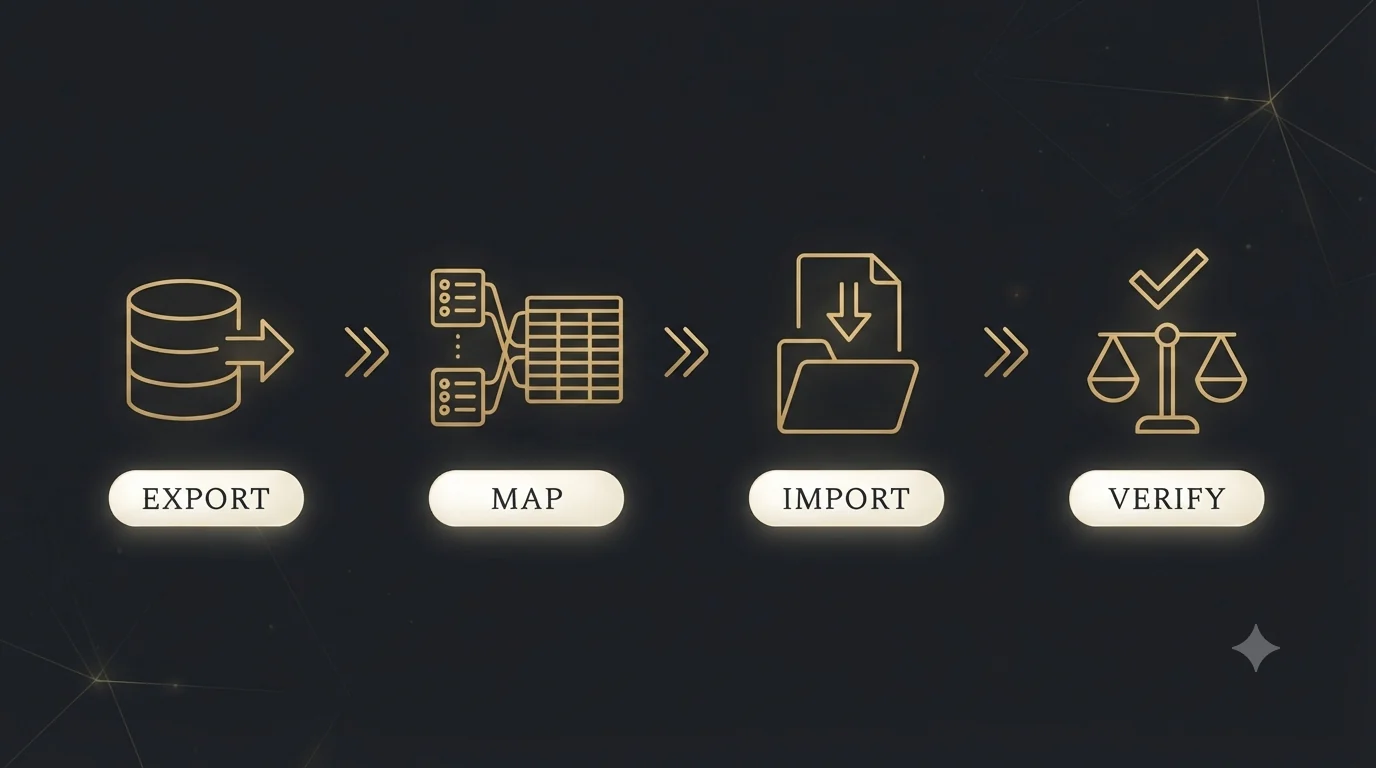
Here is the honest part up front: there is no one-click tool that moves a Reckon One book into QuickBooks Enterprise. The two products run on completely different databases, so the migration has to be done deliberately — export, map, import, verify. Done well, you open day one in Enterprise with clean balances and accurate customer and supplier records. Done poorly, you inherit months of cleanup. This guide covers what actually transfers, the step-by-step process, and the mistakes that cost businesses real money.
The basics
What is a Reckon One to QuickBooks Enterprise conversion?
A Reckon One to QuickBooks Enterprise conversion is the process of moving your accounting data — chart of accounts, customers, suppliers, items, open invoices and bills, and account balances — out of Reckon One’s cloud platform and into a properly configured QuickBooks Enterprise company file, then verifying that both systems agree to the penny.
A bit of history explains why this takes real work. Reckon distributed QuickBooks in Australia for years, so many people assume the two products share a data format. They do not. Reckon One was built by Reckon as its own cloud product on a separate database. That means every conversion is a structured Reckon One data migration: data comes out through exports and reports, gets mapped to QuickBooks Enterprise’s account types and item structures, and goes in through controlled imports.
Reasons to switch
Why businesses convert Reckon One to QuickBooks Enterprise
Reckon One is a capable, affordable product for small operations. The businesses we move off it usually are not unhappy with the software — they have simply outgrown it. The common triggers:
- Transaction volume. Enterprise is built for high-volume files and supports far larger customer, supplier, and item lists.
- Inventory depth. Higher Enterprise tiers include Advanced Inventory: FIFO costing, barcode scanning, serial and lot tracking, and multi-location warehouses. Reckon One’s inventory tracking is much lighter.
- Job costing. Contractors and project-based firms want committed costs, estimates vs. actuals, and WIP reporting that Enterprise handles natively.
- User roles. Enterprise supports up to 40 simultaneous users with granular, role-based permissions — a big deal once you have AP clerks, project managers, and a controller in the same file.
- US operations. Companies expanding into or relocating to the US often standardize on QuickBooks because that is what their accountant, lender, and tax preparer work in.
Reckon One vs. QuickBooks Enterprise at a glance
| Feature | Reckon One | QuickBooks Enterprise |
|---|---|---|
| Best fit | Micro and small businesses | Growing and mid-sized businesses |
| Deployment | Cloud only | Desktop, with hosted cloud options |
| Users | Small teams | Up to 40 simultaneous users |
| Inventory | Basic tracking | Advanced Inventory (FIFO, barcodes, multi-location) |
| Job costing | Limited | Full job costing with estimates vs. actuals |
| Reporting | Standard reports | 200+ reports plus Advanced Reporting |
| Pricing model | Modular monthly subscription | Annual subscription by tier |
Scope of the migration
What data transfers — and what does not
This is the question every owner asks first, so here is the straight answer:
| Data | Transfers? | How it is handled |
|---|---|---|
| Chart of accounts | Yes | Exported, mapped to Enterprise account types, imported |
| Customers and suppliers | Yes | List import with contact details and terms |
| Items and services | Yes | Rebuilt with correct item types and accounts |
| Open invoices (AR) | Yes | Entered individually so aging reports stay accurate |
| Open bills (AP) | Yes | Same treatment as AR |
| Account balances | Yes | Opening balance journal entry as of the cutover date |
| Historical transactions | Optional | Monthly summaries or full detail import, by agreement |
| Payroll history | No | Payroll restarts with year-to-date setup entries |
| Bank feeds | No | Reconnected fresh inside Enterprise |
| Recurring transactions and templates | No | Rebuilt in Enterprise |
| Attachments | No | Exported from Reckon One and stored separately |
One detail matters more than any other in that table: open AR and AP must be entered as individual transactions, not lumped into the opening journal entry. That is the only way customer statements, supplier balances, and aging reports come out right on day one.
Our process
The conversion process, step by step
Every firm has its own checklist. After years of doing QuickBooks conversion services from Reckon, Sage, Xero, and others, this is the sequence that consistently produces clean results:
Reconcile and lock Reckon One
Every bank and credit-card account gets reconciled through the cutover date. Converting unreconciled books just moves the mess to a new address.
Pick the conversion date
The start of a fiscal year is cleanest. Otherwise, use a month-end. Mid-month cutovers create reconciliation headaches that linger for quarters.
Export the source data
Chart of accounts, customer and supplier lists, item lists, trial balance, AR and AP aging, and inventory valuation — all pulled as of the cutover date and archived.
Map the chart of accounts
Reckon One account types do not match Enterprise types one-for-one. Each account is mapped deliberately, and this is also the best moment to renumber or restructure the chart.
Build the Enterprise file correctly
Company settings, industry edition, fiscal year, sales tax setup, user roles, and preferences — configured before a single record is imported.
Import the lists
Customers, suppliers, and items go in first and get spot-checked against the source exports.
Enter opening balances
A journal entry establishes account balances, while open invoices, unpaid bills, and inventory quantities are entered as live records against them.
Bring in history (if scoped)
Either monthly summary journal entries for prior periods or detailed transaction imports using structured import tools.
Validate everything
Trial balance, AR aging, AP aging, and inventory valuation from Enterprise are compared line by line against the Reckon One reports. Differences get chased down to zero.
Cut over and train
Bank feeds reconnect, recurring transactions get rebuilt, users get trained, and the first live month runs under supervision.
For most small to mid-sized files, that whole cycle takes one to three weeks, depending on how much history moves and how clean the source books are.
The payoff
Benefits of converting Reckon One to QuickBooks Enterprise
- Room to grow. List capacity and user counts stop being the ceiling on your operations.
- Inventory you can trust. FIFO costing and multi-location tracking replace spreadsheet workarounds.
- Real job costing. Project-based businesses finally see profitability per job, not just per company.
- Stronger controls. Role-based permissions mean your AP clerk sees bills, not payroll.
- Deeper reporting. Custom reports built on your own fields, without exporting to Excel first.
- A clean starting point. A conversion is a natural moment to fix a bloated chart of accounts, merge duplicate customers, and retire dead items.
Pitfalls
Common mistakes in a Reckon One conversion
We are often called in to repair conversions that went sideways. The same errors show up again and again:
- Migrating dirty books. Unreconciled accounts and an unresolved suspense balance in Reckon One become permanent mysteries in Enterprise. If the books are behind, do the catch-up bookkeeping first.
- Posting AR and AP as one journal entry. The trial balance ties, but every customer and supplier balance reads zero. Aging reports are useless from day one.
- Ignoring tax code mapping. Reckon One is built around GST and BAS reporting. QuickBooks Enterprise uses a different sales tax framework. Skipping this mapping guarantees wrong tax reports.
- Converting every historical transaction by default. Full history sounds appealing, but for many businesses, summary balances plus archived Reckon One reports serve the same purpose at a fraction of the cost and risk.
- Losing access to source records. Tax authorities expect records kept for years — the ATO requires five, and the IRS has its own retention rules. Export and archive everything before any subscription lapses.
- Skipping validation. If nobody compared the Enterprise trial balance to the Reckon One trial balance, the conversion is not done. It is a guess.
Do it right
Best practices that make the migration painless
- Freeze a hard cutoff. After the cutover date, nothing gets entered in Reckon One. One system owns the truth.
- Keep a full export archive. Trial balance, general-ledger detail, aging reports, and payroll reports, saved as PDF and spreadsheet files.
- Validate with three reports. Trial balance, AR aging, and AP aging decide whether a conversion succeeded. All three must match the source exactly.
- Restart payroll cleanly. Enter year-to-date figures per employee in the new system rather than trying to force payroll history across.
- Run the first month with support. Most user questions surface in the first close, not during training.
- Document the mapping. A simple record of how each Reckon One account maps to Enterprise saves your accountant hours at year-end.
Intuit’s official QuickBooks Enterprise documentation and Reckon’s own help center both publish export and import references worth bookmarking, and your CPA can confirm record-retention requirements for your jurisdiction.
Why Numerawise
Why choose Numerawise Solutions
Conversions are not a side service for us — they are a core practice. Numerawise Solutions has moved businesses onto QuickBooks from Sage, Foundation, Xero, FreshBooks, Reckon, and other platforms, including complex multi-entity and job-costed files. Our Sage 50 to QuickBooks conversion work follows the same discipline you will see here: fixed scope, documented account mapping, individually entered open AR and AP, and a line-by-line validation report you can hand to your CPA.
Just as important, we are bookkeepers first. If your Reckon One file needs cleanup before it is fit to migrate, our outsourced bookkeeping services team handles the reconciliation and catch-up work, then runs the conversion — one firm, one accountable process, no finger-pointing between vendors. Explore all our QuickBooks conversion services to see the full range.
Final thoughts
Making the move with confidence
A Reckon One to QuickBooks Enterprise conversion rewards preparation and punishes shortcuts. The businesses that come through it cleanly all do the same things: they reconcile before they migrate, they choose a sensible cutover date, they bring open receivables and payables across as live transactions, and they refuse to sign off until the trial balance and aging reports match the source to the penny. Get those fundamentals right and the payoff is immediate — inventory numbers you can act on, job costs you can actually see, and a file with room for the next decade of growth. Get them wrong and you will spend the next two quarters explaining differences nobody can trace. If you would rather hand the whole thing to a team that does this every week, Numerawise Solutions offers a free conversion assessment — we will review your Reckon One file, scope the work, and give you a fixed quote.
In short
Key takeaways
- There is no automated tool for moving Reckon One data into QuickBooks Enterprise; it is a structured export-map-import-verify project.
- Lists, balances, and open AR/AP transfer well. Payroll history, bank feeds, and recurring transactions restart fresh.
- Enter open invoices and bills individually — never as a single journal entry — or your aging reports break.
- Reconcile Reckon One and pick a month-end or fiscal-year cutover date before anything moves.
- A conversion is only finished when the trial balance, AR aging, and AP aging match the source exactly.
- Archive complete Reckon One exports for the record-retention period before any subscription ends.
Who performs the work
Led by an Intuit ProAdvisor

Ram — Founder & Principal
Ram is the founder of Numerawise Solutions in Atlanta. An Intuit ProAdvisor (Gold tier) and a former Intuit Technical Support engineer, he has personally led more than 200 accounting-software conversions, including Reckon One and QuickBooks Enterprise engagements, for small and mid-market firms across the United States.
More about Ram Verified on UpworkCommon questions
Reckon One to QuickBooks Enterprise conversion FAQs
How long does a Reckon One to QuickBooks Enterprise conversion take?
Most conversions take one to three weeks from kickoff to cutover. A lists-and-balances migration for a clean file can finish in under a week. Timelines stretch when the source books need reconciliation first, when multiple years of transaction history are moving in detail, or when inventory quantities need a physical count before the opening balances are set.
Can I transfer my full transaction history from Reckon One?
Yes, but it is a scoping decision, not a default. Detailed history is rebuilt through structured transaction imports, which adds cost and validation time. Many businesses choose monthly summary journal entries for prior years instead, keeping archived Reckon One reports for drill-down. Your accountant’s needs and any audit requirements usually decide which approach makes sense.
Does payroll data move to QuickBooks Enterprise?
Payroll transaction history does not convert between the systems. The standard approach is a clean payroll restart: each employee is set up in Enterprise with year-to-date earnings, taxes, and deductions as of the cutover date. That keeps annual filings accurate without forcing incompatible payroll records across platforms. Timing the cutover to a quarter or year start makes this easier.
What happens to my GST tax codes during the conversion?
Reckon One’s tax framework is built around GST and BAS reporting, while QuickBooks Enterprise uses a different sales tax structure. During a conversion, every tax code is mapped deliberately to the correct treatment in the new file, and historical tax reports are archived from Reckon One so prior lodgments remain fully supported.
Should I cancel my Reckon One subscription right after converting?
Not immediately. Keep read access, or at minimum a complete export archive, until you have closed at least one period in Enterprise and confirmed everything ties out. Tax authorities also expect records retained for several years — five under ATO rules — so archive the general ledger, trial balance, aging reports, and payroll reports before the subscription lapses.
Can I convert Reckon One to QuickBooks myself?
Technically, yes — the exports and Enterprise’s import tools are available to anyone. The risk is not the mechanics; it is the judgment calls: account-type mapping, tax-code treatment, how open AR/AP gets entered, and knowing which validation reports must tie. DIY conversions we are hired to repair almost always failed on one of those points, and repairs cost more than doing it right once.
When is the best time to convert to QuickBooks Enterprise?
The start of your fiscal year is ideal because opening balances are simplest and payroll restarts cleanly. If you cannot wait, any month-end works well. Avoid mid-month cutovers and, if possible, your busiest season — you want your team learning the new system during a quiet stretch, not during peak invoicing.
How do you verify the conversion was accurate?
Three reports decide it: the trial balance, the AR aging, and the AP aging, pulled from both systems as of the cutover date and compared line by line. Inventory files add a valuation summary comparison. A professional conversion service should hand you that validation package in writing — if a provider cannot, keep looking.
Will my reports look the same in QuickBooks Enterprise?
The numbers will match; the layouts will not be identical. Enterprise has its own report library — more than 200 built-in reports plus a custom report writer — so most businesses end up with better reporting than they had, after a short adjustment period. We typically rebuild your five most-used Reckon One reports in Enterprise as part of onboarding so nothing critical goes missing.
What does a Reckon One to QuickBooks Enterprise conversion cost?
Cost depends on scope: number of entities, list sizes, whether history moves in summary or detail, inventory complexity, and how much cleanup the source file needs. Lists-and-balances projects sit at the low end; multi-year detailed history with inventory sits at the top. Reputable providers quote a fixed price after reviewing your file — be wary of anyone quoting before seeing it.
Begin
Ready to move from Reckon One to QuickBooks Enterprise?
Provide a few details and we will email a fixed-price quote within one business day, with your Reckon One history reconciled into a clean QuickBooks Enterprise file.