If you are still running Sage Line 500, you are in good company. Plenty of established manufacturers, wholesalers, and distributors never left it, because it did the job and change felt risky. But Line 500 is now unsupported, and every year it stays in place the risk quietly climbs: no updates, a shrinking pool of consultants, and hardware nobody wants to depend on.
Here is the reassuring part. A Sage Line 500 to Sage 200 upgrade is a route thousands of businesses have already taken. The catch is that Line 500 sites are usually heavily customised, so this is never a one-click job. Treat it as a proper data migration project and it goes smoothly. This guide, written from hands-on migration experience, shows you how.
Why a Sage Line 500 to Sage 200 migration matters now
Sage Line 500, like its close relative Sage 1000, has reached end of life, with mainstream Sage support wound down. A handful of partners offer extended, best-efforts cover, but that is a stopgap. Here is what pushes owners to act:
- The updates stopped. No security patches and no compliance updates, which is a real problem as tax and reporting rules change.
- The skills are disappearing. Fewer people know Line 500 each year, so support is slower, costlier, and harder to find.
- The hardware is aging. Many Line 500 installs still lean on old servers and operating systems that are risks in their own right.
- The customisations are fragile. Years of bespoke tweaks can break as everything around them moves on.
A planned Sage Line 500 to Sage 200 migration swaps that mounting risk for a current, supported, cloud-connected system — ideally before an audit or a failure forces a rushed move.
What moves in a Sage Line 500 data migration to Sage 200
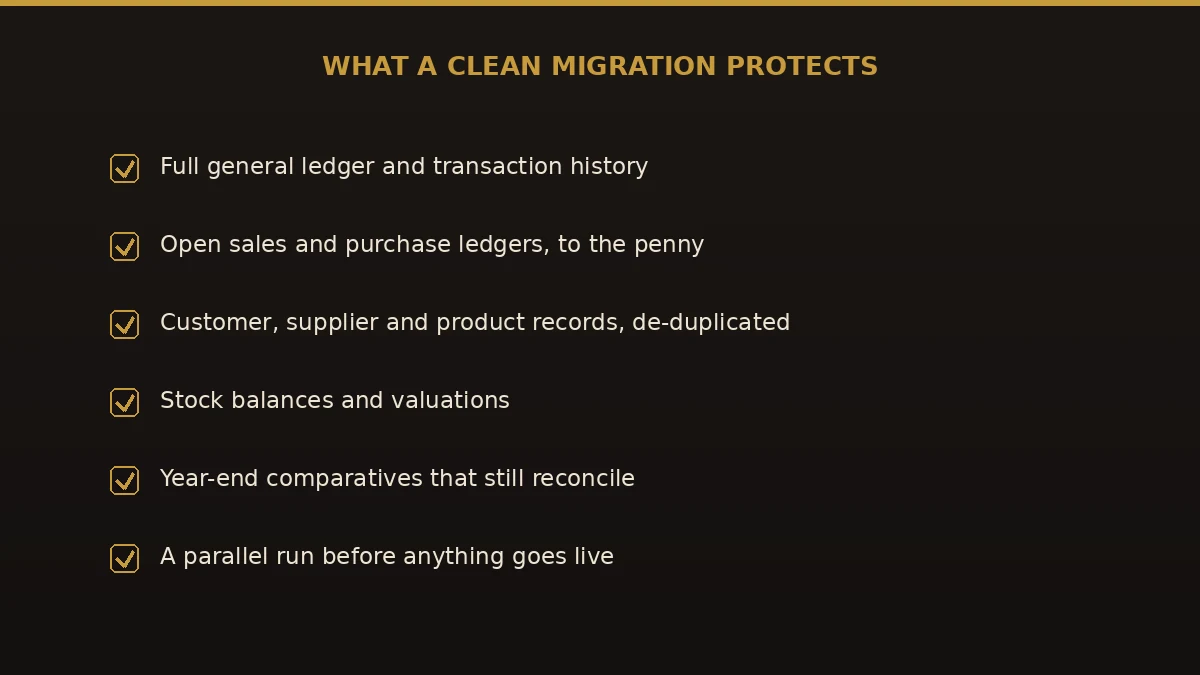
The real asset in Line 500 is decades of history. A proper Sage Line 500 data migration to Sage 200 carries that across and maps it to the way Sage 200 works today.
- Nominal ledger and chart of accounts — rebuilt in Sage 200, usually simplified along the way.
- Customer and supplier accounts — brought over and de-duplicated.
- Open sales and purchase ledgers — outstanding invoices and credits, carried as open items.
- Trial balance and historical transactions — enough to keep year-on-year reporting intact.
- Stock, BOMs, and price lists — important for the manufacturers and distributors who lived on Line 500.
- Bespoke reports and integrations — reviewed, then rebuilt in Sage 200 where they still earn their keep.
That last point is the one Line 500 owners underestimate. Old customisations rarely map one-to-one, so part of the project is deciding what to rebuild, what to replace with standard Sage 200 features, and what to quietly retire.
How to migrate Sage Line 500 to Sage 200, step by step
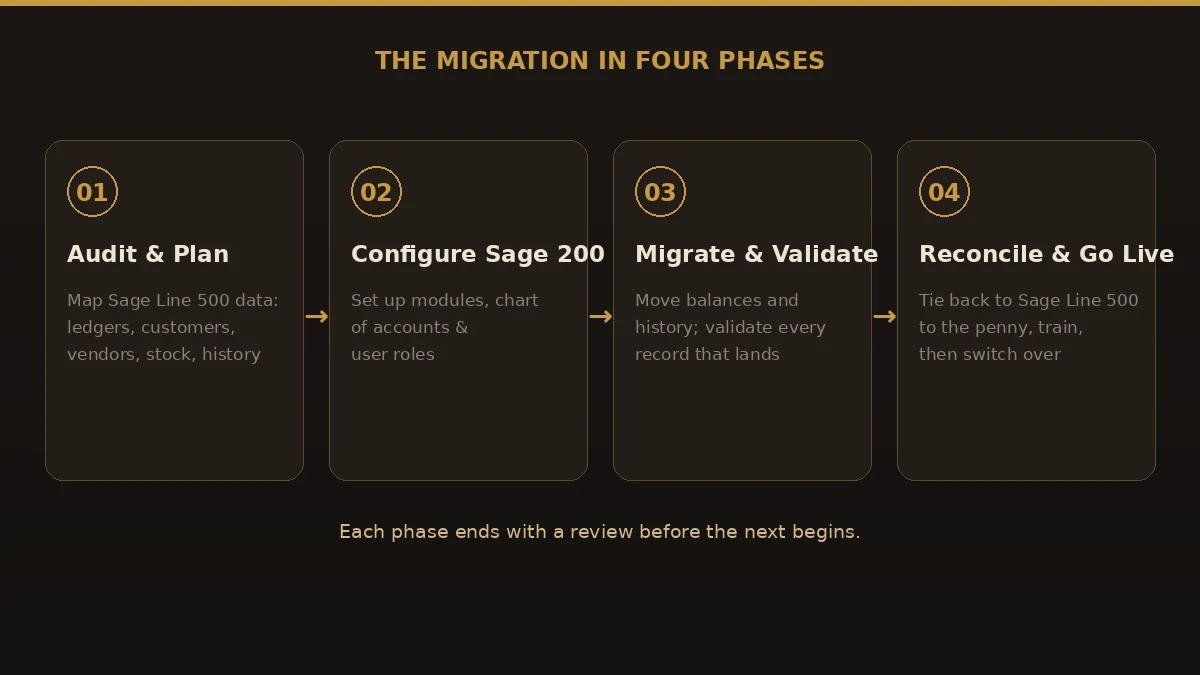
When we migrate Sage Line 500 to Sage 200, we run four phases, each signed off before the next starts. On a customisation-heavy Line 500 site, that discipline is what keeps surprises out of go-live.
- Audit and plan. Document every module, customisation, integration, and report in use, plus open balances and how much history to bring. This is bigger on Line 500 than most systems — do not skip it.
- Configure Sage 200. Build the target cleanly: chart of accounts, ledgers, stock and BOM settings, user roles, and any add-ons that replace old bespoke code.
- Migrate and validate. Extract, map, and load the data, checking record counts and balances at each stage so nothing slips through unnoticed.
- Reconcile, run parallel, and go live. Tie Sage 200 back to your final Line 500 figures to the penny, run a parallel period, train the team, then switch off the old system.
Sage Line 500 vs Sage 200: what changes
Sage 200 is not just newer — it is supported, cloud-connected, and built for how finance teams work now. This is the gap a Sage Line 500 to Sage 200 upgrade closes:
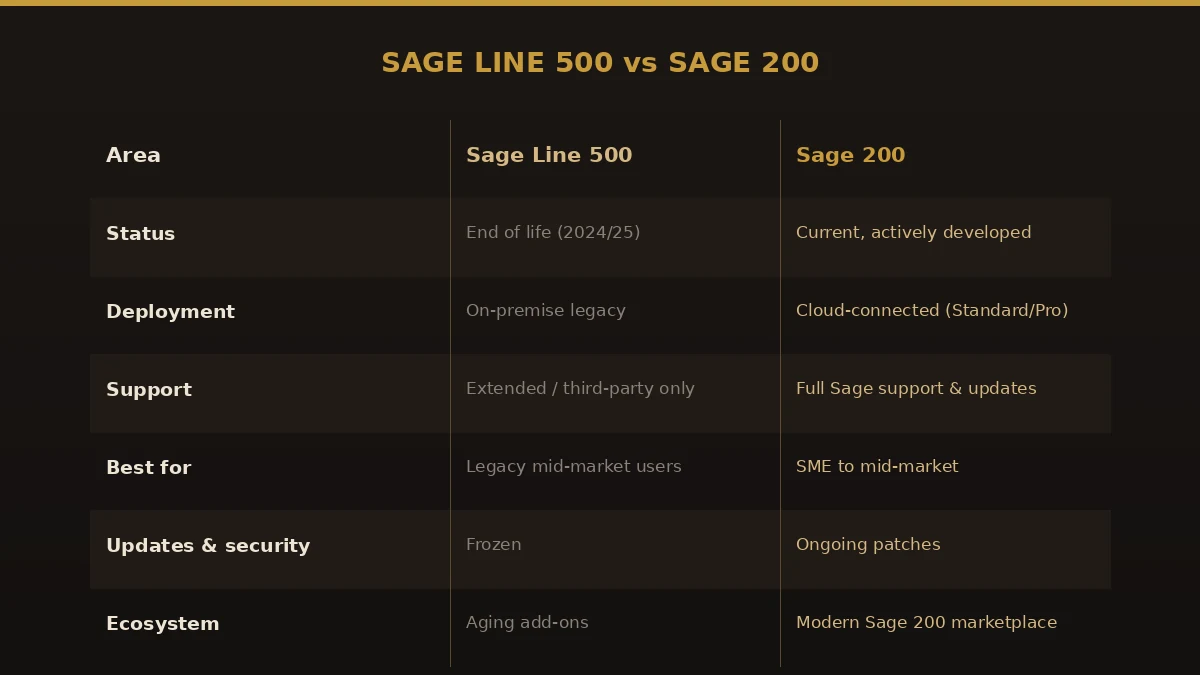
| Area | Sage Line 500 | Sage 200 |
|---|---|---|
| Status | End of life | Current, actively developed |
| Deployment | Legacy on-premise | Cloud-connected (Standard / Professional) |
| Support | Extended or third-party only | Full Sage support and updates |
| User experience | Dated interface | Modern UI with Excel integration |
| Customisation | Bespoke, often unsupported | Marketplace add-ons and APIs |
| Updates & security | Frozen | Ongoing patches and compliance |
Benefits of moving from Sage Line 500 to Sage 200
- Stay supported. Security patches, compliance updates, and a support line that answers.
- Cut the hardware risk. Sage 200’s cloud connection ends the reliance on aging on-site servers.
- Better reporting. Clearer dashboards and tight Excel integration for month-end and stock.
- Modern integrations. APIs and a live marketplace replace brittle bespoke links.
- Room to grow. Add modules as the business changes, without another rip-and-replace.
Common mistakes to avoid
- Underestimating the customisations. Line 500 sites are rarely vanilla; scope every bespoke report and integration early.
- Leaving it too late. A rushed migration against a deadline removes your room to test.
- Treating it as an export/import. Line 500 and Sage 200 structure data very differently; a raw dump misplaces balances.
- Copying the old chart of accounts. Decades of accumulated codes carry every legacy problem forward.
- Skipping the parallel run. Going live untested means finding errors in live reports, in front of auditors.
Best practices for a clean migration
- Start from a clean Line 500 period. Reconcile and close cleanly before extracting anything.
- Design Sage 200 first. Agree the structure, and which customisations to rebuild, before loading a single balance.
- Validate at every step. Check counts and balances as data lands, not just at the end.
- Run parallel for a full period. Compare Sage 200 output to Line 500 side by side until they match.
- Train before you retire the old system. Keep Line 500 read-only until the team is confident in Sage 200.
Why choose Numerawise Solutions
We are accounting-software migration specialists, and our discipline never changes: plan the move, protect the data, and reconcile the result before anything goes live. For a Sage Line 500 to Sage 200 migration we focus on the riskiest part — extracting years of Line 500 data, mapping it into a clean Sage 200 structure, and tying the balances back to your old reports to the penny. You get a fixed scope up front and keep ownership of your data throughout. We also handle Sage 1000 to Sage 200, QuickBooks to Sage 200, and a full range of accounting software conversions, so we can advise honestly on whether Sage 200 is your best destination.
The bottom line on your Sage Line 500 to Sage 200 migration
Line 500 served you well, but end of life turns a dependable system into a slow-burning risk. A planned Sage Line 500 to Sage 200 migration gets you onto a supported, cloud-connected platform with your history intact — ledgers, stock, BOMs, and comparatives that still reconcile. The danger is never the software; it is a rushed, undesigned move that ignores years of customisation. Audit thoroughly, design the target, validate as you go, and run a parallel period, and the upgrade becomes a non-event. If you are weighing it up, talk to a specialist who does Sage Line 500 data migration to Sage 200 work while you still have time to do it properly.
Key takeaways
- Sage Line 500 has reached end of life, so a Sage Line 500 to Sage 200 migration is about staying supported and secure, not just gaining features.
- Line 500 sites are customisation-heavy, so the audit phase is bigger — scope every bespoke report and integration early.
- The core work is a Sage Line 500 data migration to Sage 200: mapping ledgers, stock, BOMs, and history into a clean Sage 200 structure.
- Run four phases with validation at each step and a full parallel period before you switch off Line 500.
Quick answers.
What is a Sage Line 500 to Sage 200 migration?
It is the process of moving your finance and operations data off Sage Line 500 and onto Sage 200. A proper Sage Line 500 to Sage 200 migration transfers your nominal ledger, customer and supplier accounts, open balances, stock, and history, mapping them into Sage 200 so your reporting still reconciles after the switch.
Why should I migrate Sage Line 500 to Sage 200 now?
Sage Line 500 has reached end of life, so it no longer gets updates or full Sage support. Running it means no security patches, fewer consultants to call, and aging hardware. Choosing to migrate Sage Line 500 to Sage 200 moves you onto a current, supported, cloud-connected platform before a failure or audit forces the issue.
How long does a Sage Line 500 to Sage 200 upgrade take?
Most mid-market businesses complete a Sage Line 500 to Sage 200 upgrade in a few weeks to a few months. Line 500 sites often carry heavy customisation, so the audit and rebuild work adds time. How much history you migrate and how many integrations exist also affect the timeline. A parallel run adds time but cuts risk sharply.
Will I lose my history or customisations in a Sage Line 500 data migration to Sage 200?
Not if it is planned. A Sage Line 500 data migration to Sage 200 maps your ledgers, open items, stock, and history into Sage 200 so year-on-year reporting holds. Bespoke reports and integrations rarely map one-to-one, so they are reviewed and rebuilt using Sage 200 features, APIs, or marketplace add-ons where they still add value.
How much does a Sage Line 500 to Sage 200 migration cost?
There are two costs: the Sage 200 subscription and the migration project. Sage 200 is priced by module and user through Sage and its partners, while the migration is scoped on data volume, history, customisations, and integrations. Because Line 500 sites vary so much, get both quoted together for a true Sage Line 500 migration services budget.
Is Sage Line 500 the same as Sage 1000?
They are closely related. Sage 1000 grew out of the Line 500 lineage, and both have reached end of life with similar migration paths to Sage 200, Sage Intacct, or Sage X3. If you are on either, the planning is much the same: audit thoroughly, design the target, migrate, validate, and run parallel before going live.
Can I keep using Sage Line 500 after end of life?
For a while, yes. Some partners offer extended, best-efforts support, but the software still gets no core updates or security patches. Treat extended support as breathing room to plan your Sage Line 500 to Sage 200 migration properly, not a reason to keep running an unsupported system indefinitely.
What is the hardest part of a Sage Line 500 to Sage 200 conversion?
The customisations. Years of bespoke reports, scripts, and integrations are what make each Line 500 site unique, and they rarely transfer straight across. A good Sage Line 500 to Sage 200 conversion audits all of them early, then decides what to rebuild, what to replace with standard Sage 200 features, and what to retire.
Is Sage 200 the only upgrade option from Sage Line 500?
No. Depending on size and complexity, Line 500 users also move to Sage Intacct or Sage X3. Sage 200 suits many small to mid-market companies that want a supported, cloud-connected system without the weight of a larger ERP. A good migration partner will advise honestly on which destination fits your business.
Get a free scoping call.
Tell us what you’re working on. We respond same business day.

Ram · Founder & Principal
Founder of Numerawise Solutions, established MMXXIV in Atlanta. Intuit ProAdvisor Gold tier. Former Intuit Technical Support engineer. Has personally led two hundred accounting software conversions for US small businesses since founding the practice. Reachable directly at [email protected].
Free: The Clean-Cutover Checklist
The step-by-step checklist we use to migrate businesses to QuickBooks without losing data — bank rec, opening balances, payroll YTD, and the validation tie-out. Get it in your inbox.
No spam — just the checklist and the occasional QuickBooks tip.