Xero to QuickBooks Enterprise Conversion Services
Numerawise Solutions migrates your accounts, balances, and complete transaction history from Xero into QuickBooks Enterprise through our Xero to QuickBooks Enterprise conversion service. Every figure is reconciled against the original file and verified before go-live, and the work is performed by Intuit ProAdvisors.
Complimentary file review · Fixed-price quote within 24 hours · Intuit ProAdvisor Gold
What actually happens
Xero to QuickBooks Enterprise conversion: what actually happens when you switch
You ran your books on Xero for years, and it did the job. Then the business grew — more inventory, bigger jobs, tighter reporting, more people needing access at once — and now you keep hitting walls. That is usually the point where a Xero to QuickBooks Enterprise conversion starts to make real sense.
We have handled plenty of these moves, so here it is straight: shifting accounting data between two very different systems is rarely a one-click job. Xero lives in the cloud; QuickBooks Enterprise is a heavy-duty desktop platform built for complex, high-volume operations. Connecting the two takes planning, not luck. This guide breaks down how the switch really works — what transfers, what does not, the steps involved, and the mistakes that cost people weeks of cleanup.
The basics
What is a Xero to QuickBooks Enterprise conversion?
A Xero to QuickBooks Enterprise conversion is the process of moving your accounting records — chart of accounts, customers, vendors, items, and transaction history — out of Xero and into a QuickBooks Desktop Enterprise company file.
It is more than copying data. Because each program stores information differently, the work involves exporting clean data from Xero, rebuilding the structure inside QuickBooks Enterprise, recording your opening balances, and then proving the new file matches the old one down to the penny. Done right, your Trial Balance, Profit & Loss, and Balance Sheet in QuickBooks line up with your final Xero reports. Done in a rush, you inherit a mess that takes longer to fix than the migration itself.
Why switch
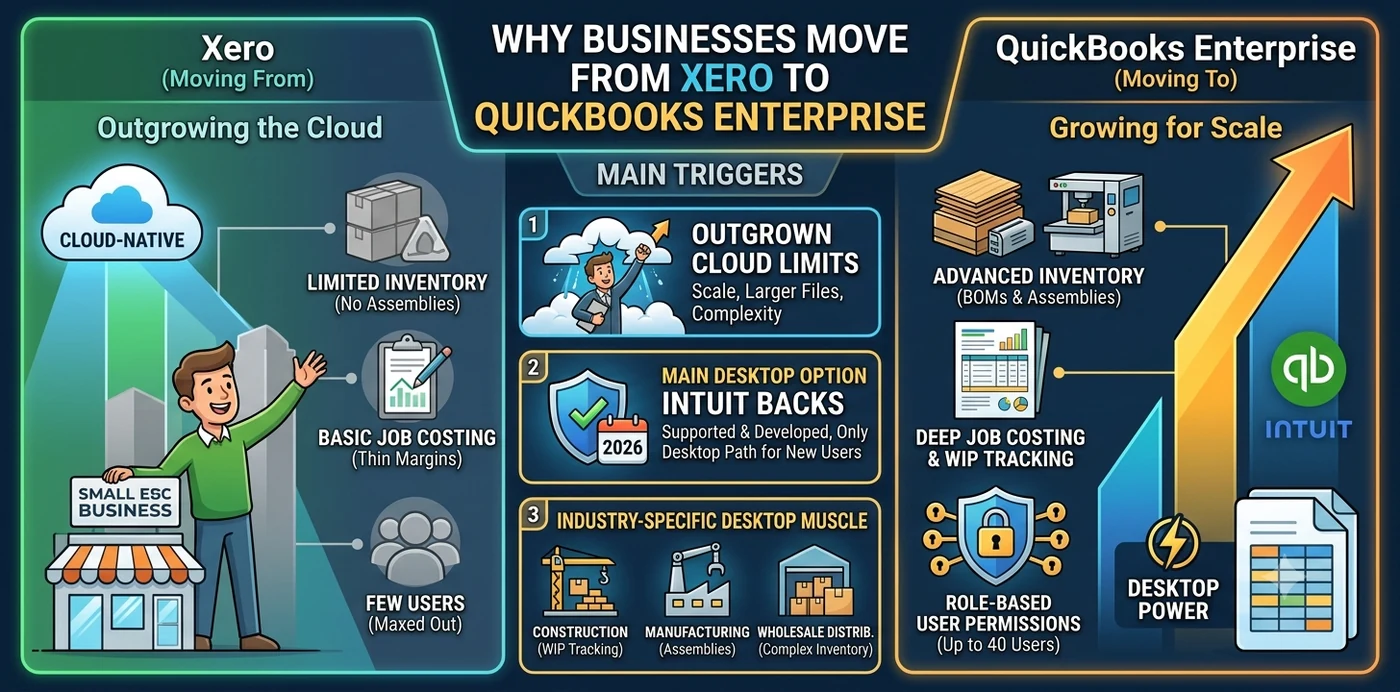
Why businesses move from Xero to QuickBooks Enterprise
People do not switch accounting systems for fun — there is almost always a trigger. Here are the ones we see most often.
You have outgrown what cloud software handles well
QuickBooks Enterprise is built for scale. It supports advanced inventory (assemblies and bills of materials), deep job costing, role-based user permissions, larger data files, and up to 40 users on one file. If your inventory has layers, or you track profit by job, Xero starts to feel thin.
Enterprise is now the main desktop option Intuit backs
This part matters in 2026. Intuit stopped selling new QuickBooks Desktop Pro, Premier, and Mac subscriptions to US customers in September 2024. QuickBooks Desktop Enterprise is the only desktop edition Intuit still sells to new customers and actively supports, with no announced shutdown date. If you want desktop-grade power going forward, Enterprise is the path that is still open.
Your industry needs desktop muscle
Construction, manufacturing, and wholesale distribution lean on features that cloud tools simplify too much. In construction work especially, accurate job costing and WIP tracking can make or break a year-end — and Enterprise was built with that kind of complexity in mind.
What moves, what doesn’t
What data transfers, and what does not
This is the first question we get, every time. Not everything makes the trip, and knowing the gaps upfront saves you from nasty surprises later.
| Transfers cleanly | Comes over with caveats | Usually does not transfer |
|---|---|---|
| Chart of accounts | Tracking categories (mapped to Classes) | Payroll history (imports as plain checks) |
| Customers and contacts | Multi-currency balances | Bank reconciliation history |
| Vendors and suppliers | Sales tax codes and items | File attachments and documents |
| Open invoices and bills | Inventory valuation method may shift | Budgets |
| Trial balance and opening balances | Historical transactions (often as journal entries) | Draft and recurring journals |
| Item and product lists | Project quotes, tasks, and timesheets |
- Payroll is the big one. It comes in as regular checks and will not populate payroll reports or W-2 calculations — you re-enter year-to-date employee figures after the conversion.
- Reconciliation history stays behind. Migrated accounts land in QuickBooks looking unreconciled; that is normal, and you reconcile them after the move using your final Xero statements.
- Most transactions become journal entries. Apart from invoices, much of your history often arrives as journal entries, which can leave unlinked payments showing as zero-balance names in A/R and A/P aging until they are cleaned up.
The process
How the Xero to QuickBooks Enterprise conversion works
Here is the sequence we follow on a real Xero to QuickBooks data migration. Skip a step and you usually pay for it later.
Reconcile and close in Xero first
Match every bank and credit-card account to its latest statement and note the ending balances. The cleanest conversions happen right after a quarter or year is closed and reconciled.
Back up and export your Xero reports
Pull Profit & Loss, Balance Sheet, Trial Balance, Account Transactions, A/R and A/P aging, contacts, and chart of accounts. Not all data converts, so these are your audit trail.
Clean up before you convert
Tidy the chart of accounts, clear the suspense account, match outstanding payments to invoices, and apply credit memos. Junk in Xero becomes junk in QuickBooks.
Set up the QuickBooks Enterprise file
Configure preferences, sales tax, items, and your Classes (where Xero’s tracking categories map). Do not enter transactions yet.
Migrate the data
A specialist pulls your records through the Xero API and delivers a restorable QuickBooks backup file. The manual route uses CSV or IIF imports for lists plus an opening-balance journal entry for the numbers.
Reconcile and validate
Run the Trial Balance, Balance Sheet, and P&L in QuickBooks and compare them to your final Xero reports. Mark historical transactions reconciled up to the migration date, then reconnect bank feeds.
Rebuild payroll and train the team
Re-enter payroll year-to-date figures and walk staff through the new workflows before they rely on the file.
Methods compared
Conversion methods compared
There is no single right way to convert. The best method depends on how much history you have and how messy it is.
| Method | Best for | Pros | Watch-outs |
|---|---|---|---|
| Manual export and import | Small, clean books with little history | Low cost, full control | Slow, easy to introduce errors; opening balances entered by journal |
| Specialist conversion service | Complex books, multiple years, job costing or inventory | Pulls data via the Xero API, delivers a restorable QuickBooks file, reports match | Cost varies by volume; needs advisor access to your Xero |
| Native Intuit free tool | Not available for Enterprise | — | Intuit’s free Dataswitcher path only converts Xero to QuickBooks Online, not Desktop or Enterprise |
That last row trips a lot of people up: there is no free, official Intuit button that drops your Xero data straight into Enterprise. For a QuickBooks Enterprise migration, you are either doing it by hand or hiring a conversion specialist. (Considering the cloud instead? See QuickBooks Online migration services.)
The payoff
The benefits of moving to QuickBooks Enterprise
When the conversion is handled well, the payoff shows up fast:
- Real inventory control with assemblies, bills of materials, and multiple costing methods.
- Stronger job costing so you see true profit by project, not just by account.
- More users on one file — up to 40 — without the file slowing to a crawl.
- Advanced reporting that gives you the detail your accountant keeps asking for.
- Granular permissions so each team member sees only what they should.
- A platform Intuit still supports, which is no small thing given where the desktop lineup stands today.
Pitfalls
Common mistakes to avoid
Most failed migrations trace back to a handful of avoidable errors:
- Converting in the middle of a period. Always migrate at a clean cutoff after reconciliation.
- Skipping the Xero reconciliation. Unreconciled accounts come in dirty and stay that way.
- Assuming payroll transfers. It does not — plan to rebuild year-to-date figures.
- Not exporting Xero reports first. Once you cancel Xero, that data is gone. Save it.
- Entering data into the new QuickBooks file before importing. A full conversion can overwrite or clash with what you have keyed in. Start with a blank file.
- Ignoring tracking categories. Map them to Classes before the move, or your reporting loses a whole dimension.
- No validation at the end. If you do not compare reports line by line, you will not know it is wrong until tax time.
Do it right
Best practices for a smooth conversion
A few habits separate the painless moves from the painful ones:
- Time it to a period close. End of a quarter or fiscal year is ideal.
- Run both systems in parallel for a month. It is cheap insurance and catches gaps early.
- Keep read-only access to Xero for at least a year. You will want it for audits and tax questions.
- Validate three reports, not one. Trial Balance, Balance Sheet, and Profit & Loss should all match.
- Document your opening balances and how you recorded them, so the file makes sense later.
- Bring in a certified professional. A QuickBooks ProAdvisor catches what automated tools miss.
If you also run other platforms, the same discipline applies whether you are handling a Sage 50 to QuickBooks conversion or weighing QuickBooks Online migration services instead of Enterprise.
Why Numerawise
Why choose Numerawise Solutions
We have spent years inside QuickBooks files for businesses with real complexity — construction job costing, multi-entity reconciliation, prevailing wage, and high transaction volumes. That experience shapes how we approach every Xero data conversion.
- We reconcile and validate before and after the move, so your reports match — not “close enough.”
- We handle the parts that break most conversions: payroll re-entry, tracking categories mapped to Classes, and unlinked A/R and A/P cleanup.
- We are fluent in bulk-import tools and Xero API exports, so large histories do not scare us.
- You get a clear list of post-conversion tasks, not a file dumped in your lap.
Our QuickBooks data migration and ongoing bookkeeping services mean we do not disappear once the switch is done — we make sure the new file actually works for how you run your business. Explore all Xero conversion services or the full QuickBooks Enterprise offering.
Final thoughts
A move worth planning, not winging
A Xero to QuickBooks Enterprise conversion is not something to wing on a Friday afternoon. The two systems think about data differently, payroll and reconciliation history need special handling, and most of your transactions will land as journal entries that require cleanup. None of that is a reason to avoid the move — it is a reason to plan it. Get the prep right, validate your reports at the end, and you walk away with a powerful file built to grow with you.
In short
Key takeaways
- A Xero to QuickBooks Enterprise conversion moves your books from cloud Xero into a desktop QuickBooks Enterprise file, and it takes real planning.
- Chart of accounts, contacts, items, and open transactions transfer; payroll history, reconciliation history, attachments, and budgets generally do not.
- Most historical transactions arrive as journal entries, so expect some A/R and A/P cleanup.
- There is no free Intuit tool for Xero to Enterprise — the free Dataswitcher path only goes to QuickBooks Online.
- QuickBooks Enterprise has no announced end-of-life and is the only desktop edition Intuit still sells to new customers.
- Reconcile in Xero first, validate three reports after, and keep Xero read-only access for a year.
Who performs the work
Led by an Intuit ProAdvisor

Ram — Founder & Principal
Ram is the founder of Numerawise Solutions in Atlanta. An Intuit ProAdvisor (Gold tier) and a former Intuit Technical Support engineer, he has personally led more than 200 accounting-software conversions, including Xero and QuickBooks Enterprise engagements, for small and mid-market firms across the United States.
More about Ram Verified on UpworkCommon questions
Xero to QuickBooks Enterprise conversion FAQs
How long does a Xero to QuickBooks Enterprise conversion take?
It depends on your data volume and how clean your books are. A specialist conversion of the data itself often takes a few business days. Build in another one to two weeks for reconciliation, validation, bank-feed setup, and team training. Manual conversions of larger histories can stretch from several days to a couple of weeks.
Does my payroll history transfer from Xero to QuickBooks Enterprise?
Not cleanly. Payroll records come into QuickBooks as regular checks and will not appear in payroll reports or W-2 calculations. After the conversion, you re-enter year-to-date employee figures so your payroll and tax filings stay accurate. Plan for this step rather than discovering it at quarter-end.
Is there a free tool to convert Xero to QuickBooks Enterprise?
No. Intuit’s free, official Dataswitcher conversion only moves Xero data into QuickBooks Online, not Desktop or Enterprise. For a QuickBooks Enterprise migration, you either import data manually using CSV and IIF files plus opening-balance journals, or you hire a specialist service that pulls your records through the Xero API.
Will my financial reports match after the conversion?
They should. A properly handled conversion is validated by comparing your Trial Balance, Balance Sheet, Profit & Loss, and A/R and A/P aging against your final Xero reports. If anything does not match, that is your signal to investigate before going live. Never skip this check.
Should I convert to QuickBooks Online or Enterprise instead?
It comes down to complexity. QuickBooks Online is great for remote access and daily bookkeeping but limits advanced inventory, costing methods, and detailed job costing. Enterprise handles all of that on the desktop. If your business relies on assemblies, deep reporting, or many simultaneous users, Enterprise usually fits better.
Do I need to reconcile in Xero before I convert?
Yes, and it is one of the most important steps. Reconcile every bank and credit-card account to your latest statements and record the ending balances. Reconciled accounts import cleanly, and those noted balances make your post-conversion reconciliation in QuickBooks far faster and more accurate.
How much does a Xero to QuickBooks Enterprise conversion cost?
There is no flat price. Cost scales with how many years of history you are moving, your transaction volume, whether inventory and payroll are involved, and how much cleanup your data needs. The smartest move is to request a conversion assessment so you get a quote based on your actual file.
Can I keep using Xero during the switch?
Yes. Running both systems in parallel for a short window — often a month — is a best practice. It lets you confirm the QuickBooks file behaves correctly before you fully cut over. Keep read-only access to Xero for at least a year afterward for audits and tax questions.
Is QuickBooks Enterprise being discontinued in 2026?
No. As of mid-2026, Intuit has not announced an end-of-life for QuickBooks Desktop Enterprise. It remains available to new and existing customers and is the only desktop edition Intuit still actively sells. Note that individual version years still retire on a rolling schedule, so keep your edition current.
Begin
Ready to move from Xero to QuickBooks Enterprise?
Provide a few details and we will email a fixed-price quote within one business day, with your Xero history reconciled into a clean QuickBooks Enterprise file.