Restoration is a good business run on brutal cash flow. A water or fire loss needs crews on site within hours, so you spend real money before a claim number even exists.
That timing gap is why restoration company bookkeeping fails when it is treated like normal job costing. If your books cannot tell you what each claim actually cost, what the carrier owes, and what depreciation is still outstanding, you are flying blind on the exact number that keeps you solvent.
Why bookkeeping for restoration companies is different
A normal contractor invoices and gets paid. A restoration contractor navigates an insurance claim first. That changes everything about the accounting.
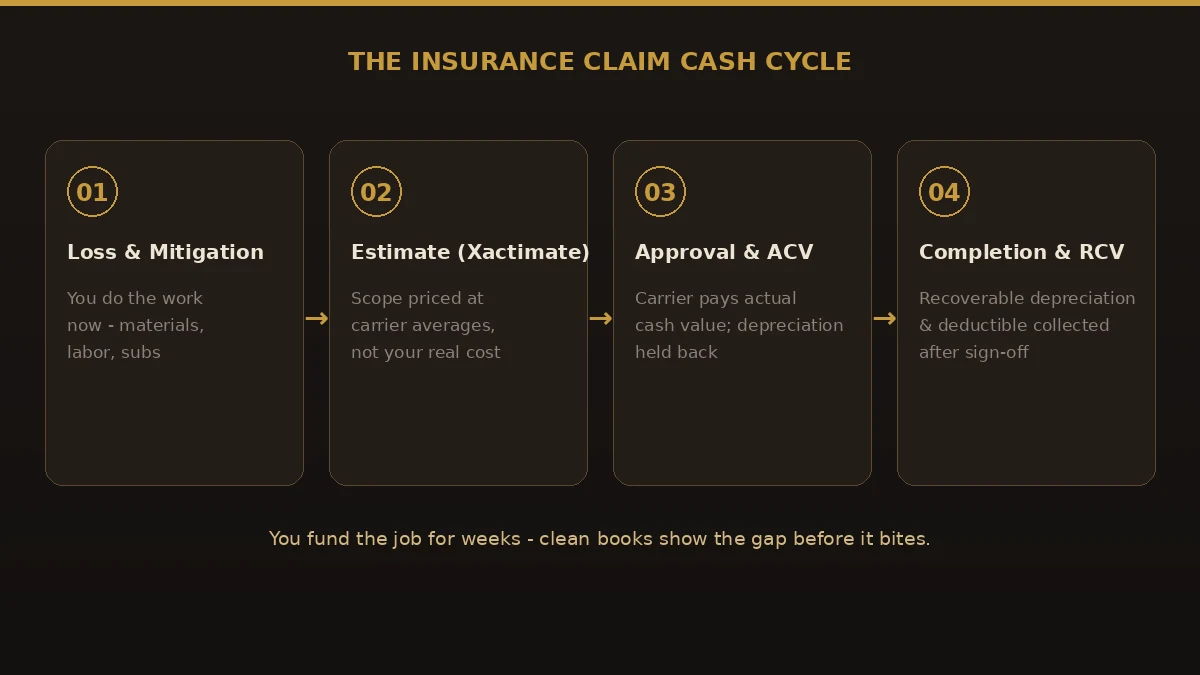
- You are the bank. You cover materials, labor, and subcontractors up front, then wait on the carrier. That receivable can sit for 30, 60, or 90+ days.
- ACV vs RCV. Carriers often pay actual cash value first and hold back recoverable depreciation until the work is finished and documented. Your books must track what is still owed.
- Deductibles. The policyholder owes the deductible, and it has to be collected and recorded, not absorbed.
- Supplements. Scope grows once walls come down. Missed supplements are lost revenue, and they need to be billed and tracked against the original estimate.
- Xactimate is not your cost. It prices at industry averages. If you never compare it to actual spend, a job can look profitable while quietly losing money.
What our restoration bookkeeping services cover
Whether you run water, fire, mold, or full reconstruction, good restoration bookkeeping services cover this cycle every month:
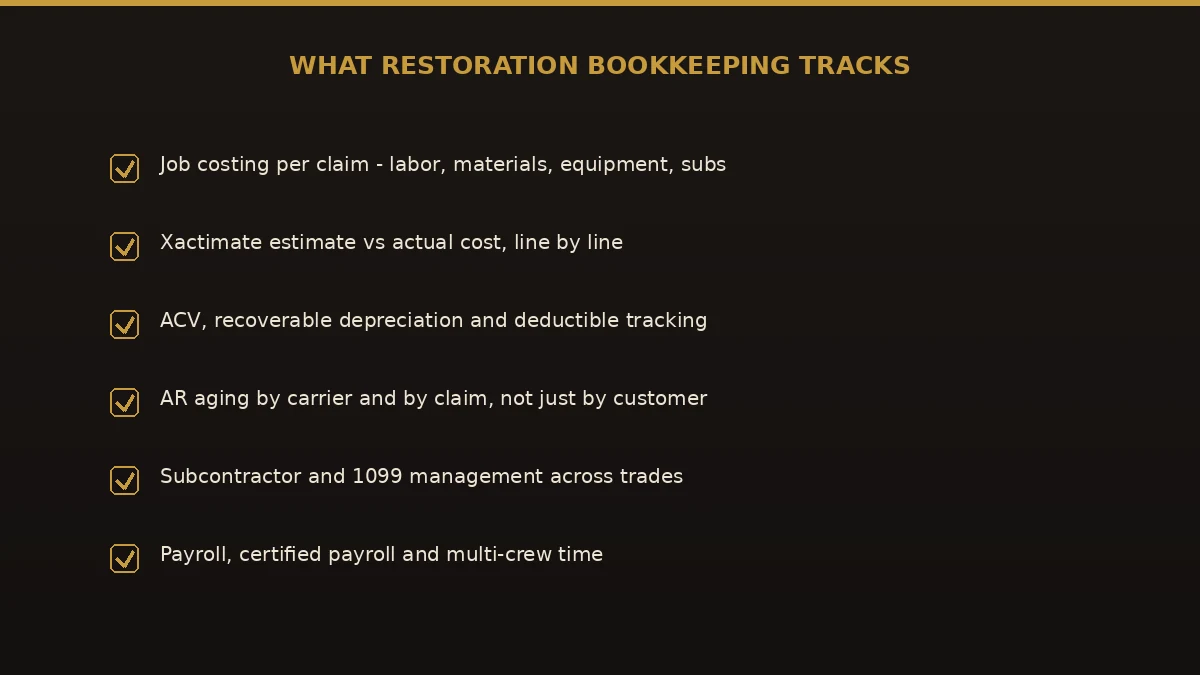
- Per-claim job costing. Labor, materials, equipment, and subs tracked against each loss, not lumped together.
- Xactimate vs actual. Estimate compared to real cost, line by line, so you see true margin.
- Insurance claim accounting. ACV, recoverable depreciation, deductibles, and supplements all tracked to completion.
- AR aging by carrier and claim. Not just "who owes us" but "which claim, which adjuster, how old."
- Subcontractor and 1099 management. Across multiple trades and crews.
- Payroll and monthly reports. A P&L that separates mitigation from reconstruction, plus job-level profitability.
The software that runs restoration accounting
Most restoration firms run a job-management platform — DASH, JobNimbus, or PSA — alongside their accounting. Sound restoration company accounting connects the two so numbers do not live in two places.
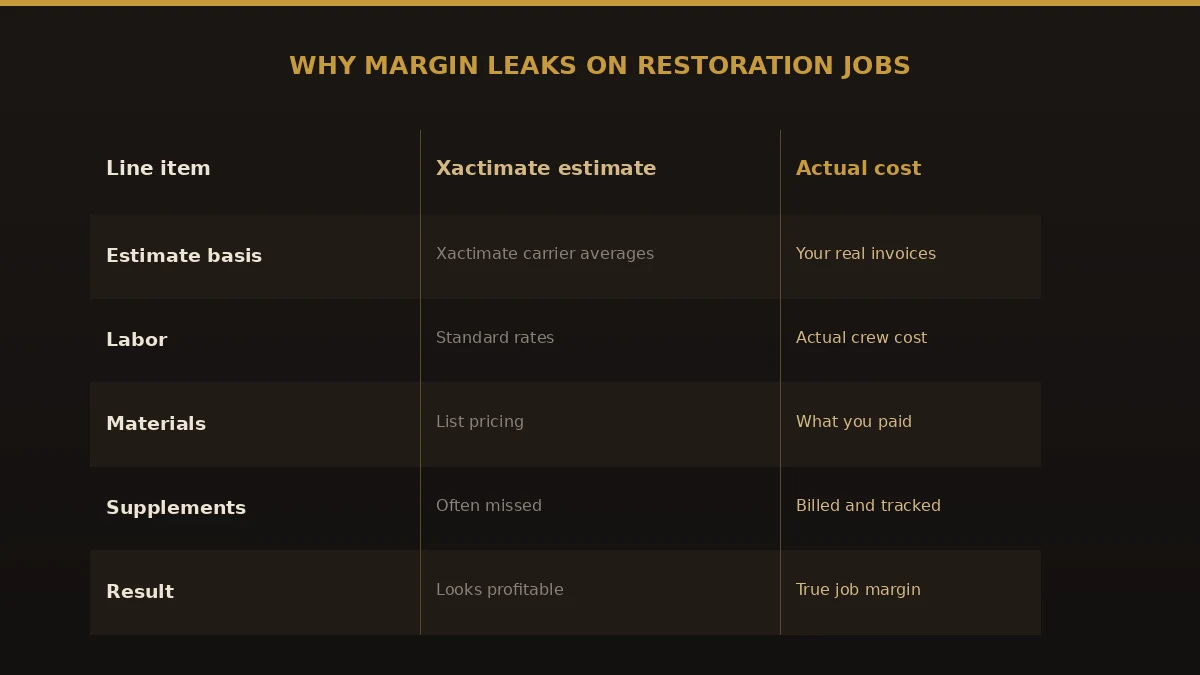
We build accounting for restoration companies in QuickBooks Online Plus or Advanced, using class and project tracking so each claim carries its own costs and revenue. Xactimate is the estimating standard used by the large majority of adjusters, so your books need to reconcile to it without becoming a copy of it. That mapping — job platform to Xactimate to QuickBooks — is where most restoration contractor bookkeeping either works or falls apart.
Benefits of professional restoration bookkeeping
- You see cash before it runs out. Claim receivables aged by carrier tell you what is coming and when.
- You catch margin leaks early. Xactimate-versus-actual shows the jobs quietly losing money.
- You never miss recoverable depreciation. The held-back money gets billed once work is signed off.
- Supplements get captured. Added scope is billed, not forgotten.
- Financing and bonding get easier. Lenders and sureties want clean, current, job-level books.
Common mistakes to avoid
- Treating claim payments as one lump. ACV, depreciation, deductible, and supplements are separate; merging them hides what is still owed.
- Trusting Xactimate as your cost. It is a billing estimate, not your actual spend. Track both.
- Not job-costing per claim. Company-level profit can look fine while individual losses bleed.
- Forgetting recoverable depreciation. It is real money left on the table if you never bill for it.
- Ignoring the deductible. It is owed by the policyholder and must be collected and recorded.
Best practices for clean restoration books
- Open a job the moment a loss comes in. Capture costs from hour one, before the claim number exists.
- Use class or project tracking per claim in QuickBooks. This is what makes per-loss reporting possible.
- Reconcile Xactimate to actual monthly. Do not wait until the job closes to find the gap.
- Track depreciation and supplements as receivables. They are money owed, so treat them that way.
- Age AR by carrier. Different insurers pay at very different speeds; plan cash around it.
Why choose Numerawise Solutions
We are an accounting firm built around QuickBooks and clean, job-level books, and we understand how restoration money actually moves. Our bookkeeping for restoration companies runs inside your own QuickBooks file, mapped to your job-management platform, with a class or project per claim so you can see ACV, depreciation, deductibles, and true margin on every loss. You get a flat monthly fee scoped after a real review, a named person who knows restoration, and reports on a schedule. If you are behind, we quote the catch-up separately. Alongside restoration accounting services, we handle payroll, QuickBooks setup and cleanup, and outsourced accounting, plus broader bookkeeping services.
The bottom line
Restoration is won and lost on cash flow and true job margin, and both live in your books. Strong bookkeeping for restoration companies tracks each claim from the first hour of mitigation through the final depreciation payment — ACV, deductibles, supplements, and Xactimate against your real costs. Open a job the moment the phone rings, cost every claim on its own, reconcile the estimate to actual each month, and age your receivables by carrier. Do that, and restoration business bookkeeping stops being a scramble and becomes the early-warning system that keeps the doors open and the crews paid.
Key takeaways
- Bookkeeping for restoration companies must track the insurance claim cycle: ACV, recoverable depreciation, deductibles, and supplements.
- Xactimate prices at carrier averages, so reconcile the estimate to your actual cost, line by line.
- Cost every claim on its own and age AR by carrier — company-level profit hides losing jobs.
- Run it in QuickBooks Online Plus or Advanced with a class or project per claim, mapped to your job platform.
Quick answers.
What is bookkeeping for restoration companies?
It is job-cost bookkeeping built around the insurance claim cycle. Bookkeeping for restoration companies tracks each loss separately, records actual cash value, recoverable depreciation, deductibles, and supplements, compares Xactimate estimates to real costs, and ages receivables by carrier. It is different from ordinary contractor bookkeeping because you fund the work long before the insurer pays.
Why is restoration company bookkeeping so different?
Because the money moves backwards. In restoration company bookkeeping you spend on crews, equipment, and subs first, then wait on an insurance carrier who pays in stages: actual cash value up front and recoverable depreciation after completion. Your books have to track what each claim cost, what is still owed, and how Xactimate pricing compares to your actual spend.
Can I use QuickBooks for a restoration company?
Yes. Most firms use QuickBooks Online Plus or Advanced with class or project tracking so each claim carries its own costs and revenue. QuickBooks handles the accounting, while a job-management platform like DASH, JobNimbus, or PSA handles field operations. Good restoration company accounting maps the two together so numbers do not live in separate systems.
What is the difference between ACV and RCV in restoration accounting?
ACV is actual cash value, which the carrier usually pays first, minus depreciation. RCV is replacement cost value, the full amount. The difference, recoverable depreciation, is held back and paid once the work is complete and documented. Accounting for restoration companies must track that held-back amount as a receivable so it never gets missed.
How do you handle Xactimate in restoration bookkeeping?
Xactimate is the estimating standard used by most adjusters, but it prices at carrier averages, not your costs. Restoration bookkeeping services reconcile the Xactimate estimate to your actual labor, material, and subcontractor spend, line by line, so you see true job margin. A job can look profitable on the estimate while losing money on real costs.
How much do restoration bookkeeping services cost?
Pricing depends on claim volume, number of trades, how many job and payment systems are in play, and whether payroll is included. Typical market pricing runs a flat monthly fee that varies widely by size. Insist on a scoped quote after a review of your actual setup rather than a number given upfront, and confirm what is included.
How do restoration companies manage cash flow while waiting on claims?
By treating the claim as a receivable and planning around it. Restoration contractor bookkeeping ages AR by carrier and claim, so you know what is coming and when. Because insurers pay at different speeds, and depreciation and supplements lag, clean job-level books are what let you fund the next loss without a cash crunch.
Do you track deductibles and supplements?
Yes, and both matter. The deductible is owed by the policyholder and must be collected and recorded, not absorbed. Supplements are added scope discovered during the job and are real revenue that is easy to miss. Restoration business bookkeeping tracks both against the original estimate so nothing is left uncollected.
Can restoration bookkeeping be done remotely?
Yes. Restoration accounting services are typically delivered remotely inside your own QuickBooks file with named user access, connected to your cloud job-management platform and bank feeds. You keep ownership of the file and can see exactly what changed and when, wherever your crews are working.
Get a free scoping call.
Tell us what you’re working on. We respond same business day.

Ram · Founder & Principal
Founder of Numerawise Solutions, established MMXXIV in Atlanta. Intuit ProAdvisor Gold tier. Former Intuit Technical Support engineer. Has personally led two hundred accounting software conversions for US small businesses since founding the practice. Reachable directly at [email protected].
Free: The Clean-Cutover Checklist
The step-by-step checklist we use to migrate businesses to QuickBooks without losing data — bank rec, opening balances, payroll YTD, and the validation tie-out. Get it in your inbox.
No spam — just the checklist and the occasional QuickBooks tip.