Convert QFX File to QuickBooks | Professional QFX to QBO Conversion Service
Bank only gave you a QFX file QuickBooks won’t read? We convert your QFX file to QuickBooks — an accurate, verified QBO file that imports without errors, reviewed by accounting professionals.
If your bank only hands you a QFX download and QuickBooks refuses it, you are not doing anything wrong — the two formats simply were not built for each other. To convert a QFX file to QuickBooks, you need to change it into the QBO Web Connect format QuickBooks reads. That is exactly what our QFX to QBO conversion service does: we take your bank’s QFX file, convert every transaction cleanly, and hand you a QBO file that imports without errors.
This page explains what QFX and QBO files are, why the conversion is necessary, how our secure process works step by step, the problems we solve, and how we help small businesses, accountants, bookkeepers, and CPA firms get bank transactions into QuickBooks accurately — without hours of manual entry.
Need Help Converting QFX Files to QuickBooks?
Contact Numerawise Solutions today for accurate, professional QFX to QBO conversion.
Get a Free QuoteWhat is a QFX file?
A QFX file (Quicken Financial Exchange) is a bank-transaction file format created by Intuit for Quicken, the personal-finance software. It is based on the open OFX (Open Financial Exchange) standard, which banks use to package your transactions — dates, amounts, descriptions, and payees — into a downloadable file.
Here is the catch that trips up so many QuickBooks users: QFX is a Quicken format, not a QuickBooks format. Even though Quicken and QuickBooks are both Intuit products, they read different file types. When you download a QFX file and try to import it into QuickBooks, QuickBooks does not recognize it — because it expects a QBO file instead.
Many banks offer several download options: QFX for Quicken, QBO for QuickBooks, CSV for spreadsheets, and OFX. When your bank only provides QFX (or QFX and CSV), you are stuck — unless the file is converted into the format QuickBooks accepts. If you are downloading QFX because you still run Quicken alongside QuickBooks, Quicken vs QuickBooks explains when it is time to consolidate on one.
What is a QBO file?
A QBO file is QuickBooks’s Web Connect format — the bank-transaction file QuickBooks is built to import. Like QFX, it is based on the OFX standard, but it is structured specifically for QuickBooks, with the fields and identifiers QuickBooks needs to match transactions to the right account.
When you import a properly formatted QBO file, QuickBooks reads each transaction, assigns it to your chosen bank or credit card account, and lets you review and add it to your books — no manual typing. This is why QuickBooks uses QBO for bank imports: it is the format that carries clean, structured transaction data straight into your file, ready for categorization and reconciliation.
| Format | Built for | QuickBooks imports it? |
|---|---|---|
| QFX | Quicken | No |
| QBO (Web Connect) | QuickBooks | Yes |
| CSV | Spreadsheets | Only with mapping / extra steps |
| OFX | General standard | Not directly |
The whole point of a QFX to QBO conversion is to move your transaction data from the Quicken container into the QuickBooks container — accurately, and with the right account identifiers — so the import just works.
Why convert QFX to QBO?
Converting is not busywork — it solves a real problem and saves real hours. Here is what a clean QFX file conversion to QuickBooks gives you:
- Import bank transactions into QuickBooks when your bank only provides QFX.
- Save hours of manual entry. No keying in hundreds of transactions by hand.
- Reduce bookkeeping errors. Manual typing introduces typos, wrong amounts, and missed entries.
- Maintain transaction accuracy. Dates, amounts, and payees carry over intact.
- Simplify reconciliation. Clean imported data ties to your statement far faster.
- Handle bulk transactions — months or years of history — in one conversion.
For a business or firm processing many accounts, the time saved is significant. Manually entering a year of transactions can take days; a professional QFX to QBO conversion turns that into a ready-to-import file — accurately, and with an accountant’s review behind it.
How our QFX to QBO conversion process works
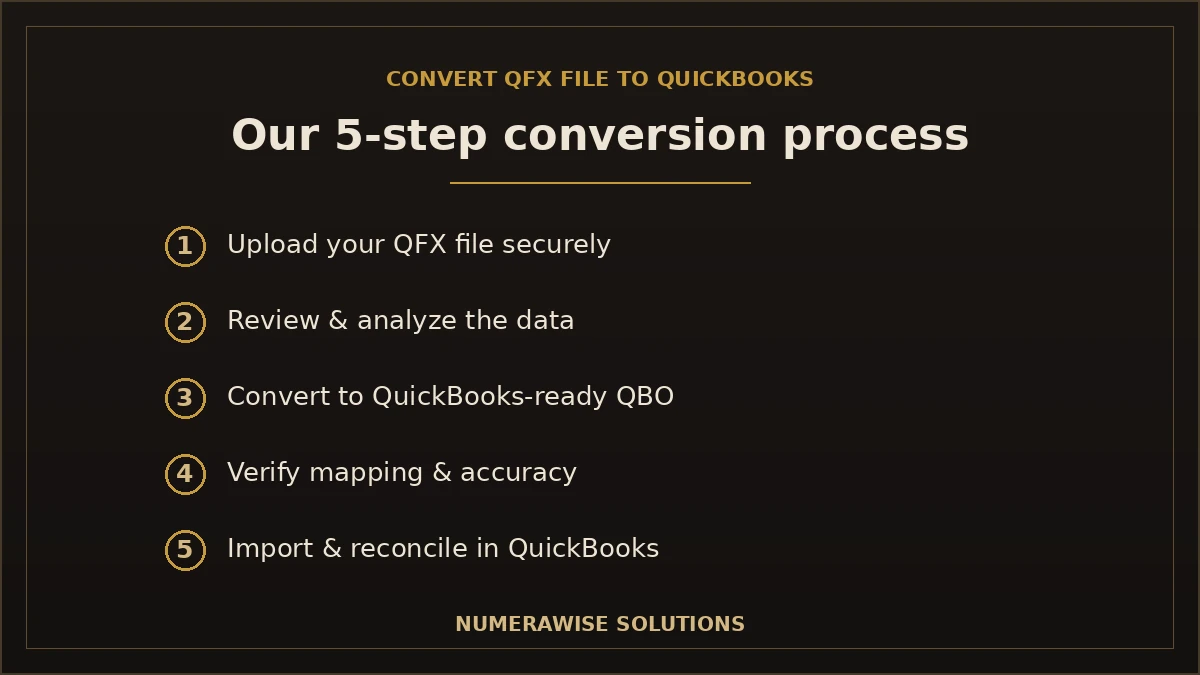
We keep the process simple for you and rigorous behind the scenes. Five steps take you from a QFX file your bank gave you to reconciled transactions inside QuickBooks.
Step 1: Upload your QFX file securely
You send us your QFX file through a secure, encrypted channel — never plain email. Your financial data is protected from the very first step.
Step 2: Review and analyze the transaction data
We open and examine the file: transaction counts, date ranges, account details, and any anomalies. This is where an accountant’s eye catches problems a converter tool would miss.
Step 3: Convert QFX into a QuickBooks-compatible QBO file
We convert the data into the QBO Web Connect format QuickBooks accepts, with the correct account identifiers so the import maps to the right account in your books.
Step 4: Verify transaction mapping and accuracy
Before delivery, we check the converted file against the source: every transaction, date, amount, and payee. Nothing is dropped, duplicated, or mis-dated.
Step 5: Import into QuickBooks and complete reconciliation
We deliver the ready-to-import QBO file — and if you like, we help you import it and reconcile the account so your books tie out. Support covers both QuickBooks Desktop and QuickBooks Online.
Get Professional QuickBooks Conversion Assistance
From one QFX file to years of history across multiple accounts — we convert it accurately. Request your free quote.
Get a Free QuoteWhy choose Numerawise Solutions for QFX to QBO conversion?
Anyone can run a file through a converter. Getting a QBO file that imports cleanly and reconciles — with the errors caught before they reach your books — is a different thing. Here is what sets our service apart:
- Experienced QuickBooks specialists. Real accounting professionals handle and review your conversion, not just software.
- Secure data handling. Encrypted transfer, restricted access, and careful treatment of your financial information at every step.
- Accountant-level review. Every file is checked for accuracy before it reaches you.
- Affordable pricing. Clear quotes based on the actual work, with no surprises.
- Fast turnaround. Most conversions are delivered quickly, so you are not waiting on your books.
- Support for accountants and businesses. We work directly with CPA firms and bookkeepers as well as business owners.
- Quality checks before delivery. The file is verified transaction by transaction, so the import is error-free.
We handle QFX to QBO as part of our broader QuickBooks conversion services, so if your needs go beyond a single file — a full software migration, ongoing books — the same team can help.
Common QFX to QBO conversion problems we solve
Most people who come to us have already hit a wall. These are the problems we fix every day:
- QuickBooks does not accept QFX files. The core issue — we convert to the QBO format QuickBooks reads.
- Your bank does not provide QBO downloads. When only QFX or CSV is offered, we bridge the gap.
- Duplicate transactions. We remove duplicates so nothing is imported twice.
- Incorrect transaction dates. We correct date formatting so transactions land in the right periods.
- Missing payee information. We preserve and clean payee and memo data so your records stay meaningful.
- Import errors. Malformed files that QuickBooks rejects are rebuilt to import cleanly.
- Failed bank reconciliation. Accurate, complete data means your account actually reconciles afterward.
If you have tried a free online converter and QuickBooks still throws an error, the file structure or the account identifiers are usually the reason — and that is exactly what our review-and-verify steps fix.
QFX to QBO conversion for different users
The conversion is the same; the reason for it differs by who you are.
Small businesses
Owners who just want their bank transactions in QuickBooks without spending an evening typing. We turn your QFX download into a clean import so you can get back to running the business.
CPA firms
Firms handling many clients and banks need fast, accurate conversions they can rely on. We deliver import-ready QBO files with accountant-level review, so your team is not stuck reformatting bank data.
Bookkeepers
When a client’s bank only offers QFX, we remove the roadblock. You get clean data to categorize and reconcile, and you keep your workflow moving.
Real estate companies
Multiple properties and accounts mean lots of bank files. We convert them in bulk and map each to the right account, so property-level books stay accurate.
Ecommerce businesses
High transaction volume across bank and payment accounts is a natural fit for conversion. We handle large QFX files so your sales and fees import without manual entry.
Support for QuickBooks Desktop and QuickBooks Online
The right target format depends on which QuickBooks you run, and we handle both. QuickBooks Desktop imports QBO Web Connect files directly, so a converted QBO file drops straight in. QuickBooks Online supports bank-transaction imports as well, and we prepare your data in the format and structure it needs. Whether you are on Desktop or Online — or planning a move between them — we make sure your converted transactions land in the right place. If you are also weighing a platform change, see our QuickBooks Desktop to QuickBooks Online migration.
What to do when your bank does not provide QBO files
This is the situation that brings most people here. Some banks — especially smaller or regional ones — only offer QFX (for Quicken) or CSV downloads, with no QBO option for QuickBooks. You are left with a file QuickBooks will not read and no obvious way forward.
That is precisely the gap we fill. Send us whatever your bank provides, and we convert it into a QBO file QuickBooks accepts — with the correct bank and account identifiers so the transactions map properly. You never have to change banks or resign yourself to manual entry just because your bank does not speak QuickBooks’s language. Intuit’s own guidance on the Web Connect import format confirms QuickBooks relies on the QBO structure — which is exactly what we deliver.
Benefits of professional QFX to QBO conversion
- Error-free QuickBooks import. Files verified before delivery, so the import works the first time.
- Hours of time saved. No manual entry, even for large or multi-account files.
- Accurate, reconciled books. Clean data means the account actually ties to the statement.
- Secure handling of sensitive financial information throughout.
- Expert review that catches duplicates, date issues, and missing data before they reach your books.
- Bulk conversion of months or years of history in one go.
Common mistakes when converting QFX files yourself
- Using an unreliable free converter. Many produce files QuickBooks still rejects, or drop transactions silently.
- Wrong account identifiers. A QBO file with the wrong bank ID imports to the wrong account or fails.
- Ignoring duplicates. Importing overlapping date ranges double-counts transactions.
- Skipping verification. Trusting a converted file without checking it against the source.
- Sending data insecurely. Emailing raw bank files exposes sensitive information.
Best practices for a clean conversion
- Download the full date range you need from your bank before converting.
- Note which QuickBooks account each file belongs to.
- Convert to QBO with the correct account identifiers — not a generic template.
- Verify every transaction against the source before importing.
- Import into QuickBooks and reconcile to confirm nothing is missing.
- Keep the original QFX files as a backup until reconciliation is complete.
Convert your QFX file to QuickBooks with confidence
A QFX file that QuickBooks will not read is a small problem with a simple fix — when it is done right. The key is converting to a properly structured QBO file, with the correct account identifiers, verified transaction by transaction, so the import is clean and the account reconciles. Done poorly, a bad conversion imports duplicates, wrong dates, or nothing at all. For businesses, accountants, and bookkeepers who need it done accurately, professional help pays for itself in saved time and error-free books. Whether you have one file or years of history across many accounts, Numerawise Solutions will convert your QFX file to QuickBooks — securely, accurately, and with an accountant’s review behind every file. Our bookkeeping services and Sage 50 to QuickBooks conversion round out the support once your transactions are in.
Key takeaways
- QuickBooks does not import QFX — that is a Quicken format; QuickBooks needs QBO.
- Conversion moves your transactions from the Quicken container into a QuickBooks-ready QBO file.
- It saves hours of manual entry and keeps dates, amounts, and payees accurate.
- We solve the hard cases: banks with no QBO option, duplicates, date errors, and failed imports.
- Every file is reviewed and verified before delivery, for an error-free import on Desktop or Online.
Quick answers.
Can QuickBooks import QFX files directly?
No. QuickBooks does not import QFX files, because QFX (Quicken Financial Exchange) is built for Quicken, not QuickBooks. QuickBooks imports QBO Web Connect files instead. To get QFX bank transactions into QuickBooks, the file must be converted to the QBO format — which is exactly what our QFX to QBO conversion service does, accurately and ready to import.
How do I convert QFX to QBO?
You convert QFX to QBO by changing the file into QuickBooks's Web Connect format with the correct account identifiers, then verifying every transaction before importing. Free converters exist but often produce files QuickBooks rejects or that drop data. Our service uploads your file securely, reviews it, converts it, verifies transaction accuracy, and delivers an import-ready QBO file — with accountant-level review behind it.
What is the difference between QFX and QBO?
Both are OFX-based bank-transaction files, but they are built for different software. QFX is the Quicken format; QBO (Web Connect) is the QuickBooks format. QuickBooks reads QBO, not QFX, even though both come from Intuit. Converting QFX to QBO moves your transaction data — dates, amounts, and payees — from the Quicken container into the one QuickBooks accepts.
Can you convert large QFX files?
Yes. We handle bulk conversions, including large QFX files with months or years of history and high transaction volume. Large files are exactly where manual entry becomes impractical and a professional conversion saves the most time. We verify the full file transaction by transaction, so even a big conversion imports cleanly and reconciles against your statements.
Is my financial data secure?
Yes. Security is built into every step. You send your file through an encrypted channel — never plain email — access is restricted, and your financial information is handled carefully by accounting professionals throughout. Once your converted QBO file is delivered and imported, your data lives in your own QuickBooks account, which you control.
Can you convert multiple bank accounts?
Yes. We regularly convert files for multiple bank and credit card accounts and map each one to the correct account in QuickBooks. This is common for real estate companies with many properties, ecommerce businesses, and CPA firms handling several clients. Each file is converted with the right account identifiers so nothing lands in the wrong place.
Does QFX conversion work with QuickBooks Online?
Yes. We support both QuickBooks Desktop and QuickBooks Online. Desktop imports QBO Web Connect files directly, while QuickBooks Online supports bank-transaction imports in the format and structure it needs. We prepare your converted data for whichever version you run, so your transactions land in the right account either way.
How long does QFX to QBO conversion take?
Most conversions are delivered quickly — often within a business day for a standard file, depending on size and the number of accounts. Large, multi-account, or multi-year conversions take a little longer because of the verification step. We give you a clear timeline with your quote, so you know exactly when to expect your import-ready QBO file.
Can you fix QBO import errors?
Yes. If QuickBooks is rejecting a QBO file or throwing import errors, we can diagnose and fix it. The usual causes are a malformed file structure, wrong account identifiers, or bad date formatting — all of which we correct and re-verify. Even if you started with a free converter, we can rebuild the file so it imports cleanly and reconciles.
Do you support CPA firms?
Absolutely. CPA firms and bookkeepers are among our core clients. We deliver fast, accurate, import-ready QBO files with accountant-level review, so your team is not stuck reformatting bank data for every client. We work behind the scenes as your conversion partner, handling QFX to QBO conversions in bulk so you can focus on higher-value client work.
Get a free scoping call.
Tell us what you’re working on. We respond same business day.

Ram · Founder & Principal
Founder of Numerawise Solutions, based in Atlanta. Intuit ProAdvisor Gold tier. Former Intuit Technical Support engineer. Has personally led two hundred accounting software conversions for US small businesses since founding the practice. Reachable directly at [email protected].
Free: The Clean-Cutover Checklist
The step-by-step checklist we use to migrate businesses to QuickBooks without losing data — bank rec, opening balances, payroll YTD, and the validation tie-out. Get it in your inbox.
No spam — just the checklist and the occasional QuickBooks tip.