Let us be balanced. QuickBooks is excellent software, and most small businesses never need to leave it. If it still fits, moving would add cost and complexity for no real gain.
But growth changes the maths. When you run several companies, sell across borders in multiple currencies, or manage inventory across warehouses, a QuickBooks to Sage 300 conversion can remove the friction QuickBooks starts to create. This guide, written from hands-on migration work, covers when to move from QuickBooks to Sage 300 and how to do it cleanly.
When a QuickBooks to Sage 300 migration makes sense
The trigger is rarely QuickBooks failing. It is the business outgrowing it. A QuickBooks to Sage 300 migration tends to pay off when:
- You run multiple companies. Sage 300 handles multi-company accounting and consolidation far more comfortably.
- You trade in several currencies. Sage 300 supports up to 999 currencies with automated gains and losses.
- Inventory gets complex. Multiple warehouses, lot and serial tracking, and landed costs are native.
- Your GL needs structure. Segmented account codes give reporting QuickBooks cannot match.
If none of these apply, staying on QuickBooks is often the smarter, cheaper call — and we will tell you so. Trust matters more than a sale.
What data moves in a QuickBooks to Sage 300 data migration
The value in your QuickBooks file is the history. A real QuickBooks to Sage 300 data migration carries that across and maps it to how Sage 300 is structured.
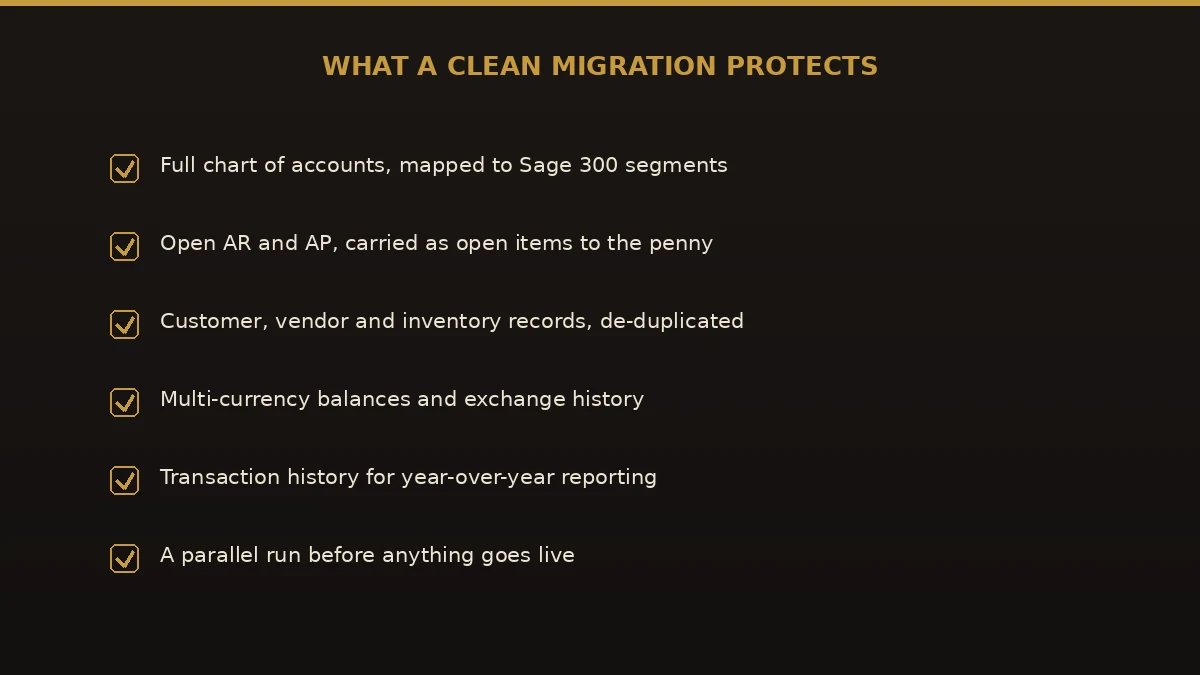
- Chart of accounts — mapped to Sage 300 segmented GL codes, usually tidied on the way.
- Customers and vendors — brought over and de-duplicated.
- Open AR and AP — outstanding invoices and credits, carried as open items.
- Inventory items — quantities, costs, and price lists, across warehouses where relevant.
- Trial balance and transaction history — enough to keep year-over-year reporting intact.
- Multi-currency balances — with exchange history preserved.
Not everything maps one-to-one. QuickBooks memorized transactions, custom fields, and some report layouts need rebuilding in Sage 300. Knowing that before you start keeps your first month-end calm.
How to migrate QuickBooks to Sage 300, step by step
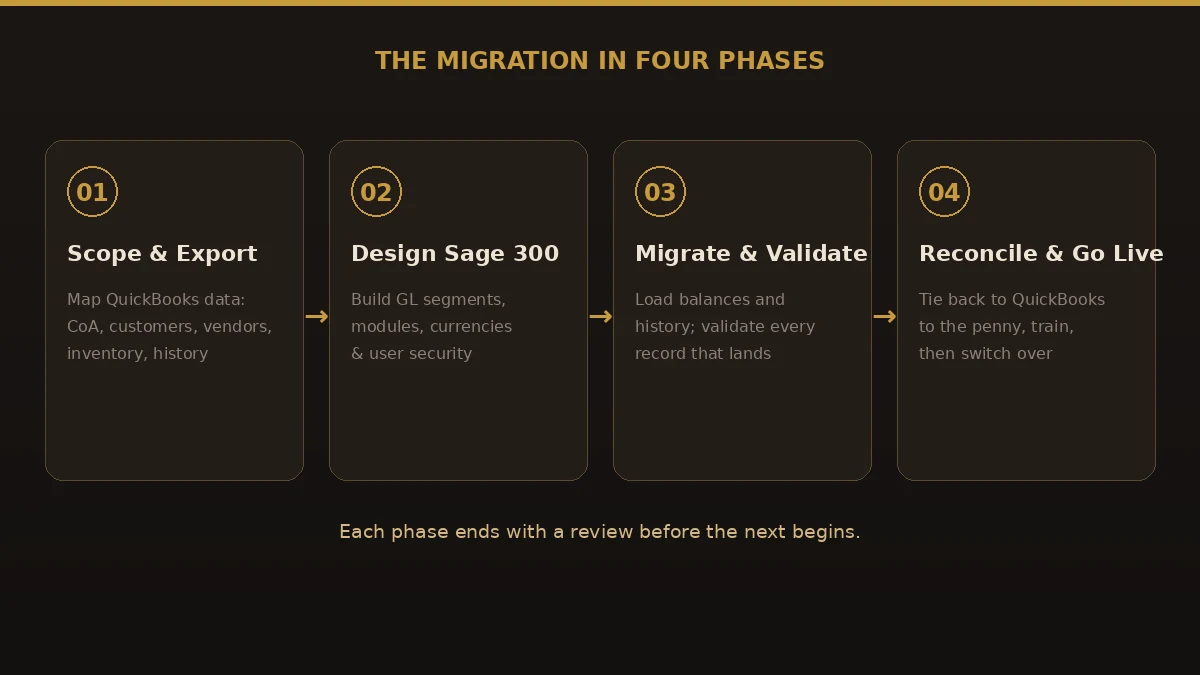
When we migrate QuickBooks to Sage 300, we run four phases, each signed off before the next begins, so problems surface early rather than at go-live.
- Scope and export. Inventory your QuickBooks setup: accounts, open balances, inventory, currencies, and the reports you rely on. Agree how much history to bring, then export.
- Design Sage 300. Build the target cleanly: GL segments, modules, currencies, and user security — designed in, not carried forward as clutter. This is the heart of the QuickBooks to Sage 300 implementation.
- Migrate and validate. Load balances and history into Sage 300, checking record counts and totals at each step so nothing is silently dropped during the QuickBooks to Sage 300 import.
- Reconcile, run parallel, and go live. Tie Sage 300 back to your last QuickBooks reports to the penny, run a parallel period, train the team, then switch over.
QuickBooks vs Sage 300: what changes
These tools sit at different stages of a business. This is the gap a QuickBooks to Sage 300 conversion closes:
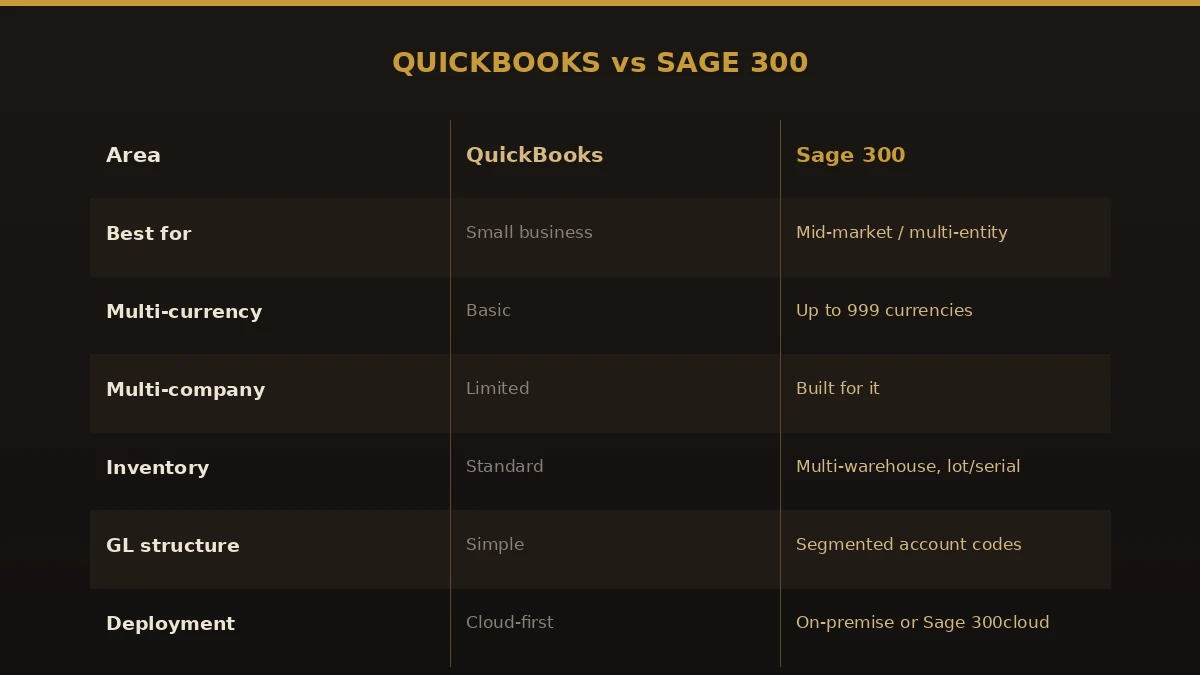
| Area | QuickBooks | Sage 300 |
|---|---|---|
| Best for | Small business | Mid-market, multi-entity |
| Multi-currency | Basic | Up to 999 currencies |
| Multi-company | Limited | Built for consolidation |
| Inventory | Standard | Multi-warehouse, lot/serial, landed cost |
| GL structure | Simple | Segmented account codes |
| Deployment | Cloud-first | On-premise or Sage 300cloud |
Benefits of moving to Sage 300
- Room to grow. Modules you switch on as the business changes, without another rip-and-replace.
- Real multi-currency. Automated gains and losses across hundreds of currencies.
- Deeper inventory control. Warehouses, lot and serial tracking, and landed costs built in.
- Consolidated reporting. Multi-company results without spreadsheet gymnastics at month-end.
- Segmented GL. Report by department, region, or project directly from the account structure.
Common mistakes to avoid
- Moving before you need to. If QuickBooks still fits, an upgrade from QuickBooks to Sage 300 adds cost for little gain.
- Treating it as an export/import. A raw transfer of QuickBooks to Sage 300 data misplaces balances; the two structure data differently.
- Skipping the GL design. Segmented accounts are Sage 300’s strength; copying a flat QuickBooks chart forward wastes it.
- Underestimating currencies. Multi-currency history needs careful mapping, not a bulk paste.
- No parallel run. Going live untested means finding errors in live reports, in front of auditors.
Best practices for a clean migration
- Confirm the move is worth it. Be honest about whether you have genuinely outgrown QuickBooks.
- Start from a clean QuickBooks period. Reconcile and close cleanly before extracting anything.
- Design the GL segments first. Agree the account structure before loading a single balance.
- Validate at every step. Check counts and totals as data lands, not just at the end.
- Run parallel for a full period. Compare Sage 300 output to QuickBooks side by side until they match.
Why choose Numerawise Solutions
We are accounting-software migration specialists, and our discipline never changes: plan the move, protect the data, and reconcile the result before anything goes live. For a QuickBooks to Sage 300 migration, we focus on the riskiest part — extracting your QuickBooks data, mapping it into a clean Sage 300 structure, and tying the balances back to your old reports to the penny. You get a fixed scope up front and keep ownership of your data throughout. We also handle QuickBooks to Sage 200, QuickBooks to Sage Intacct, and a full range of accounting software conversions — and if Sage 300 is not your best destination, we will say so.
The bottom line on your QuickBooks to Sage 300 migration
A QuickBooks to Sage 300 migration is not about leaving good software behind — it is about matching your finance system to a bigger, more complex business. When you genuinely need multi-currency, multi-company, or deeper inventory, Sage 300 delivers, and your history can cross over intact. The risk is never the software; it is a rushed, undesigned move. Confirm the move is worth it, design the GL, validate as you go, and run a parallel period, and the switch becomes a non-event. Whether you want to convert QuickBooks to Sage 300 or simply transfer QuickBooks to Sage 300 data cleanly, the discipline is the same. If you are weighing it up, talk to a specialist who does QuickBooks to Sage 300 data migration work before you commit to a date.
Key takeaways
- A QuickBooks to Sage 300 migration is about outgrowing QuickBooks — multi-currency, multi-company, or deep inventory — not about QuickBooks failing.
- The real work is a QuickBooks to Sage 300 data migration: mapping accounts, open items, inventory, and currency history into a clean Sage 300 structure.
- Run four phases with validation at each step and a full parallel period before go-live.
- If QuickBooks still fits, staying is often the smarter, cheaper choice.
Quick answers.
What is a QuickBooks to Sage 300 migration?
It is the process of moving your finance system from QuickBooks to Sage 300 (formerly Accpac). A proper QuickBooks to Sage 300 migration transfers your chart of accounts, customers and vendors, open balances, inventory, currencies, and history, mapping them into Sage 300 so your reporting still reconciles after the switch.
When should I migrate QuickBooks to Sage 300?
When you have outgrown QuickBooks. The usual triggers to migrate QuickBooks to Sage 300 are running multiple companies, trading in several currencies, or needing deeper inventory and segmented GL reporting. If none of those apply, QuickBooks is often the better, simpler, cheaper choice, and staying put is the right call.
How long does a QuickBooks to Sage 300 conversion take?
Most businesses complete a QuickBooks to Sage 300 conversion in a few weeks to a few months. Timing depends on how many companies and years of history you migrate, how clean the QuickBooks data is, and how much inventory and multi-currency complexity is involved. A parallel run adds time but sharply reduces risk.
Will I lose my history in a QuickBooks to Sage 300 data migration?
Not if it is planned. A QuickBooks to Sage 300 data migration maps your accounts, open items, and transaction history into Sage 300 so year-over-year comparisons still hold. The danger is a raw import that lands data in the wrong place. Deliberate mapping and validation are what keep your history intact.
How much does it cost to move from QuickBooks to Sage 300?
There are two costs: the Sage 300 licensing and the migration project. Sage 300 typically runs $75 to $200 per user per month, with modules and an annual care fee on top, and implementations vary widely by scope. The QuickBooks to Sage 300 data migration is scoped separately based on data volume, history, and complexity.
Can I import QuickBooks data directly into Sage 300?
A raw QuickBooks to Sage 300 import rarely works cleanly, because the two systems structure data very differently. Balances, segmented GL codes, and multi-currency history all need deliberate mapping. A proper conversion extracts, maps, and validates the data rather than pasting it in, which is what protects your reporting.
Is Sage 300 better than QuickBooks?
Not better, different. QuickBooks is excellent for small businesses and is simpler and cheaper. Sage 300 suits mid-market firms that need multi-currency, multi-company, and advanced inventory. An upgrade from QuickBooks to Sage 300 only makes sense once you have genuinely outgrown QuickBooks, so match the tool to the size of the business.
Do I have to transfer all my QuickBooks data?
No. Many businesses transfer QuickBooks to Sage 300 with open items plus a few years of history for reporting, and archive the rest as read-only exports. Migrating less data can speed up the project, but keep enough history for year-over-year reporting, tax, and any audit or lending requirements.
What is the biggest risk when I convert QuickBooks to Sage 300?
Skipping the GL design and the parallel run. QuickBooks and Sage 300 structure data differently, so an unchecked move misplaces balances and wastes Sage 300’s segmented reporting. The fix is simple discipline: design the account structure first, validate record counts and totals at each step, and run a parallel period until the two systems match.
Get a free scoping call.
Tell us what you’re working on. We respond same business day.

Ram · Founder & Principal
Founder of Numerawise Solutions, established MMXXIV in Atlanta. Intuit ProAdvisor Gold tier. Former Intuit Technical Support engineer. Has personally led two hundred accounting software conversions for US small businesses since founding the practice. Reachable directly at [email protected].
Free: The Clean-Cutover Checklist
The step-by-step checklist we use to migrate businesses to QuickBooks without losing data — bank rec, opening balances, payroll YTD, and the validation tie-out. Get it in your inbox.
No spam — just the checklist and the occasional QuickBooks tip.