Plenty of businesses still run Sage 200 on a server in the back office, or an older Sage product that is showing its age. It works — until a hardware scare, a remote-working push, or a growth spurt makes the on-premise setup feel like a liability.
That is usually the trigger for a Sage 200 Cloud upgrade. The good news is the path is well-trodden. The catch is that it is a proper data project, not a quick copy. This guide, written from hands-on migration work, shows how a Sage 200cloud migration actually runs.
What a Sage 200 Cloud migration involves
"Sage 200 Cloud" is the modern, cloud-hosted way to run Sage 200. A Sage 200 Cloud migration moves you there from one of a few starting points: an on-premise Sage 200, an older Sage product like Sage 50 or Sage 1000, or another accounting system entirely.
There are two flavours of the destination, and choosing correctly is the first real decision in any migrate to Sage 200 Cloud project.
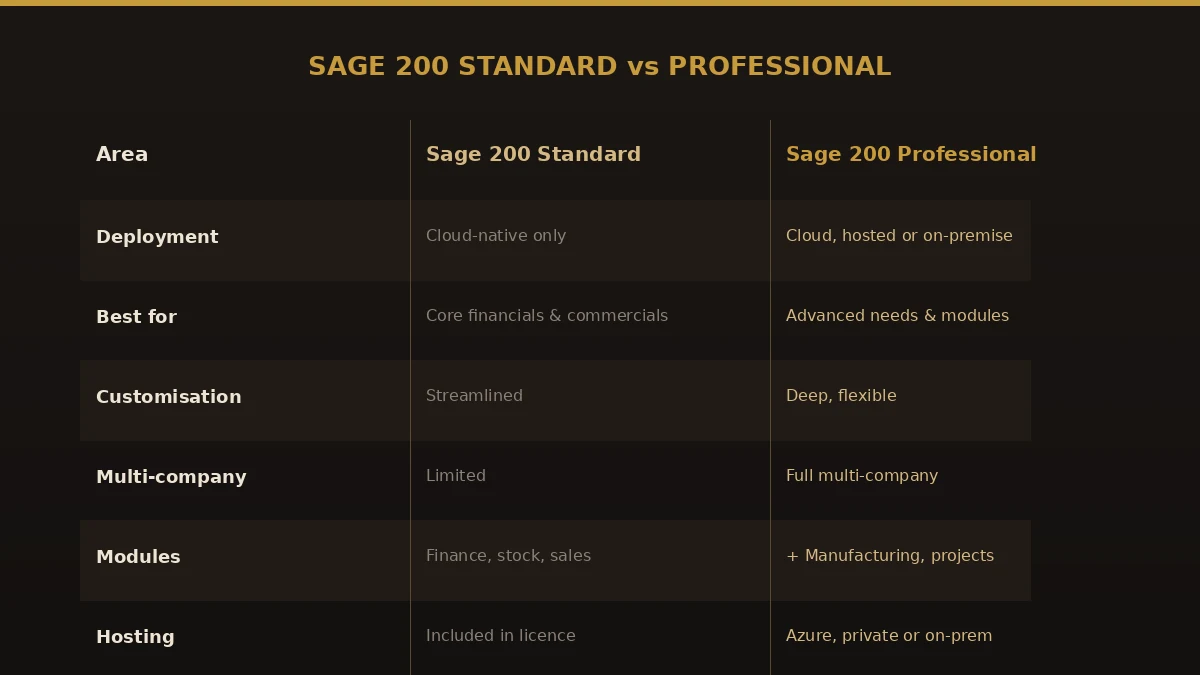
| Area | Sage 200 Standard | Sage 200 Professional |
|---|---|---|
| Deployment | Cloud-native only | Cloud, hosted, or on-premise |
| Best for | Core financials and commercials | Advanced needs and extra modules |
| Customisation | Streamlined | Deep and flexible |
| Multi-company | Limited | Full multi-company |
| Modules | Finance, stock, sales | Plus manufacturing, projects |
Sage 200 Standard is cloud-native with hosting included in the monthly licence. Sage 200 Professional can run in the cloud, on private hosting, or on-premise, and adds customisation, multi-company, and industry modules. Most straightforward moves land on Standard; complex or multi-entity businesses lean Professional.
What moves in a Sage 200 Cloud data migration
The value in your current system is its history. A real Sage 200 Cloud data migration carries that across and maps it to how Sage 200 is structured.
- Nominal ledger and chart of accounts — rebuilt in Sage 200, usually tidied on the way.
- Customer and supplier accounts — brought over and de-duplicated.
- Open sales and purchase ledgers — outstanding invoices and credits, carried as open items.
- Trial balance and transaction history — enough to keep year-on-year reporting intact.
- Stock items and price lists — where you run inventory.
- VAT settings and prior figures — mapped so your next return still ties out.
Not everything maps one-to-one. Bespoke reports and old customisations may need rebuilding. Knowing that before you start keeps your first month-end calm.
How to migrate to Sage 200 Cloud, step by step
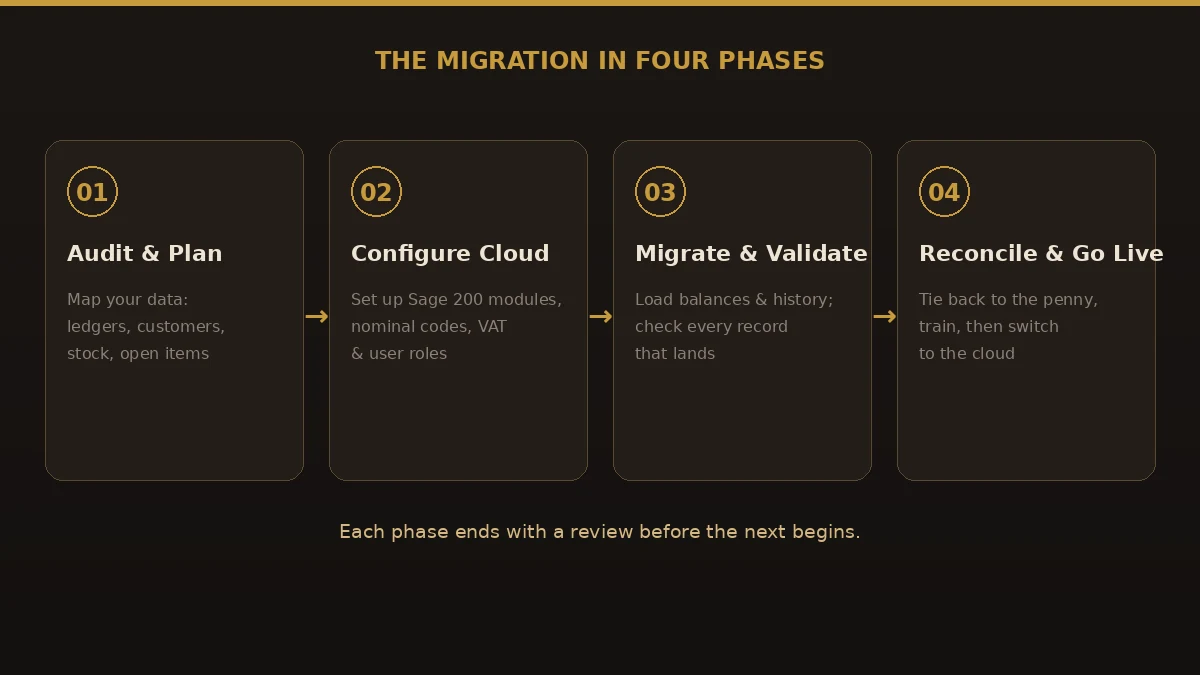
A disciplined Sage 200 Cloud implementation runs in four phases, each signed off before the next begins, so problems surface early rather than at go-live.
- Audit and plan. Inventory your current setup: modules in use, customisations, integrations, open balances, and the reports you rely on. Agree how much history to bring.
- Configure the cloud. Build the target cleanly: nominal structure, ledgers, VAT, stock, and user roles — Standard or Professional, designed in rather than carried forward as clutter.
- Migrate and validate. Load balances and history into Sage 200, checking record counts and totals at each step so nothing is silently dropped.
- Reconcile, run parallel, and go live. Tie Sage 200 back to your last reports to the penny, run a parallel period, train the team, then switch to the cloud.
Benefits of moving to Sage 200 Cloud
A well-run Sage 200 Cloud conversion pays back quickly:
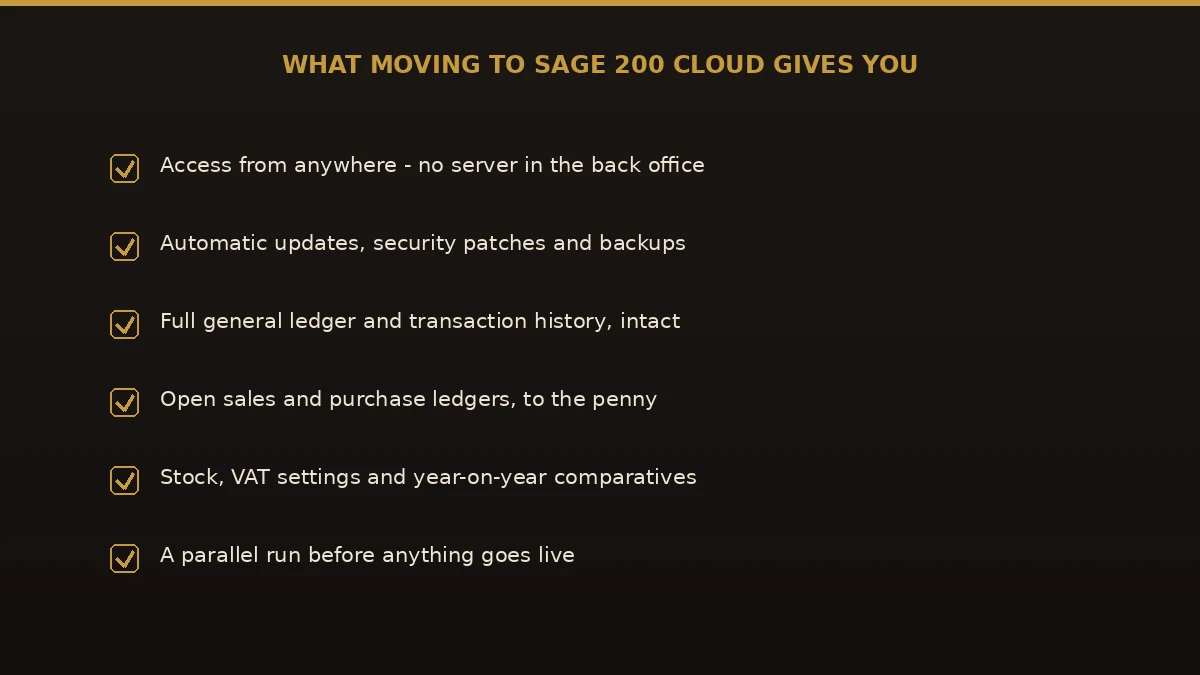
- Work from anywhere. No server in the back office; your team reaches the books from home, site, or office.
- Automatic updates and backups. Security patches, compliance updates, and managed backups are handled for you.
- Lower IT burden. No ageing hardware to maintain, patch, or replace.
- Room to scale. Add modules and users as the business grows.
- Better resilience. Cloud hosting is more robust than a single office server.
Common mistakes to avoid
- Picking the wrong edition. Choosing Standard when you need Professional’s multi-company or modules means a rushed re-do.
- Treating it as an export/import. A raw copy misplaces balances; Sage 200 structures data its own way.
- Skipping the design step. Copying an old chart of accounts forward carries every problem with it.
- Forgetting VAT. Map VAT codes and prior figures carefully so your next return reconciles.
- No parallel run. Going live untested means finding errors in live reports, in front of auditors.
Best practices for a clean migration
- Choose Standard or Professional up front. Match the edition to your real needs before you build anything.
- Start from a clean period. Reconcile and close cleanly before extracting anything.
- Design Sage 200 first. Agree the nominal structure before loading a single balance.
- Validate at every step. Check counts and totals as data lands, not just at the end.
- Run parallel for a full period. Compare Sage 200 output to your old system side by side until they match.
Why choose Numerawise Solutions
We are accounting-software migration specialists, and our discipline never changes: plan the move, protect the data, and reconcile the result before anything goes live. For a Sage 200 Cloud migration, we focus on the riskiest part — extracting your data, mapping it into a clean Sage 200 structure, and tying the balances back to your old reports to the penny. Our Sage 200 Cloud migration services come with a fixed scope up front, and you keep ownership of your data throughout. We also handle Sage 1000 to Sage 200, Sage Line 500 to Sage 200, QuickBooks to Sage 200, and a full range of accounting software conversions.
The bottom line on your Sage 200 Cloud migration
A Sage 200 Cloud migration is about matching a growing business to a modern, supported platform — anywhere access, automatic updates, and no server to babysit — with your history carried across intact. The risk is never the software; it is a rushed, undesigned move. Choose Standard or Professional deliberately, design the target, validate as you go, and run a parallel period, and the switch becomes a non-event. If you are weighing a migrate to Sage 200 Cloud project, talk to a specialist who does Sage 200 Cloud data migration work before you commit to a date.
Key takeaways
- A Sage 200 Cloud migration moves you off on-premise or legacy systems to cloud-hosted Sage 200, with anywhere access and automatic updates.
- Choose the destination first: Sage 200 Standard (cloud-native) or Sage 200 Professional (cloud, hosted or on-premise, with more modules).
- The real work is a Sage 200 Cloud data migration: mapping ledgers, open items, stock, and VAT into a clean structure.
- Run four phases with validation at each step and a full parallel period before go-live.
Quick answers.
What is a Sage 200 Cloud migration?
It is the process of moving your finance system to cloud-hosted Sage 200, from an on-premise Sage 200, an older Sage product, or another package. A proper Sage 200 Cloud migration transfers your nominal ledger, customer and supplier accounts, open balances, stock, and history, mapping them into Sage 200 so your reporting still reconciles after the switch.
What is the difference between Sage 200 Standard and Professional?
Sage 200 Standard is cloud-native with hosting included in the licence, built for core financials and commercials. Sage 200 Professional can run in the cloud, on private hosting, or on-premise, and adds deeper customisation, multi-company, and modules like manufacturing and projects. Choosing the right edition is the first decision in any migrate to Sage 200 Cloud project.
How long does a Sage 200 Cloud migration take?
Most businesses complete a Sage 200 Cloud migration in a few weeks to a few months. Timing depends on how many modules and years of history you migrate, how many customisations and integrations exist, and how clean the source data is. A parallel run adds time but sharply reduces risk, so build it into the plan.
Will I lose my history in a Sage 200 Cloud data migration?
Not if it is planned. A Sage 200 Cloud data migration maps your ledgers, open items, and transaction history into Sage 200 so year-on-year comparisons still hold. The danger is a raw export/import that lands data in the wrong place. Deliberate mapping and validation are what keep your history intact.
How much does a Sage 200 Cloud migration cost?
There are two costs: the Sage 200 subscription and the migration project. Sage 200 is priced by edition, module, and user through Sage and its partners, while the migration is scoped on data volume, history, and customisation. Get both quoted together so you can budget the full Sage 200 Cloud migration services picture.
Is Sage 200 fully cloud-based?
It depends on the edition. Sage 200 Standard is cloud-native and only runs in the cloud. Sage 200 Professional can be deployed in the cloud, on private hosting such as Azure, or on-premise. A Sage 200 Cloud upgrade usually means moving to a cloud-hosted deployment of one of these editions rather than a single fixed product.
Can I move from Sage 50 or Sage 1000 to Sage 200 Cloud?
Yes. Many Sage 200 Cloud conversions start from Sage 50, Sage 1000, or Sage Line 500, all of which have clear paths to Sage 200. The approach is the same regardless of source: audit thoroughly, design the target, migrate, validate, and run a parallel period before going live.
Do I have to migrate all my data?
No. Many businesses bring across open items plus a few years of history for reporting, and archive the rest as read-only exports. Migrating less data can speed up a Sage 200 Cloud implementation, but keep enough history for year-on-year reporting, tax, and any audit or lending requirements.
What is the biggest risk in a Sage 200 Cloud migration?
Choosing the wrong edition and skipping validation. Picking Standard when you need Professional forces a costly re-do, and an unvalidated move misplaces balances. The fix is simple discipline: choose Standard or Professional deliberately, design the structure first, validate at each step, and run a parallel period until the two systems match.
Get a free scoping call.
Tell us what you’re working on. We respond same business day.

Ram · Founder & Principal
Founder of Numerawise Solutions, established MMXXIV in Atlanta. Intuit ProAdvisor Gold tier. Former Intuit Technical Support engineer. Has personally led two hundred accounting software conversions for US small businesses since founding the practice. Reachable directly at [email protected].
Free: The Clean-Cutover Checklist
The step-by-step checklist we use to migrate businesses to QuickBooks without losing data — bank rec, opening balances, payroll YTD, and the validation tie-out. Get it in your inbox.
No spam — just the checklist and the occasional QuickBooks tip.